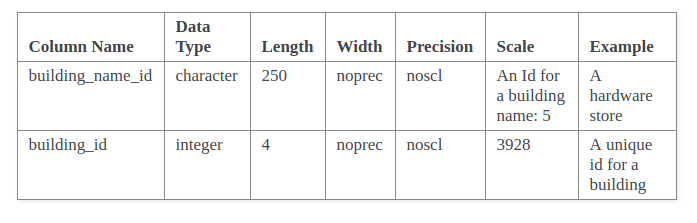
I've figure out that if I add:
html_additional_pages = {
    'schema1': 'schema1.html' }
to my conf.py, I can get my schema1.html file located in my _templates
folder to appear and work correctly with the dynamic content.
However, I don't seem to be able to link to it from my toctree in my
index.rst file.

Is it possible to link to an html file in "_templates" folder from an item
in my toctree?


On Friday, April 6, 2018 at 6:46:23 PM UTC+12, Jan wrote:
>
> I ended up trying something which gets me part of what I'm looking for,
> but still leaves me without the structure I'm looking for.
>
> To get a nice looking html table which I could control formatting with a
> custom CSS, I placed a "custom.css" file in a "_static" folder. I also
> placed a "page.html" file in a "_templates" folder. That page html file
> looks like this:
> {% extends "!page.html" %}
> {{ super() }}
> {% block body %}
> {% filter upper %}
> <b><font size="+2">Schema: {{ schema_gen["name"] }} </font></b><br/>
> {% endfilter %}
> <b><font size="+1">Description: {{ schema_gen["comment"] }}
> </font></b><br/>
>
> <p>
> {% for item in outputschema  %}
> <b><p>Table Name: {% filter upper %} {{ item["table_nam"] }} {% endfilter
> %}<br/></b>
> <b>Description: {{ item["table_comment"] }}<br/></b>
> {% if item["table_columns"] %}
> <table>
> <tbody>
> <thead>
> <tr>
> <th>Column Name</th>
> <th>Data Type</th>
> <th>Length</th>
> <th>Precision</th>
> <th>Scale</th>
> <th>Description</th>
> </tr>
> </thead>
> {% for columns in item["table_columns"] %}
> <tr>
> {% for column in columns %}
> <td>{{ column }}</td>
>
> {% endfor %}
> </tr>
> {% endfor%}
> </tbody>
> </table>
> {% endif %}
> </p>
> {% endfor %}
> </p>
>
>
> {% endblock %}
>
> After uploading to my repo, Sphinx automatically generated my ReadTheDocs
> docs and created a very nice looking index.html page with my tables
> formatted correctly, and using the css I needed.
>
> I'm still confused because this created my tables in my INDEX page. How do
> I leave my index page intact (containing other ReStructureText content)
> without my inherited "page.html" content, but have a sub-page listed in my
> index page toctree with this new html content (ie schema1) ?
>
> My index.rst:
>
> .. toctree::
>
>    schema1
>    schema2
>
> I want my schema1.html file to contain my tables as I've dynamically
> generated them in the code block above.
> I'm quite confused about how I can potentially use the inheritance
> templating to work in a single subpage only, rather than in my index page.
>
> I tried putting a file named schema1.html in my "_templates" folder, but
> that didn't do anything.
>
> I must be missing something quite fundamental to inheritance in Sphinx.
> What am I not understanding?
>
>
>
> On Thursday, March 29, 2018 at 2:50:00 PM UTC+13, Peter Burdine wrote:
>>
>> A few things:
>> 1) You may want to consider another jinja extension to sphinx:
>> https://pypi.python.org/pypi/sphinx-jinja.  We use YAML as the
>> datasource, though it could be anything maps to Python lists/dicts (json,
>> xml, etc).  You can then either reference the a file with the jinja
>> template, or you can embed the jinja code in your .rst files.  We have
>> found it is easiest to make list tables for this.  You can use
>> {% if loop.first %}
>> to setup your table headers.
>>
>>
>> 2) The builder controls the output formatting not the reST input (unless
>> you use tablularcolumns for LaTeX, but that is another story).  Have you
>> tried:
>> https://stackoverflow.com/questions/23462494/how-to-add-a-custom-css-file-to-sphinx
>>
>>
>> On Wednesday, March 28, 2018 at 12:45:44 AM UTC-7, Jan wrote:
>>>
>>> I'm trying to understand sphinx, and I'm thoroughly not understanding
>>> how to implement even some basic concepts. I've created a sphinx project
>>> linked to my readthedocs account. Everything works to generate my basic
>>> index.rst file in read the docs. I'm trying to follow the ideas of adding
>>> dynamic input to a specific page within my project, as mentioned here:
>>> http://ericholscher.com/blog/2016/jul/25/integrating-jinja-rst-sphinx/
>>>
>>> My objective is to setup my sphinx project so that whenever a specific
>>> text file changes in my /docs folder, it updates my ReadTheDocs content
>>> dynamically/automatically.
>>>
>>> My /docs folder has these key elements:
>>>
>>> parsethisfile.txt
>>> conf.py
>>> index.rst
>>> Database.rst
>>> ...
>>>
>>> In my conf.py I've added some python which parses a txt file, and then
>>> creates references to the object:
>>>
>>> def rstjinja(app, docname, source):
>>>     """
>>>     Render our pages as a jinja template for fancy templating goodness.
>>>     """
>>>     # Make sure we're outputting HTML
>>>     if app.builder.format != 'html':
>>>         return
>>>     src = source[0]
>>>     rendered = app.builder.templates.render_string(
>>>         src, app.config.html_context
>>>     )
>>>     source[0] = rendered
>>>
>>> def setup(app):
>>>     app.connect("source-read", rstjinja)
>>>
>>> html_context = {
>>>     #'outputschema': schema_list_out
>>> }
>>>
>>> The "schema_list_out" is a list (or I could make a dictionary) which
>>> contains elements for a database schema, such as table names, comments,
>>> column names and column parameters.
>>>
>>> If I wanted to generate dynamic ReadTheDocs pages, I've successfully
>>> been able to add some variables to my Database.rst file like this:
>>> {% for schema_item in outputschema %}
>>> **Schema Name: {{ schema_item["name"] }}**
>>> {% endfor %}
>>> and sphinx correctly creates a Database.html file that shows this:
>>>
>>> Schema Name: buildings
>>>
>>> More importantly, I'm trying to create nice looking tables for the items
>>> in my "schema_list_out" list. The only way I've been able to do that is
>>> using the python tabulate module (in my conf.py), where I generate the
>>> table within python, output as rst, and save it as a list element object
>>> within my "schema_list_out". If I use the right control structure in my
>>> rst, I generate a nice looking table in rst format that looks correct in my
>>> sphinx generated output:
>>>
>>>
>>> <https://lh3.googleusercontent.com/-dhpbPBXkgwQ/Wrsp8EOcAWI/AAAAAAAAF2E/kU8XMyxpMEs6H_aeDuEsNQ6DN9XEthTMACLcBGAs/s1600/schema2.png>
>>> But the problem here is I have no way of controlling how this looks
>>> inside the rst file because it's RST, and I can't add HTML, css or anything
>>> else to control how the table looks (like table width, color etc). reST
>>> markup doesn't seem to offer enough control over a table.
>>> How do I create dynamically created tables which can be formatted
>>> nicely, in RST? If I could create the tables easily in my Database.html,
>>> I'd do that, but it's not a template, it's generated by sphinx from my
>>> Database.rst. I can't figure out how to create my Database.html myself,
>>> with the jinja control structures inside of it. How do do that?
>>>
>>>
>>>
>>>
>>>

--
You received this message because you are subscribed to the Google Groups
"sphinx-users" group.
To unsubscribe from this group and stop receiving emails from it, send an email
to [email protected].
To post to this group, send email to [email protected].
Visit this group at https://groups.google.com/group/sphinx-users.
For more options, visit https://groups.google.com/d/optout.