Hi Andrew

this is how my graphs.conf looks like
 [[chart8]]

       title = "Climograma ~ Junio a Diciembre de 2019"
       subtitle = P total y T media mensual (media de la temperatura media
diaria de cada día del mes)
       time_length = year_specific
       year_specific = 2019
       aggregate_interval = 86400 # 1 day
       xaxis_groupby = month
       xaxis_categories = 'Junio','Julio', 'Agosto', 'Septiembre', 'Octubre'
, 'Noviembre', 'Diciembre'

        [[[outTemp]]]

            name = Temp media
            type = spline
            aggregate_type = avg
            color = "#fc0404"
            zIndex = 2

        [[[rainTotal]]]
            name = Precip total
            type = column
            aggregate_type = sum
            color = "#438bd6"
            yAxis = 1
            yAxis_tickinterval = 10
            yAxis_min = 0
            zIndex = 0

And this is how my chart looks like: (two decimals instead of one and wrong
units)


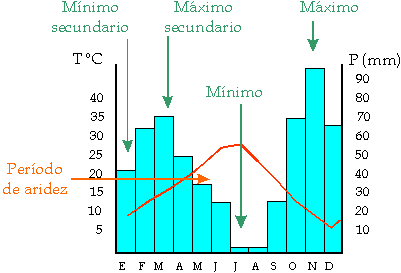
This how I would like: (scale right and left)


El lunes, 12 de agosto de 2019, 13:43:33 (UTC+2), Andrew Milner escribió:
>
> have you set the tick interval for each of the measurements you are
> plotting?
>
> maybe if you attached the relevant part of the .conf we would have a
> better idea of what you are actually plotting, and what parameters you have
> set (or not set)
>
> what is actually happening - can you also attach a png of your plot - or
> give a link to your website and say what exactly is wrong.
>
>
>
>
> On Monday, 12 August 2019 14:02:09 UTC+3, Pepe wrote:
>>
>> Hi Pat
>>
>> I know yaxis_tickinterval but I cannot achieve the chart in the way that
>> I want it. This is how could it be:
>> https://upload.wikimedia.org/wikipedia/commons/9/94/Esquema_climogramas.png
>> The values of the axis are very important because they are showing (in this
>> way) more efficiently the presence of dry season; this is the reason of my
>> doubt.
>>
>> thank you.
>>
>> El domingo, 11 de agosto de 2019, 18:59:05 (UTC+2), Pat escribió:
>>>
>>> For the observation which you have specified yaxis = 1, you also should
>>> specify the yaxis_tickinterval
>>> <https://github.com/poblabs/weewx-belchertown/wiki/Belchertown-Charts-Documentation#yaxis_tickinterval>
>>>
>>> if you want more ticks on the yaxis.
>>>
>>> On Sunday, August 11, 2019 at 11:52:33 AM UTC-4, Pepe wrote:
>>>>
>>>> Correction: In red what I meant
>>>>
>>>> *Hi*
>>>>
>>>> *I am triying to draw a climate graph but I want to put doble values in
>>>> the right than left . For example if I got 20 in the left must be 40 in
>>>> the
>>>> right, that is to say, the rainfall scale must always be twice that of
>>>> temperature. Attached the graph I get with precipitation scale column
>>>> wrong.*
>>>>
>>>> *Any idea?*
>>>>
>>>>
>>>>
>>>>
>>>> El sábado, 1 de junio de 2019, 18:57:56 (UTC+2), Pat escribió:
>>>>>
>>>>> Belchertown skin 1.0 is released!
>>>>>
>>>>> This update contains a lot of updates and changes including *an
>>>>> entire rewrite of the Highcharts system* which allows you to make
>>>>> almost any graph you want for almost any time span you want. You can see
>>>>> some examples of the charts you can make on the BelchertownWeather.com
>>>>> website graphs page <https://belchertownweather.com/graphs/?graph=all>
>>>>> .
>>>>>
>>>>> You can add/remove/change/reorder any chart, change colors, add
>>>>> observation plots, categorize for all time. Almost anything you want to
>>>>> do
>>>>> is available! The skin comes with the standard 4 charts ready to go, but
>>>>> there's extensive Belchertown Charts Documentation
>>>>> <https://github.com/poblabs/weewx-belchertown/wiki/Belchertown-Charts-Documentation>
>>>>>
>>>>> which can help you get started.
>>>>>
>>>>> In addition to the Charts there's now a dark mode (which has an
>>>>> auto-switching mode based on sunset/sunrise), more flexibility for
>>>>> translations, user customized station observation table which is updated
>>>>> in
>>>>> real time if the MQTT Websockets are enabled, and a lot more. Check the
>>>>> release notes for all the details!
>>>>>
>>>>> You can download the latest release here
>>>>> <https://github.com/poblabs/weewx-belchertown/releases/download/weewx-belchertown-1.0/weewx-belchertown-release-1.0.tar.gz>,
>>>>>
>>>>> and read all of the details on the changes here:
>>>>> https://github.com/poblabs/weewx-belchertown/releases
>>>>>
>>>>> *Note: You cannot upgrade from Belchertown 0.9 and older*. You must
>>>>> uninstall everything and reinstall new. This is due to the Chart system
>>>>> being fully rewritten and the potential for conflicts. Please read
>>>>> this upgrade guide if you are upgrading from an older version of
>>>>> Belchertown skin
>>>>> <https://github.com/poblabs/weewx-belchertown/wiki/Upgrading-to-Belchertown-skin-1.0>
>>>>> .
>>>>>
>>>>> Thanks to all the beta testers and translators over the last couple of
>>>>> months help me iron out all the kinks and shape the skin in a way that
>>>>> can
>>>>> be translated a little easier!
>>>>>
>>>>> Attached are some examples of the charts that can be made. If you find
>>>>> any issues, you can reply here or open an issue on the Belchertown
>>>>> skin GitHub page <https://github.com/poblabs/weewx-belchertown>.
>>>>>
>>>>

--
You received this message because you are subscribed to the Google Groups
"weewx-user" group.
To unsubscribe from this group and stop receiving emails from it, send an email
to [email protected].
To view this discussion on the web visit
https://groups.google.com/d/msgid/weewx-user/ad707ba0-2f72-430c-a690-12fcbbaf7745%40googlegroups.com.