Thanks for the help.
After looking over this problem a bit, I decided to scrap the sheet name
idea and just have all sales on one sheet.
sales are in this format:

DummyField, Date, DummyField, DummyField, SalesRep
For this table, I want to get the number of sales generated for a
particular agent by date.
Sales Rep                            10/1/13       10/2/13 10/3/13
12345                                      ## ##                ##
45678                                      ## ##                 ##
Would this lend itself to a DCOUNT solution (and to answer the obvious
question, I can't use a database at work).
On 10/3/2013 10:36 AM, Brian Barker wrote:
At 08:47 03/10/2013 -0600, John Meyer wrote:
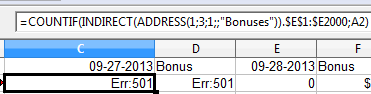
http://i174.photobucket.com/albums/w108/pueblonative/FormulaError2_zps27abcf42.png
http://i174.photobucket.com/albums/w108/pueblonative/Formulaerror1_zpsda33a4c4.png
Here are the worksheet names and the formula I am using.
I haven't been following this thread, so take this with a pinch of
salt, but I think I can see the problems here.
Your source value in cell C1 of sheet Bonuses may look like
"09-27-2013" but it is actually a date value formatted to look like
that. I can see this from its right alignment (unless you have set
this cell formatting manually). Your INDIRECT(ADDRESS... will
retrieve this value, but not with the date formatting applied. I'm
guessing, but I think the most obvious result would be the underlying
date value (possibly 41544), the numbers of days from the date
origin. Now your sheet is actually named "09-27-2013" - as text - and
there is no sheet named "41544". Hence the error.
You could enter the date in C1 as text. Type an apostrophe before the
value and it will be interpreted as text (and left aligned by
default). The result of your INDIRECT(ADDRESS... will now be the same
text string and this will match the sheet name.
But that's not the whole story. The result of the INDIRECT function
is a text string representing the sheet name, but you cannot just
append ".$E$1 ..." to this. Instead you need to concatenate these
text strings as
INDIRECT(ADDRESS(1;3;1;;"Bonuses"))&".$E$1 ..."
but then you have another text string and you need to use INDIRECT()
again to convert it to a reference. Try:
=COUNTIF(INDIRECT(INDIRECT(ADDRESS(1;3;1;;"Bonuses"))&".$E$1:$E$2000");A2)
If you wanted to retain the values in C1 and so on as genuine dates,
you may be able to convert the date value to the appropriate text
explicitly using TEXT(...;"MM-DD-YYYY") within your formula. But I
can't get this to work; I think the problem is that sheet names that
are numerical or perhaps start with a number need in this context to
be surrounded by quotes - and it's difficult to see how you could add
these.
I trust this helps.

Brian Barker


---------------------------------------------------------------------
To unsubscribe, e-mail: [email protected]
For additional commands, e-mail: [email protected]
---------------------------------------------------------------------
To unsubscribe, e-mail: [email protected]
For additional commands, e-mail: [email protected]