I also have this issue and have tried to troubleshoot it.

Maybe this is an interesting contribution.
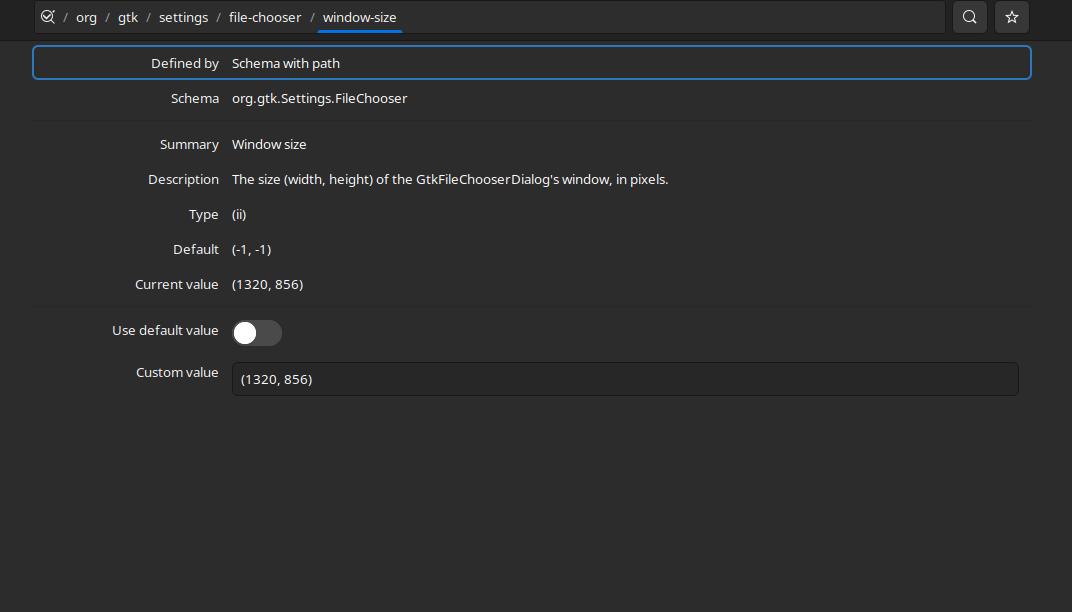
If you use dconf-editor and find the "window-size" option for
filechooser, you can see the dimensions of the current filechooser
window. Here, you can manually set it to something reasonable (e.g.,
800x600) or the default. Then press save.

https://i.postimg.cc/zvGTpYmy/filechooer.jpg

Ok, how here is the interesting bit. When you next call the filechooser
from an app showing this annoying behaviour, you will see that you need
to reload the deconf-editor window because changes have been made. So
the app call changed the user-set size and increased it. But also
changes it from default to another size (bigger).

In my desperation I even tried to make the dconf file read only and even
tried to change its owner to prevent my user from writing (changing it).
None of these work.


Another addition to this bug.
The behaviour where the dialogue window is not responsive is because the
background window (the browser, for example) is still in focus. This is why you
cannot press escape to close the filechooser. In fact, you can press ctr+s
multiple times and it just opens a new instance of filechooser with a larger
window than before until maximised.

I can confirm that this behaviour is shown in Brave browser (chrome),
Firefox,  and Telegram.

--
You received this bug notification because you are a member of Ubuntu
Bugs, which is subscribed to Ubuntu.
https://bugs.launchpad.net/bugs/1971112

Title:
  File picker gets bigger more and more each time!

To manage notifications about this bug go to:
https://bugs.launchpad.net/ubuntu/+source/gtk+3.0/+bug/1971112/+subscriptions


--
ubuntu-bugs mailing list
[email protected]
https://lists.ubuntu.com/mailman/listinfo/ubuntu-bugs