Well I have a better understanding of what is happening at the human level than
at #3 above.
 - qa XRef - Tc-Nfm-001
== Distribution ==
head --lines 9 dists/raring/Release
Origin: Ubuntu
Label: Ubuntu
Suite: raring
Version: 13.04
Codename: raring
Date: Wed, 13 Feb 2013  7:20:15 UTC
Architectures: i386
Components: main restricted
Description: Ubuntu Raring 13.04

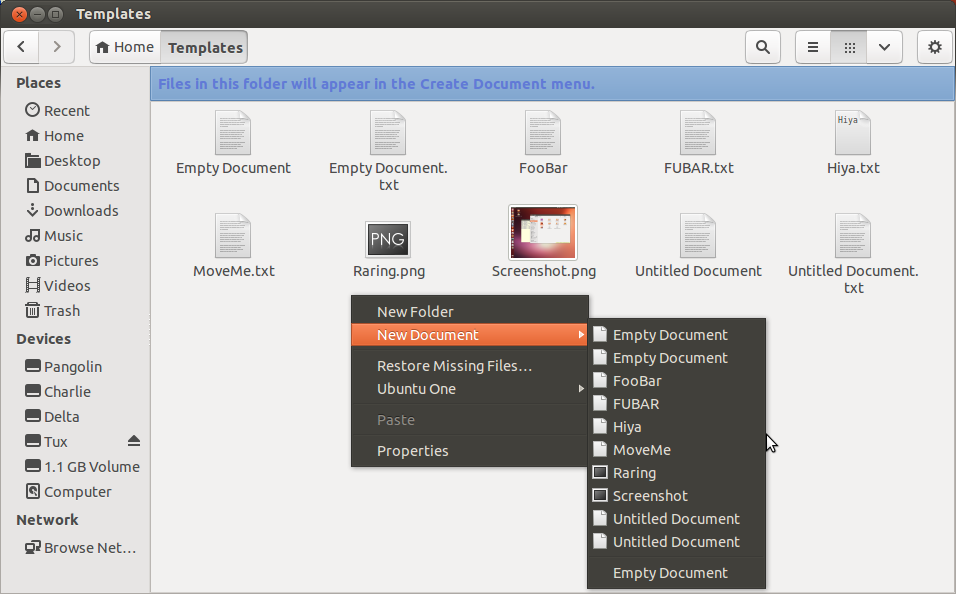
- Changes from what I observed in #3 above
  - Before we had prebuild empty document as well as the test created template
in the context menu
    - xxx and xxx.txt
  - the context menu showed both without the suffix so it _looked_ a bit weird
        - since somebody decided no not show the real filename
    - It did work accurately though

- This version does eliminate the paper ... scratch I cited above...
sorta

- Only if you start with an empty template folder as per Tc-Nfm-001
    - AND you use touch to create the document not Nautilus

- Now IF the Template Folder is empty
  - There is NO context menu to create a new document
  - I believe that to be a step backwards from before
    - A Quickfix workaround might be to put some documents in the Templates
folder
      - Text, Letter, Drawing, Spreadsheet ...

- You can create all the docs you want with bash in ~/Templates
  - They will not show up in a New Document Menu

- If you use Nautilus to drag a document into the Templates folder
   - It will appear on the New Document context menu immediately
  - Along with the default Empty Document menu Item from #3 above

- If you restart the system all the documents in ~/Templates will appear
on the context menu

I tried to issue a bug-report from the running iso but it fought me

** Attachment added: "raring new doc context menu"

https://bugs.launchpad.net/ubuntu/+source/nautilus/+bug/1119832/+attachment/3528525/+files/raring_Bug-1119832_Dist13feb-0720.png

--
You received this bug notification because you are a member of Ubuntu
Bugs, which is subscribed to Ubuntu.
https://bugs.launchpad.net/bugs/1119832

Title:
  After creating a blank txt file in ~/Templates there are 2 "Empty
  Document" options in context menu

To manage notifications about this bug go to:
https://bugs.launchpad.net/nautilus/+bug/1119832/+subscriptions

--
ubuntu-bugs mailing list
[email protected]
https://lists.ubuntu.com/mailman/listinfo/ubuntu-bugs