To better illustrate my point, please have a look at the attached
screenshot of waste-water pipes. Note that in the middle there is a
thick transparent purple line with a data-defined line-thickness
depending on the pipe diameter, defined in map units and at the sides
there are darker, opaque lines, defined in mm with a data-defined
offsets. So you can see, you can not only mix transparent/non
transparent symbol levels, but you can also mix units (map units and
mm). This is quite powerful!
However, this example also illustrates one shortcoming. Have a look at
the angle at the manhole symbol, labeled with "52160 ...." - here you
can see that the two adjacent thick pipes overlap and it gets darker
(still transparent) because of that. If the transparency wouldn't be
attached to the individual feature, but on the whole symbol level, this
wouldn't be the case.
There is always room for improvements ;-)

Andreas

On 20.06.2015 16:02, Andreas Neumann wrote:
Hi Benoit,

It depends. Yes - you can mix transparent and opaque features. For
each color you can also set the opacity/transparency value.

However, if two features overlap and you use transparency on the
feature level, you can see the features shine through - whereas when
the transparency would be on the symbol level (which isn't implemented
yet in QGIS) you would first composite all elements in a symbol level
and then apply the opacity on the whole group. See
http://www.w3.org/TR/2011/REC-SVG11-20110816/masking.html#ObjectAndGroupOpacityProperties
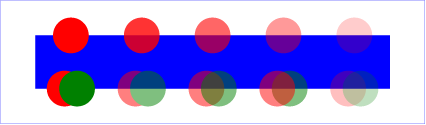
for the difference. In
http://www.w3.org/TR/2011/REC-SVG11-20110816/images/masking/opacity01.png
- if you look at the bottom row of circles - the second pair of
circles has the opacity on the group of two circles, whereas the third
pair has opacity on every single element. I hope you can see the
difference.

It would be very cool if QGIS could have a more fine-grained opacity -
new opacity on symbol level and new opacity on a whole group of
layers. It would make the cartographic options even better ;-)

Andreas

On 19.06.2015 16:40, Benoît Laurent wrote:
Hello,

I noticed this feature request : https://hub.qgis.org/issues/3438.

Is it possible to have semi-transparent and opaque features within
the same layer ?

Best regards,

Benoît

---
L'absence de virus dans ce courrier électronique a été vérifiée par
le logiciel antivirus Avast.
https://www.avast.com/antivirus

_______________________________________________
Qgis-user mailing list
[email protected]
http://lists.osgeo.org/mailman/listinfo/qgis-user
_______________________________________________
Qgis-user mailing list
[email protected]
http://lists.osgeo.org/mailman/listinfo/qgis-user
_______________________________________________
Qgis-user mailing list
[email protected]
http://lists.osgeo.org/mailman/listinfo/qgis-user