I never thought to ask that question. It worked for me as well. One person on
the list commented that they had trouble saving it as text. There's no need to
save it as text, just save. glad I can finally help someone on the list with an
answer to a question. Have a nice day.
________________________________
From: [email protected] <[email protected]> on behalf of Ronald
van Rhijn <[email protected]>
Sent: Tuesday, April 7, 2020 3:04:04 PM
To: [email protected] <[email protected]>
Subject: Re: Removing the Avett link application from start up.

Jimmie, thanks. That worked for the Avid Link.

Ronald

Op 6 apr. 2020, om 23:35 heeft jimmie smith
<[email protected]<mailto:[email protected]>> het
volgende geschreven:


Avid Application Manager is a small background app that Avid created to alert
users of their software of updates and other news. You'll find once installed
it launches each time you start up your computer. However many users do not
want background apps running and there is no need for the Avid Application
Manager to run for Pro Tools to work.

However there is currently no 'disable at startup' option, or a simple way to
stop it from launching each time to turn your computer on, however follow these
simple steps and you can control Avid Application Manager behaviour in both Mac
and Windows PC.

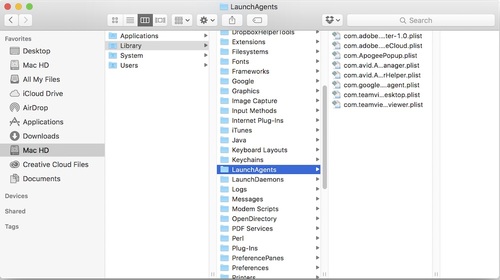
How To Stop The Avid Application Manager From Launching At Startup - Mac
[https://images.squarespace-cdn.com/content/v1/54d696e5e4b05ca7b54cff5c/1454236523384-Q6U3OJ102LZC0ZJ3BZP9/ke17ZwdGBToddI8pDm48kLvO88XaRQOvvjlb-FXAvCMUqsxRUqqbr1mOJYKfIPR7LoDQ9mXPOjoJoqy81S2I8N_N4V1vUb5AoIIIbLZhVYxCRW4BPu10St3TBAUQYVKcMf1usAC6mAKJAWBbrkeU_GyMMyQbD3k5_8aElq9B0PL-_m7Ulwj7QA_Jm8CV_FnV/image-asset.jpeg?format=500w]

Follow these simple steps.

  *   Go to Mac HD/Library/LaunchAgents
  *   Then right click on the file called com.avid.ApplicationManager.plist
file and open it with Text Edit
  *   Change the  RunAtLoad key to false
  *   Then use Save As and place it on your Desktop, it may add the word 'copy'
to the end of the name.
  *   Click on the name to edit it and change the name so that the entry is
called com.avid.ApplicationManager.plist file it may prompt you and ask you if
you wish to add the plist extension, if it does then say yes.
  *   Now drag the updated file back into Mac HD/Library/LaunchAgents where it
came from, it will ask if you want to replace or keep both, say replace then
you will be prompted for your password.
  *   Enter you password to complete the copy process,

That's it - now Avid Application Manager will not launch on you Mac unless you
want it to. You'll find it in the Applications folder and if you wish you can
make another shortcut to the dock.


--
You received this message because you are subscribed to the Google Groups "Pro
Tools Accessibility" group.
To unsubscribe from this group and stop receiving emails from it, send an email
to
[email protected]<mailto:[email protected]>.
To view this discussion on the web visit
https://groups.google.com/d/msgid/ptaccess/DM6PR01MB4395F52E17E75F64F8BDE0D9F6C20%40DM6PR01MB4395.prod.exchangelabs.com<https://groups.google.com/d/msgid/ptaccess/DM6PR01MB4395F52E17E75F64F8BDE0D9F6C20%40DM6PR01MB4395.prod.exchangelabs.com?utm_medium=email&utm_source=footer>.


--
You received this message because you are subscribed to the Google Groups "Pro
Tools Accessibility" group.
To unsubscribe from this group and stop receiving emails from it, send an email
to
[email protected]<mailto:[email protected]>.
To view this discussion on the web visit
https://groups.google.com/d/msgid/ptaccess/DD8B5F7A-AAA3-4CF5-840F-9F034306B27D%40xs4all.nl<https://groups.google.com/d/msgid/ptaccess/DD8B5F7A-AAA3-4CF5-840F-9F034306B27D%40xs4all.nl?utm_medium=email&utm_source=footer>.

--
You received this message because you are subscribed to the Google Groups "Pro
Tools Accessibility" group.
To unsubscribe from this group and stop receiving emails from it, send an email
to [email protected].
To view this discussion on the web visit
https://groups.google.com/d/msgid/ptaccess/DM6PR01MB43959F986E70DB917D3A32F9F6C30%40DM6PR01MB4395.prod.exchangelabs.com.