Hi~

I can't imagine it either, but it happens. T.T
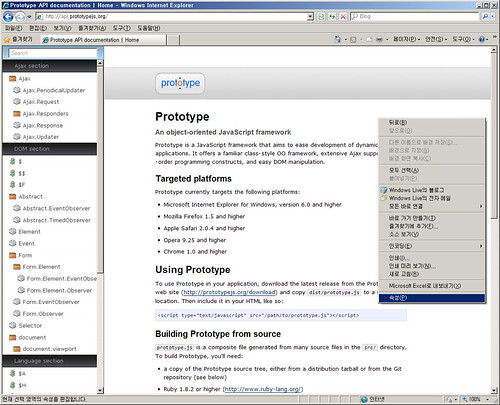
Try follow steps.

1. Open a web page that including Prototype 1.6.1 on IE8 on Windows
XP.
2. Right click on your mouse and click "Properties".
3. Isn't your browser killed?

I don't know the reason but when I remove the Prototype 1.6.1, It
doesn't happen anymore.
Even it happens on Prototype API page. (http://api.prototypejs.org)

Curiously, 1.6.0 is OK.


On 2월19일, 오후3시13분, "T.J. Crowder" <[email protected]> wrote:
> Hi,
>
> > I have prepared a screenshot. hope this will help you understand
> > better.
>
> Well, I don't read Korean :-), but the item in that position on my
> context menu is "Properties", so hopefully that's what you mean.
>
> I can't imagine any reason Prototype being on the page would affect
> the Properties dialog box.
> --
> T.J. Crowder
> Independent Software Consultant
> tj / crowder software / comwww.crowdersoftware.com
>
> On Feb 19, 2:07 am, joy <[email protected]> wrote:
>
>
>
> > Hi T.J Crowder.^ ^
>
> > I have prepared a screenshot. hope this will help you understand
> > better.
>
> > Please check this
> > -http://farm3.static.flickr.com/2702/4368633803_c6dcaa215b.jpg
>
> > It happens only on IE8 on Windows XP, not Windows 7.
> > I can't guarantee that this problem is occurring from IE8 Korean
> > version only.
>
> > Thank you. Have a nice day~

--
You received this message because you are subscribed to the Google Groups
"Prototype & script.aculo.us" group.
To post to this group, send email to [email protected].
To unsubscribe from this group, send email to
[email protected].
For more options, visit this group at
http://groups.google.com/group/prototype-scriptaculous?hl=en.