This is an automated email from the ASF dual-hosted git repository.

wuweijie pushed a commit to branch master
in repository https://gitbox.apache.org/repos/asf/shardingsphere.git
The following commit(s) were added to refs/heads/master by this push:
new 252a28abc15 feat(blog): add new articles and images (#19799)
252a28abc15 is described below
commit 252a28abc15e67fd27382b7631ce099c5188b7d3
Author: Yumeiya <[email protected]>
AuthorDate: Thu Aug 4 15:51:54 2022 +0800
feat(blog): add new articles and images (#19799)
* add new articles and images
* delete images
* Revert "delete images"
This reverts commit eaa30221c3bcb95ae6327ca7f011c9001d11f4d1.
* Delete unused images
* Update
2022_07_06_ShardingSphere-JDBC_Driver_Released_A_JDBC_Driver_That_Requires_No_Code_Modifications.en.md
* Update
2022_07_08_ShardingSphere-Proxy_Front-End_Protocol_Troubleshooting_Guide_and_Examples.en.md
* Update 2022_07_12_ShardingSphere_Cloud_Applications_
An_out-of-the-box_ShardingSphere-Proxy_Cluster.en.md
* Update
2022_07_26_DistSQL_Applications_Building_a_Dynamic_Distributed_Database.en.md
---
...river_That_Requires_No_Code_Modifications.en.md | 119 +++++
...otocol_Troubleshooting_Guide_and_Examples.en.md | 292 ++++++++++++
...t-of-the-box_ShardingSphere-Proxy_Cluster.en.md | 203 +++++++++
...ity_Efficiency_and_Replicability_at_Scale.en.md | 125 +++++
...s_Building_a_Dynamic_Distributed_Database.en.md | 504 +++++++++++++++++++++
...hardingSphere-on-Cloud_Solution_Released.en.md" | 98 ++++
6 files changed, 1341 insertions(+)
diff --git
a/docs/blog/content/material/2022_07_06_ShardingSphere-JDBC_Driver_Released_A_JDBC_Driver_That_Requires_No_Code_Modifications.en.md
b/docs/blog/content/material/2022_07_06_ShardingSphere-JDBC_Driver_Released_A_JDBC_Driver_That_Requires_No_Code_Modifications.en.md
new file mode 100644
index 00000000000..9f194dda268
--- /dev/null
+++
b/docs/blog/content/material/2022_07_06_ShardingSphere-JDBC_Driver_Released_A_JDBC_Driver_That_Requires_No_Code_Modifications.en.md
@@ -0,0 +1,119 @@
++++
+title = "ShardingSphere-JDBC Driver Released: A JDBC Driver That Requires No
Code Modifications"
+weight = 65
+chapter = true
++++
+
+## Background
+`ShardingSphereDataSourceFactory` is the most basic user API of [Apache
ShardingSphere
+JDBC](https://shardingsphere.apache.org/document/current/en/overview/#shardingsphere-jdbc),
and it is used to transform users' rule configuration objects and generate the
standard implementation of the `DataSource`.
+
+It also provides `YamlShardingSphereDataSourceFactory` for `YAML`
configuration, as well as the custom namespace for the Spring and `Spring Boot
Starter`.
+
+`DataSource` is a standard Java JDBC interface. Engineers can use it to
further create JDBC-compliant `Connection`, `Statement`, `PreparedStatement`,
`ResultSet`, and other familiar standard objects. It is fully consistent with
the implementation of the JDBC interface so there's no difference when
engineers use Apache ShardingSphere-JDBC or use a native JDBC. Additionally, it
can also transparently interface with various
[ORM](https://stackoverflow.com/questions/1279613/what-is-an-orm-ho [...]
+
+## Pain Points
+Although the standard JDBC interface can be fully adapted during the
development process, creating a `DataSource` through the ShardingSphere API can
change the way the engineer originally load the database driver.
+
+Although only a small part (one line) of startup code needs to be modified, it
actually adds additional development costs for systems that would like to
migrate smoothly to ShardingSphere. And for the system that cannot master the
source code (such as an external sourcing system), it is truly difficult to use
ShardingSphere.
+
+[ShardingSphere](https://shardingsphere.apache.org/) has always lacked a
JDBC-driven implementation largely due to its design. Java-configured
ShardingSphere-JDBC can achieve programmable flexibility, but JDBC’s Driver
interface does not provide much room for additional configuration.
+
+The configuration flexibility of ShardingSphere will be greatly restricted
through sole `URL` and `Properties`. Although `YAML` configuration can be
better adapted to Driver’s `URL` and is more readable, it belongs to the
category of static configuration and is obviously less flexible than dynamic
configuration.
+
+Therefore, ShardingSphere-JDBC uses a similar strategy of a database
connection pool, bypassing the limitations of the JDBC standard interface and
directly exposing the `DataSource` to the user.
+
+However, it is almost an unbreakable barrier not to change a single line of
code, which is the biggest pain point while improving ShardingSphere-JDBC’s
ease of use.
+
+## Opportunity
+As
[ShardingSphere-Proxy](https://shardingsphere.apache.org/document/current/en/quick-start/shardingsphere-proxy-quick-start/)
is developed ( the ShardingSphere client), its two major ecosystem features
emerged, namely hybrid deployment and
[DistSQL](https://shardingsphere.apache.org/document/5.1.0/en/concepts/distsql/).
+
+The lightweight and high-performance features of ShardingSphere-JDBC make it
more suitable for application-oriented
[CRU](https://en.wikipedia.org/wiki/Create,_read,_update_and_delete)D
operations. The ease of use and compatibility of ShardingSphere-Proxy makes it
more suitable for DDL operations oriented toward database management and
control. The two clients can be used together to complement each other, to
provide a new and more complete architecture solution.
+
+With both programming and SQL capabilities, DistSQL strikes the perfect
balance between flexibility and ease of use. In an architectural model where
the configuration properties of ShardingSphere-JDBC are significantly reduced,
it is the best solution to use JDBC URL to connect to the governance center and
DistSQL for the configuration operations.
+
+DistSQL ensures security which Java and YAML are short of, and it naturally
supports permission control and SQL auditing, and other high-order
capabilities. With DistSQL, DBAs (database administrators) can operate and
maintain database clusters with great ease.
+
+## Implementation
+After the preconditions were met, ShardingSphere-JDBC version 5.1.2 took the
opportunity to provide a JDBC driver that can be used only through
configuration changes, without requiring engineers to modify the code.
+
+**Driver class name**
+`org.apache.shardingsphere.driver.ShardingSphereDriver`
+**
+URL configuration description**
+
+- Prefix: `jdbc:shardingsphere:`
+- Config files: `xxx.yaml`, its format is consistent with that of `YAML`
configuration.
+- Load rule of config files:
+If there’s no prefix, the configuration file is loaded from an absolute path
(AP).
+
+`classpath`: the prefix indicates loading the configuration file from the
classpath.
+
+## Procedure
+**Using native drivers**
+
+```java
+Class.forName("org.apache.shardingsphere.driver.ShardingSphereDriver");
+String jdbcUrl = "jdbc:shardingsphere:classpath:config.yaml";
+
+String sql = "SELECT i.* FROM t_order o JOIN t_order_item i ON
o.order_id=i.order_id WHERE o.user_id=? AND o.order_id=?";
+try (
+ Connection conn = DriverManager.getConnection(jdbcUrl);
+ PreparedStatement ps = conn.prepareStatement(sql)) {
+ ps.setInt(1, 10);
+ ps.setInt(2, 1000);
+ try (ResultSet rs = preparedStatement.executeQuery()) {
+ while(rs.next()) {
+ // ... }
+ }
+}
+```
+**Using the database connection pool**
+
+```java
+String driverClassName =
"org.apache.shardingsphere.driver.ShardingSphereDriver";
+String jdbcUrl = "jdbc:shardingsphere:classpath:config.yaml";// take HikariCP
as an example HikariDataSource dataSource = new HikariDataSource();
+dataSource.setDriverClassName(driverClassName);
+dataSource.setJdbcUrl(jdbcUrl);
+
+String sql = "SELECT i.* FROM t_order o JOIN t_order_item i ON
o.order_id=i.order_id WHERE o.user_id=? AND o.order_id=?";
+try (
+ Connection conn = dataSource.getConnection();
+ PreparedStatement ps = conn.prepareStatement(sql)) {
+ ps.setInt(1, 10);
+ ps.setInt(2, 1000);
+ try (ResultSet rs = preparedStatement.executeQuery()) {
+ while(rs.next()) {
+ // ... }
+ }
+}
+```
+**Reference**
+
+- [JDBC
driver](https://shardingsphere.apache.org/document/current/cn/user-manual/shardingsphere-jdbc/jdbc-driver/)
+
+## Conclusion
+ShardingSphere-JDBC Driver officially makes ShardingSphere easier to use than
ever before.
+
+In the coming future, the JDBC driver can be further simplified by providing
the governance center address directly in the `URL`. Apache ShardingSphere has
made great strides towards diversified distributed clusters.
+
+**Relevant Links:**
+[GitHub issue](https://github.com/apache/shardingsphere/issues)
+
+[Contributor Guide](https://shardingsphere.apache.org/community/en/contribute/)
+
+[ShardingSphere Twitter](https://twitter.com/ShardingSphere)
+
+[ShardingSphere
Slack](https://join.slack.com/t/apacheshardingsphere/shared_invite/zt-sbdde7ie-SjDqo9~I4rYcR18bq0SYTg)
+
+[Chinese Community
+](https://community.sphere-ex.com/)
+
+**Author**
+**Zhang Liang**
+
+**Github:** @terrymanu
+
+Zhang Liang, the founder & CEO of [SphereEx](https://www.sphere-ex.com/),
served as the head of the architecture and database team of many large
well-known Internet enterprises. He is enthusiastic about open source and is
the founder and PMC chair of Apache ShardingSphere,
[ElasticJob](https://shardingsphere.apache.org/elasticjob/), and other
well-known open-source projects.
+
+He is a member of the [Apache Software Foundation](https://www.apache.org/), a
[Microsoft MVP](https://mvp.microsoft.com/), [Tencent Cloud
TVP](https://cloud.tencent.com/tvp), and [Huawei Cloud
MVP](https://developer.huaweicloud.com/mvp) and has more than 10 years of
experience in the field of architecture and database. He advocates for elegant
code, and has made great achievements in distributed database technology and
academic research. He has served as a producer and speaker at dozens [...]
diff --git
a/docs/blog/content/material/2022_07_08_ShardingSphere-Proxy_Front-End_Protocol_Troubleshooting_Guide_and_Examples.en.md
b/docs/blog/content/material/2022_07_08_ShardingSphere-Proxy_Front-End_Protocol_Troubleshooting_Guide_and_Examples.en.md
new file mode 100644
index 00000000000..60bcec1a2c9
--- /dev/null
+++
b/docs/blog/content/material/2022_07_08_ShardingSphere-Proxy_Front-End_Protocol_Troubleshooting_Guide_and_Examples.en.md
@@ -0,0 +1,292 @@
++++
+title = "ShardingSphere-Proxy Front-End Protocol Troubleshooting Guide and
Examples"
+weight = 66
+chapter = true
++++
+
+[ShardingSphere-Proxy](https://shardingsphere.apache.org/document/current/en/quick-start/shardingsphere-proxy-quick-start/),
positioned as a transparent database proxy, is one of [Apache
ShardingSphere](https://shardingsphere.apache.org/)’s access points.
+
+ShardingSphere-Proxy implements a database protocol that can be accessed by
any client using or compatible with [MySQL](https://www.mysql.com/) /
[PostgreSQL](https://www.postgresql.org/) /
[openGauss](https://opengauss.org/en/) protocols. The advantage of
ShardingSphere-Proxy over
[ShardingSphere-JDBC](https://shardingsphere.apache.org/document/current/en/overview/#shardingsphere-jdbc)
is the support for heterogeneous languages and the operable entry point to the
database cluster for DBAs.
+
+Similar to ShardingSphere’s SQL parsing module, establishing
ShardingSphere-Proxy’s support for database protocols is a long-term process
that requires developers to continuously improve the database protocol
deployment.
+
+This post will introduce you to the tools commonly used in database protocol
development by presenting a troubleshooting guide for ShardingSphere-Proxy
MySQL protocol issues as a case study.
+
+
+
+## 1. Use Wireshark to analyze network protocols
+[Wireshark](https://www.wireshark.org/) is a popular network protocol analysis
tool with built-in support for parsing hundreds of protocols (including the
MySQL / PostgreSQL protocols relevant to this article) and the ability to read
many different types of packet capture formats.
+
+The full features, installation and other details about Wireshark can be found
in the official Wireshark documents.
+
+## 1.1 Packet capture using tools like Wireshark or tcpdump
+**1.1.1 Wireshark**
+Wireshark itself has the ability to capture packets, so if the environment
connected to ShardingSphere-Proxy can run Wireshark, you can use it to capture
packets directly.
+
+After initiating Wireshark , first select the correct network card.
+
+For example, if you are running ShardingSphere-Proxy locally, the client
connects to ShardingSphere-Proxy on port 3307 at 127.0.0.1 and the traffic
passes through the Loopback NIC, which is selected as the target of packet
capture.
+
+
+
+Once the NIC is selected, Wireshark starts capturing packets. Since there may
be a lot of traffic from other processes on the NIC, it is necessary to filter
out the traffic coming from specified port.
+
+
+
+**1.1.2 tcpdump**
+In cases where ShardingSphere-Proxy is deployed in an online environment, or
when you cannot use Wireshark to capture packets, consider using tcpdump or
other tools.
+
+NIC eth0 as target, filter TCP port 3307, write the result to
/path/to/dump.cap. Command Example:
+
+`tcpdump -i eth0 -w /path/to/dump.cap tcp port 3307`
+To know how to use tcpdump, you can man tcpdump. tcpdump’s packet capture
result file can be opened through Wireshark.
+
+**1.1.3 Note**
+When a client connects to MySQL, SSL encryption may be automatically enabled,
causing the packet capture result to not directly parse the protocol content.
You can disable SSL by specifying parameters using the MySQL client command
line with the following command:
+
+`mysql --ssl-mode=disable`
+Parameters can be added using JDBC with the following parameters:
+
+`jdbc:mysql://127.0.0.1:3306/db?useSSL=false`
+
+## 1.2 Use Wireshark to read packet capture result
+Wireshark supports reading multiple packet capture file formats, including
tcpdump’s capture format.
+
+By default, Wireshark decodes port 3306 to MySQL protocol and port 5432 to
PostgreSQL protocol. For cases where ShardingSphere-Proxy may use a different
port, you can configure the protocol for specified port in Decode As…
+
+For example, ShardingSphere-Proxy MySQL uses 3307 port, which can be parsed as
SQL protocols according to the following steps:
+
+ 
+
+
+
+Once Wireshark is able to parse out the MySQL protocol, we can add filters to
display only the MySQL protocol data:
+
+`tcp.port == 3307 and mysql`
+
+
+
+After selecting the correct protocol for the specified port, you can see the
contents in the Wireshark window.
+
+For example, after the client establishes a TCP connection with the server,
the MySQL server initiates a `Greeting` to the client as shown below:
+
+
+
+
+Example: the client executes SQL select version() with the protocol shown
below:
+
+
+
+## 2. Protocol Troubeshooting Case Study: ShardingSphere-Proxy MySQL support
oversized data packages
+
+## 2.1 Problem Description
+Using MySQL Connector/J 8.0.28 as a client to connect to ShardingSphere-Proxy
5.1.1, bulk insertion error prompted while executing.
+
+Problem solved after replacing driver MySQL Connector/J 5.1.38.
+
+```
+[INFO ] 2022-05-21 17:32:22.375 [main] o.a.s.p.i.BootstrapInitializer -
Database name is `MySQL`, version is `8.0.28`
+[INFO ] 2022-05-21 17:32:22.670 [main] o.a.s.p.frontend.ShardingSphereProxy -
ShardingSphere-Proxy start success
+[ERROR] 2022-05-21 17:37:57.925 [Connection-143-ThreadExecutor]
o.a.s.p.f.c.CommandExecutorTask - Exception occur:
+java.lang.IllegalArgumentException: Sequence ID of MySQL command packet must
be `0`.
+ at com.google.common.base.Preconditions.checkArgument(Preconditions.java:142)
+ at
org.apache.shardingsphere.db.protocol.mysql.packet.command.MySQLCommandPacketTypeLoader.getCommandPacketType(MySQLCommandPacketTypeLoader.java:38)
+ at
org.apache.shardingsphere.proxy.frontend.mysql.command.MySQLCommandExecuteEngine.getCommandPacketType(MySQLCommandExecuteEngine.java:50)
+ at
org.apache.shardingsphere.proxy.frontend.mysql.command.MySQLCommandExecuteEngine.getCommandPacketType(MySQLCommandExecuteEngine.java:46)
+ at
org.apache.shardingsphere.proxy.frontend.command.CommandExecutorTask.executeCommand(CommandExecutorTask.java:95)
+ at
org.apache.shardingsphere.proxy.frontend.command.CommandExecutorTask.run(CommandExecutorTask.java:72)
+ at
java.base/java.util.concurrent.ThreadPoolExecutor.runWorker(ThreadPoolExecutor.java:1128)
+ at
java.base/java.util.concurrent.ThreadPoolExecutor$Worker.run(ThreadPoolExecutor.java:628)
+ at java.base/java.lang.Thread.run(Thread.java:834)
+[ERROR] 2022-05-21 17:44:24.926 [Connection-317-ThreadExecutor]
o.a.s.p.f.c.CommandExecutorTask - Exception occur:
+java.lang.IllegalArgumentException: Sequence ID of MySQL command packet must
be `0`.
+ at com.google.common.base.Preconditions.checkArgument(Preconditions.java:142)
+ at
org.apache.shardingsphere.db.protocol.mysql.packet.command.MySQLCommandPacketTypeLoader.getCommandPacketType(MySQLCommandPacketTypeLoader.java:38)
+ at
org.apache.shardingsphere.proxy.frontend.mysql.command.MySQLCommandExecuteEngine.getCommandPacketType(MySQLCommandExecuteEngine.java:50)
+ at
org.apache.shardingsphere.proxy.frontend.mysql.command.MySQLCommandExecuteEngine.getCommandPacketType(MySQLCommandExecuteEngine.java:46)
+ at
org.apache.shardingsphere.proxy.frontend.command.CommandExecutorTask.executeCommand(CommandExecutorTask.java:95)
+ at
org.apache.shardingsphere.proxy.frontend.command.CommandExecutorTask.run(CommandExecutorTask.java:72)
+ at
java.base/java.util.concurrent.ThreadPoolExecutor.runWorker(ThreadPoolExecutor.java:1128)
+ at
java.base/java.util.concurrent.ThreadPoolExecutor$Worker.run(ThreadPoolExecutor.java:628)
+ at java.base/java.lang.Thread.run(Thread.java:834)
+```
+
+## 2.2 Troubleshooting
+The error occurred at the front end of the Proxy, which excludes the backend
JDBC Driver and is related to the protocol implementation.
+
+**2.2.1 Analysis**
+Directly determine in the source code that if the sequence ID is not equal to
0, an error is reported.
+
+```java
+public final class MySQLCommandPacketTypeLoader {
+
+ /**
+ * Get command packet type.
+ *
+ * @param payload packet payload for MySQL
+ * @return command packet type for MySQL
+ */
+ public static MySQLCommandPacketType getCommandPacketType(final
MySQLPacketPayload payload) {
+ Preconditions.checkArgument(0 == payload.readInt1(), "Sequence ID of
MySQL command packet must be `0`.");
+ return MySQLCommandPacketType.valueOf(payload.readInt1());
+ }
+}
+```
+**Code link:**
+[https://github.com/apache/shardingsphere/blob/d928165ea4f6ecf2983b2a3a8670ff66ffe63647/shardingsphere-db-protocol/shardingsphere-db-protocol-mysql/src/main/java/org/apache/shardingsphere/db/protocol/mysql/packet/command/MySQLCommandPacketTypeLoader.java#L38](https://github.com/apache/shardingsphere/blob/d928165ea4f6ecf2983b2a3a8670ff66ffe63647/shardingsphere-db-protocol/shardingsphere-db-protocol-mysql/src/main/java/org/apache/shardingsphere/db/protocol/mysql/packet/command/MySQLCommand
[...]
+
+In accordance with MySQL protocol documentation, consider when the sequence ID
will not equal 0 [2].
+
+- The server responds multiple messages to the client.
+- The client sends multiple consecutive messages.
+- ……
+In this case, the message header of MySQL Packet consists of 3 bytes length +
1 byte Sequence ID [3], so the maximum length of Payload part is 16 MB — 1.
+
+Considering that the error is generated during bulk insertion, the problem
might be that the data sent by the client exceeds the length limit of a single
MySQL Packet and was split into multiple consecutive MySQL Packets, which the
Proxy could not handle.
+
+**2.2.2 Trying to recreate the problem**
+Using a `longtext` type field. The original idea was to construct a SQL with a
length of more than 16 MB, but inadvertently we found that the error was also
reported when the SQL length was more than 8 MB. The code was reproduced as
follows:
+
+```java
+try (Connection connection =
DriverManager.getConnection("jdbc:mysql://127.0.0.1:13306/bmsql", "root",
"root")) {
+ try (Statement statement = connection.createStatement()) {
+ statement.execute("drop table if exists foo");
+ statement.execute("create table foo (id bigint primary key, str0
longtext)");
+ long id = ThreadLocalRandom.current().nextLong();
+ String str0 = RandomStringUtils.randomAlphanumeric(1 << 23);
+ String sql = "insert into foo (id, str0) values (" + id + ", '" + str0
+ "')";
+ System.out.println(sql.length());
+ statement.execute(sql);
+ }
+}
+```
+Error reported as follows:
+
+
+
+Wireshark packet capture results show that packet length 0x80003C == 8388668
with only one MySQL Packet, and the sequence ID is only 0:
+
+
+
+Debugging the code reveals that the readMediumLE() method used by the Proxy
was a signed number and the Packet length was read as a negative number.
+
+
+
+The problem is relatively easy to fix, just replace the corresponding
`readUnsignedMediumLE()` method.
+
+Although the error message is consistent with the problem description, it does
not yet completely solve the underlying issue.
+
+After the length exceeding issue is fixed, continue troubleshooting the
problem. Send approximately 64 MB of data to ShardingSphere-Proxy using the
following code:
+
+```java
+try (Connection connection =
DriverManager.getConnection("jdbc:mysql://127.0.0.1:13306/bmsql", "root",
"root")) {
+ try (Statement statement = connection.createStatement()) {
+ statement.execute("drop table if exists foo");
+ statement.execute("create table foo (id bigint primary key, str0
longtext)");
+ long id = ThreadLocalRandom.current().nextLong();
+ String str0 = RandomStringUtils.randomAlphanumeric(1 << 26);
+ String sql = "insert into foo (id, str0) values (" + id + ", '" + str0
+ "')";
+ statement.execute(sql);
+ }
+}
+```
+Error Occurred:
+
+
+
+Analyze packet capture results:
+
+
+
+
+
+The results indicate that the client sent multiple 16MB data packets, and
Wireshark was unable to parse the MySQL long packets properly, but we can
locate the MySQL Packet Header by using the search function.
+
+Correlating with ShardingSphere-Proxy MySQL decoding logic:
+
+```java
+int payloadLength = in.markReaderIndex().readUnsignedMediumLE();
+int remainPayloadLength = SEQUENCE_LENGTH + payloadLength;
+if (in.readableBytes() < remainPayloadLength) {
+ in.resetReaderIndex();
+ return;
+}
+out.add(in.readRetainedSlice(SEQUENCE_LENGTH + payloadLength));
+```
+The problem is clear: because ShardingSphere-Proxy didn’t aggregate packets,
multiple packets are parsed separately by Proxy as multiple commands, and
because the `Sequence ID` of subsequent packets is greater than 0, the Proxy’s
internal assertion logic for the Sequence ID reported an error.
+
+## 2.3 Troubleshooting and Repair
+After troubleshooting, the error was reported as:
+
+- (Direct cause) The ShardingSphere-Proxy MySQL protocol unpacket logic does
not handle the length sign correctly [4].
+- (Root cause) ShardingSphere-Proxy MySQL does not aggregate packets larger
than 16 MB [5].
+
+It is first important to understand how MySQL protocol handles very long
packets [6].
+
+- When the total data length exceeds 16 MB — 1, the protocol splits the data
into multiple Packets of length 16 MB — 1 until the final data length is less
than 16 MB — 1, as shown in the following figure:
+
+
+
+- When the data length is exactly equal to 16 MB — 1 or a multiple thereof,
one or more packets of length 16 MB — 1 are sent followed by a packet of length
0, as shown in the following figure:
+
+
+**Solution:** in order for the protocol implementation of ShardingSphere-Proxy
MySQL to not care about how very long packets are handled, it is better to
aggregate the packets in the data decoding logic.
+
+In the ShardingSphere-Proxy front-end [Netty](https://netty.io/) decoding
logic, when a data Packet of length `0xFFFFFF` is encountered, the Payload part
of multiple MySQL Packets is aggregated via CompositeByteBuf.
+
+See the Pull Request in the reference documentation for specific codes.
+
+The following issues are currently fixed:
+
+- Correctly handle packet length numeric notation [7].
+- MySQL protocol decoding logic supports more than 16 MB packets [8].
+Potential issues to be addressed later, including but not limited to:
+
+- The MySQL protocol encoding logic does not support responding to packets
larger than 16 MB.
+
+## 3. Summarizing troubleshooting methods for Shardingsphere front-end
protocols
+For protocol-based problem troubleshooting, you first need to be familiar with
the corresponding protocols and the database protocols including but not
limited to:
+
+Observing the protocol of the client’s direct connection to the database via
packet capture tools.
+
+According to database protocol documents, read the protocol coding logic
source code of the official client database (e.g. JDBC Driver).
+
+Once you have a basic grasp of packet capture tools and protocols, you can
start troubleshooting ShardingSphere-Proxy front-end protocol issues.
+
+The code entry, where ShardingSphere-Proxy establishes the connection with the
client, is in
org.apache.shardingsphere.proxy.frontend.netty.ServerHandlerInitializer[9],
which can be used as a starting point to identify the problem.
+
+The solutions presented in this article have been released with Apache
ShardingSphere 5.1.2 [10].
+
+## Relevant Links:
+[1] [https://www.wireshark.org/](https://www.wireshark.org/)
+
+[2]
[https://dev.mysql.com/doc/internals/en/sequence-id.html](https://dev.mysql.com/doc/internals/en/sequence-id.html
+)
+[3]
[https://dev.mysql.com/doc/internals/en/mysql-packet.html](https://dev.mysql.com/doc/internals/en/mysql-packet.html)
+
+[4]
[https://github.com/apache/shardingsphere/issues/17891](https://github.com/apache/shardingsphere/issues/17891)
+
+[5]
[https://github.com/apache/shardingsphere/issues/17907](https://github.com/apache/shardingsphere/issues/17907)
+
+[6]
[https://dev.mysql.com/doc/internals/en/sending-more-than-16mbyte.html](https://dev.mysql.com/doc/internals/en/sending-more-than-16mbyte.html)
+
+[7]
[https://github.com/apache/shardingsphere/pull/17898](https://github.com/apache/shardingsphere/pull/17898)
+
+[8]
[https://github.com/apache/shardingsphere/pull/17914](https://github.com/apache/shardingsphere/pull/17914
+)
+[9]
[https://github.com/apache/shardingsphere/blob/2c9936497214b8a654cb56d43583f62cd7a6b76b/shardingsphere-proxy/shardingsphere-proxy-frontend/shardingsphere-proxy-frontend-core/src/main/java/org/apache/shardingsphere/proxy/frontend/netty/ServerHandlerInitializer.java](https://github.com/apache/shardingsphere/blob/2c9936497214b8a654cb56d43583f62cd7a6b76b/shardingsphere-proxy/shardingsphere-proxy-frontend/shardingsphere-proxy-frontend-core/src/main/java/org/apache/shardingsphere/proxy/fro
[...]
+)
+[10]
[https://shardingsphere.apache.org/document/current/cn/downloads/](https://shardingsphere.apache.org/document/current/cn/downloads/)
+
+[GitHub issue](https://github.com/apache/shardingsphere/issues)
+
+[Contributor Guide](https://shardingsphere.apache.org/community/en/contribute/)
+
+[ShardingSphere Twitter](https://twitter.com/ShardingSphere)
+
+[ShardingSphere Slack
+](https://join.slack.com/t/apacheshardingsphere/shared_invite/zt-sbdde7ie-SjDqo9~I4rYcR18bq0SYTg)
+[Chinese Community](https://community.sphere-ex.com/)
+
+## Author
+Weijie Wu, Apache ShardingSphere PMC, R&D Engineer of
[SphereEx](https://www.sphere-ex.com/en/) Infrastructure. Weijie focuses on the
Apache ShardingSphere access side and the ShardingSphere subproject
[ElasticJob](https://shardingsphere.apache.org/elasticjob/).
diff --git
a/docs/blog/content/material/2022_07_12_ShardingSphere_Cloud_Applications_
An_out-of-the-box_ShardingSphere-Proxy_Cluster.en.md
b/docs/blog/content/material/2022_07_12_ShardingSphere_Cloud_Applications_
An_out-of-the-box_ShardingSphere-Proxy_Cluster.en.md
new file mode 100644
index 00000000000..54900e5fc00
--- /dev/null
+++ b/docs/blog/content/material/2022_07_12_ShardingSphere_Cloud_Applications_
An_out-of-the-box_ShardingSphere-Proxy_Cluster.en.md
@@ -0,0 +1,203 @@
++++
+title = "ShardingSphere Cloud Applications: An out-of-the-box
ShardingSphere-Proxy Cluster"
+weight = 67
+chapter = true
++++
+
+The [Apache ShardingSphere
v5.1.2](https://shardingsphere.apache.org/document/5.1.2/en/overview/) update
introduces three new features, one of which allows using the
[ShardingSphere-Proxy](https://shardingsphere.apache.org/document/current/en/quick-start/shardingsphere-proxy-quick-start/)
chart to rapidly deploy a set of ShardingSphere-Proxy clusters in a cloud
environment. This post takes a closer look at this feature.
+
+## Background and Pain Points
+In a cloud-native environment, an application can be deployed in batches in
multiple different environments. It is difficult to deploy it into a new
environment by reusing the original `YAML`.
+
+When deploying [Kubernetes](https://kubernetes.io/) software, you may
encounter the following problems:
+
+How to manage, edit and update these scattered Kubernetes application
configuration files?
+How to manage a set of related configuration files as an application?
+How to distribute and reuse a Kubernetes application configuration?
+The above problems also occur when migrating Apache SharidngSphere-Proxy from
[Docker](https://www.docker.com/) or virtual machine to Kubernetes.
+
+Due to the flexibility of Apache ShardingSphere-Proxy, a cluster may require
multiple Apache ShardingSphere-Proxy replicas. In the traditional deployment
model, you need to configure a separate deployment file for each replica. For
deployment without version control, the system may fail to roll back quickly
during the upgrade, which may affect application stability.
+
+Today, there usually is more than one cluster for enterprises. It is a
challenge for the traditional deployment model without version control to reuse
configuration across multiple clusters while ensuring configuration consistency
when producing and testing clusters as well as guaranteeing the correctness of
the test.
+
+## Design objective
+As Apache ShardingSphere-Proxy officially supports standardized deployment on
the cloud for the first time, choosing the deployment mode is crucial. We need
to consider the ease of use, reuse, and compatibility with subsequent versions.
+
+After investigating several existing Kubernetes deployment modes, we finally
chose to use [Helm](https://helm.sh/) to make a chart for Apache
ShardingSphere-Proxy and provide it to users. We aim to manage the deployment
of Apache ShardingSphere-Proxy so that it can be versioned and reusable.
+
+## Design content
+[Helm](https://helm.sh/) manages the tool of the Kubernetes package called
`chart`. Helm can do the following things:
+
+Create a new `chart`
+Package `chart` as an archive (tgz) file.
+Interact with the repository where `chart` is stored.
+Install and uninstall `chart` in an existing Kubernetes cluster.
+Manage the release cycle of `chart` installed together with Helm.
+Using Helm to build an Apache ShardingSphere-Proxy cloud-deployed chart will
significantly simplify the deployment process in the Kubernetes environment for
users. It also enables Apache ShardingSphere-Proxy to replicate quickly between
multiple environments.
+
+Currently, the deployment of Apache ShardingSphere-Proxy depends on the
registry, and the deployment of the [ZooKeeper](https://zookeeper.apache.org/)
cluster is also supported in the Apache ShardingSphere-Proxy chart.
+
+This provides users with a one-stop and out-of-the-box experience. An Apache
ShardingSphere-Proxy cluster with governance nodes can be deployed in
Kubernetes with only one command, and the governance node data can be persisted
by relying on the functions of Kubernetes.
+
+## Quick start guide
+A [quick start
manual](https://shardingsphere.apache.org/document/current/en/user-manual/shardingsphere-proxy/startup/helm/)
is provided in the V5.1.2 documentation, detailing how to deploy an Apache
ShardingSphere cluster with default configuration files.
+
+Below we will use the source code for installation and make a detailed
description of the deployment of an Apache ShardingSphere-Proxy cluster in the
Kubernetes cluster.
+
+**Set up the environment**
+Before deploying, we need to set up the environment. Apache
ShardingSphere-Proxy charts require the following environments:
+
+- Kubernetes cluster 1.18+
+- kubectl 1.18+
+- Helm 3.8.0+
+The above need to be installed and configured before getting started.
+
+**Prepare charts source code**
+Download Apache ShardingSphere-Proxy charts in the
[repository](https://shardingsphere.apache.org/charts/).
+
+```bash
+helm repo add shardingsphere https://shardingsphere.apache.org/charts
+ helm pull shardingsphere/apache-shardingsphere-proxy
+ tar -zxvf apache-shardingsphere-proxy-1.1.0-chart.tgz
+ cd apache-shardingsphere-proxy
+```
+Apache ShardingSphere-Proxy charts configuration
+Configure `values.yaml` file.
+
+Modify the following code:
+
+```yaml
+governance:
+ ...
+ zookeeper:
+ replicaCount: 1
+ ...
+ compute:
+ ...
+ serverConfig: ""
+```
+into:
+
+```yaml
+governance:
+ ...
+ zookeeper:
+ replicaCount: 3
+ ...
+ compute:
+ ...
+ serverConfig:
+ authority:
+ privilege:
+ type: ALL_PRIVILEGES_PERMITTED
+ users:
+ - password: root
+ user: root@%
+ mode:
+ overwrite: true
+ repository:
+ props:
+ maxRetries: 3
+ namespace: governance_ds
+ operationTimeoutMilliseconds: 5000
+ retryIntervalMilliseconds: 500
+ server-lists: "{{ printf \"%s-zookeeper.%s:2181\" .Release.Name
.Release.Namespace }}"
+ timeToLiveSeconds: 600
+ type: ZooKeeper
+ type: Cluster
+```
+**⚠️ Remember to maintain the indentation**
+
+For the resmaining configurations, see the [configuration items in the
document](https://shardingsphere.apache.org/document/current/cn/user-manual/shardingsphere-proxy/startup/helm/#%E9%85%8D%E7%BD%AE%E9%A1%B9).
+
+## Install Apache ShardingSphere-Proxy & ZooKeeper cluster
+Now, the folder level is:
+
+```
+helm
+ ├── apache-shardingsphere-proxy
+ ...
+ | |
+ │ └── values.yaml
+ └── apache-shardingsphere-proxy-1.1.0-chart.tgz
+```
+
+Return to the `helm` folder and install the Apache ShardingSphere-Proxy &
ZooKeeper cluster.
+
+```
+helm install shardingsphere-proxy apache-shardingsphere-proxy
+```
+
+The ZooKeeper & Apache ShardingSphere-Proxy cluster is deployed in the default
namespace of the cluster:
+
+
+
+**Test simple functions**
+Using kubectl forward for local debugging:
+
+```
+kubectl port-forward service/shardingsphere-proxy-apache-shardingsphere-proxy
3307:3307
+```
+
+Create backend Database:
+
+
+
+Use [MySQL](https://www.mysql.com/) client to connect and use
[DistSQL](https://shardingsphere.apache.org/document/5.1.0/en/concepts/distsql/)
to add data sources:
+
+`mysql -h 127.0.0.1 -P 3307 -uroot -proot`
+
+
+
+Create rule:
+
+
+
+Write data and query result:
+
+
+
+
+
+## Upgrade
+Apache ShardingSphere-Proxy can be quickly upgraded with Helm.
+
+`helm upgrade shardingsphere-proxy apache-shardingsphere-proxy`
+
+
+
+## Rollback
+If an error occurs during the upgrade, you can use the `helm rollback` command
to quickly roll back the upgraded `release`.
+
+`helm rollback shardingsphere-proxy`
+
+
+
+## Clean Up
+After the experience, the `release` can be cleaned up quickly using the helm
`uninstall` command:
+
+`helm uninstall shardingsphere-proxy`
+
+All resources installed for Helm will be deleted.
+
+ 
+
+
+
+## Conclusion
+Apache ShardingSphere-Proxy Charts can be used to quickly deploy a set of
Apache ShardingSphere-Proxy clusters in the Kubernetes cluster.
+
+This simplifies the configuration of `YAML` for ops & maintenance teams during
the migration of Apache ShardingSphere-Proxy to the Kubernetes environment.
+
+With version control, the Apache ShardingSphere-Proxy cluster can be easily
deployed, upgraded, rolled back, and cleaned up.
+
+In the future, our community will continue to iterate and improve the Apache
ShardingSphere-Proxy chart.
+
+## Project Links:
+[ShardingSphere Github
+](https://github.com/apache/shardingsphere/issues?page=1&q=is%3Aopen+is%3Aissue+label%3A%22project%3A+OpenForce+2022%22)
+[ShardingSphere Twitter](https://twitter.com/ShardingSphere)
+
+[ShardingSphere
Slack](https://join.slack.com/t/apacheshardingsphere/shared_invite/zt-sbdde7ie-SjDqo9~I4rYcR18bq0SYTg)
+
+[Contributor Guide](https://shardingsphere.apache.org/community/cn/contribute/)
diff --git
a/docs/blog/content/material/2022_07_20_User_Case_China_Unicom_Digital_Technology_Ensuring_Stability_Efficiency_and_Replicability_at_Scale.en.md
b/docs/blog/content/material/2022_07_20_User_Case_China_Unicom_Digital_Technology_Ensuring_Stability_Efficiency_and_Replicability_at_Scale.en.md
new file mode 100644
index 00000000000..7b0adf90792
--- /dev/null
+++
b/docs/blog/content/material/2022_07_20_User_Case_China_Unicom_Digital_Technology_Ensuring_Stability_Efficiency_and_Replicability_at_Scale.en.md
@@ -0,0 +1,125 @@
++++
+title = "User Case: China Unicom Digital Technology - Ensuring Stability,
Efficiency, and Replicability at Scale"
+weight = 68
+chapter = true
++++
+
+China Unicom Digital Tech is the subsidiary of [China
Unicom](https://www.chinaunicom.com.hk/en/global/home.php), a global leading
telecommunication operator with over 310 million subscribers as of 2021.
+
+The company integrates with China Unicom’s capabilities such as cloud
computing, Big Data, IoT, AI, blockchain, and security and touches on smart
city, industrial internet, ecological protection, cultural tourism, and other
fields.
+
+Unicom Digital Tech has accumulated a large number of industry benchmark cases
and successfully provided customers with diverse and professional products &
services.
+
+## Background
+In recent years, dozens of service hotline platforms have been launched with
the help of Unicom Digital Tech, in a bid to improve enterprise and government
services.
+
+The service hotlines are characterized by high concurrency and large amounts
of data. Every time we dial a hotline, a work order record is generated. The
business volumes of a hotline during the epidemic have increased several times
compared to the past.
+
+In the work order module of the government or emergency services hotlines, to
meet the business needs of massive amounts of data and high stability, Unicom
Digital Tech adopts [ShardingSphere](https://shardingsphere.apache.org/) to
carry out sharding and store work order information.
+
+## Business challenges
+Government service hotlines are the main channel through which the government
interacts with enterprises and the public. It provides 24/7 services for the
public through a single telephone number.
+
+In addition to dealing with work orders, it also involves services such as
telephone traffic, Wiki, voice chat, etc.
+
+In the system planning stage, the database layer is the cornerstone of the
business system, so the technology selection process is crucial. System
stability is a hard indicator, followed by performance, which directly affects
the hotline’s service capability.
+
+At the same time, it should allow for easy maintenance and management, and
facilitate system upgrades and backend maintenance.
+
+The hotline service raises the following requirements for database
architecture selection:
+
+- Maturity and stability
+- High performance
+- Easy maintenance
+- Low coupling of business code
+
+## Why did Unicom Digital Technology choose ShardingSphere?
+The technical team conducted several rounds of research and tests in terms of
stability, features, access mode, and product performance, and they finally
choose the “ShardingSphere + [MySQL](https://www.mysql.com/)” distributed
database solution.
+
+- **Advanced concept**
+
+An increasing number of application scenarios have exacerbated database
fragmentation. [Database
Plus](https://faun.pub/whats-the-database-plus-concepand-what-challenges-can-it-solve-715920ba65aa)
is designed to build an ecosystem on top of fragmented heterogeneous databases
and provide enhancements capability for the database.
+
+Additionally, it can prevent database binding, achieve independent control,
add more features to the original database, and improve the overall feature
ceiling of the data infrastructure.
+
+- **Maturity and stability**
+
+The ShardingSphere project started in 2016. Following years of R&D and
iterations, the project has been polished and has proven its stability,
maturity, and reliability in multiple Internet scenarios.
+
+- **Comprehensive features**
+
+In addition to sharding capability, ShardingSphere is also capable of data
encryption & decryption and shadow DB, which were also among the evaluation
indicators of the technical team.
+
+The scenario requirements of security and stress testing can be met by a set
of technology stacks. ShardingSphere’s capabilities provide improved support
for the construction and architecture expansion of the hotline system.
+
+- **High compatibility / easy access**
+
+ShardingSphere is compatible with the MySQL protocol and supports multiple
syntaxes. In the development process, there is almost no need to worry about
access to SQL as it is really convenient.
+
+- **High performance**
+
+When the hotline is busy, thousands of on-duty operators are online. The work
order record includes tens of millions of records, which create a certain
demand for performance.
+
+ShardingSphere-JDBC is positioned as a lightweight Java framework with ideal
stress test results and data, which can meet the requirements of government
system service capabilities.
+
+- **Simplified operation & maintenance**
+
+On the basis of JDBC’s high performance, ShardingSphere also provides a Proxy
friendly to ops teams, which can be directly accessed using common clients.
+
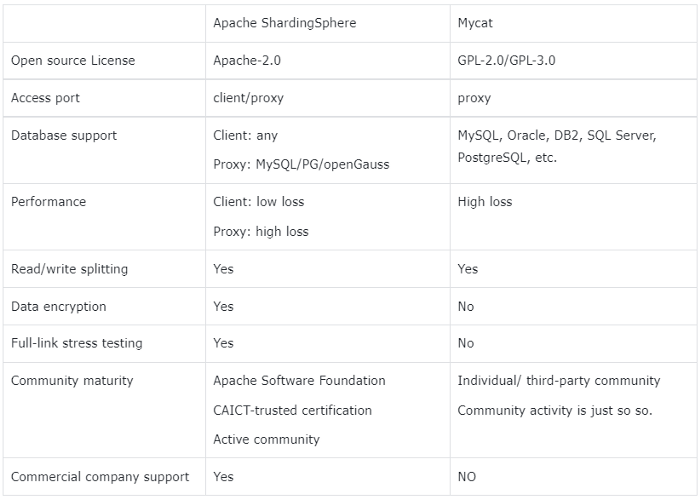
+In addition to the trade-offs of the above five key considerations, other
database middleware products were also taken into consideration. The following
table indicates the comparison between ShardingSphere and
[MyCat](http://mycat.sourceforge.net/).
+
+
+
+## Solutions
+As “ShardingSphere+MySQL” ensures stability, ease of use, and ultimate
performance, this configuration has been replicated and used in many government
and enterprise service hotline projects of Unicom Digital Tech.
+
+- **Deployment mode**
+The combination of
[ShardingSphere-JDBC](https://shardingsphere.apache.org/document/current/en/overview/#shardingsphere-jdbc)
and
[ShardingSphere-Proxy](https://shardingsphere.apache.org/document/current/en/quick-start/shardingsphere-proxy-quick-start/)
ensures both system performance and maintainability.
+
+- **Sharding key / sharding algorithm**
+The work order table of the hotline service is relatively large, and the logic
is simple to use. Therefore, the work order ID is selected as the sharding key,
and the data is distributed through the hash algorithm.
+
+- **Migration**
+The new project does not involve historical data, so there is no need to
consider the data migration process, and it can be directly used when it goes
live.
+
+- **Implementation process**
+Owing to the comprehensive evaluation of the technical scheme and multiple
copies of the scheme, the implementation process is smooth.
+
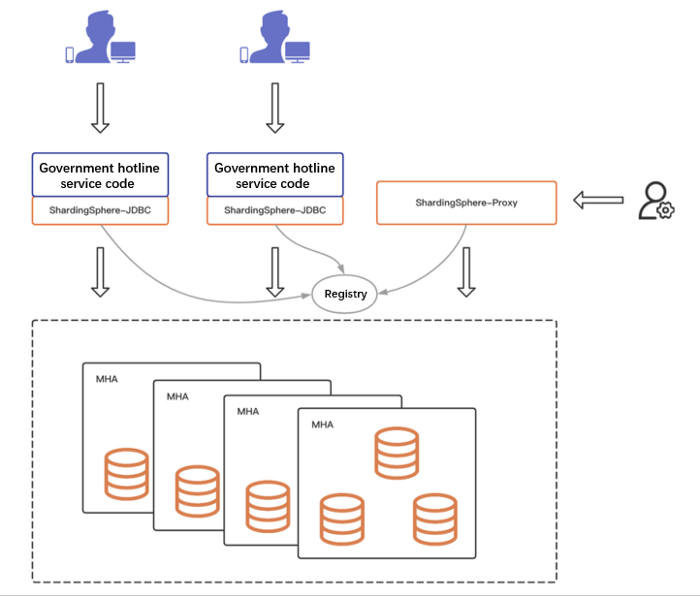
+- **System architecture**
+The hotline service module adopts the micro-service architecture
+
+The business module of the hotline service adopts the micro-service
architecture, with nodes ranging from ten to dozens, depending on the scale of
specific provinces and cities. At the database layer, physical machines are
used to deploy three-node MHA. Each hotline system requires four sets of MHA in
general.
+
+
+
+## Advantages
+
+> Business
+
+- the client mode. It ensures the government hotline’s requirements on
performance to the greatest degree.
+- System stability provides strong support for business continuity.
+
+> R&D
+
+- Excellent compatibility. It is compatible with mainstream database SQL
syntax and can be used after docking.
+- Comprehensive features. It supports read/write splitting, data encryption,
and full-link stress testing, with strong system scalability.
+
+> OPS
+
+- It supports the proxy mode and provides easy maintenance for Ops teams.
+
+> Technology selection
+
+- It prevents database binding and provides enough flexibility for future
upgrades.
+
+## Conclusion
+The hotline service cases of China Unicom Digital Tech verified
ShardingSphere’s capability to support government service scenarios and further
proved that ShardingSphere can be used in any industry.
+
+## Project Links:
+[ShardingSphere
Github](https://github.com/apache/shardingsphere/issues?page=1&q=is%3Aopen+is%3Aissue+label%3A%22project%3A+OpenForce+2022%22)
+
+[ShardingSphere
Twitter](https://github.com/apache/shardingsphere/issues?page=1&q=is%3Aopen+is%3Aissue+label%3A%22project%3A+OpenForce+2022%22)
+
+[ShardingSphere
Slack](https://join.slack.com/t/apacheshardingsphere/shared_invite/zt-sbdde7ie-SjDqo9~I4rYcR18bq0SYTg)
+
+[Contributor Guide](https://shardingsphere.apache.org/community/cn/contribute/)
\ No newline at end of file
diff --git
a/docs/blog/content/material/2022_07_26_DistSQL_Applications_Building_a_Dynamic_Distributed_Database.en.md
b/docs/blog/content/material/2022_07_26_DistSQL_Applications_Building_a_Dynamic_Distributed_Database.en.md
new file mode 100644
index 00000000000..f2f1678d27b
--- /dev/null
+++
b/docs/blog/content/material/2022_07_26_DistSQL_Applications_Building_a_Dynamic_Distributed_Database.en.md
@@ -0,0 +1,504 @@
++++
+title = "DistSQL Applications: Building a Dynamic Distributed Database"
+weight = 69
+chapter = true
++++
+
+## Background
+Ever since the release of [ShardingSphere
5.0.0](https://shardingsphere.apache.org/document/5.0.0/en/overview/),
[DistSQL](https://shardingsphere.apache.org/document/5.1.0/en/concepts/distsql/)
has been providing strong dynamic management capabilities to the
ShardingSphere ecosystem.
+
+Thanks to DistSQL, users have been empowered to do the following:
+
+- Create logical databases online.
+- Dynamically configure rules (i.e. sharding, data encryption, read/write
splitting, database discovery, shadow DB, and global rules).
+- Adjust storage resources in real-time.
+- Switch transaction types instantly.
+- Turn SQL logs on and off at any time.
+- Preview the SQL routing results.
+At the same time, in the context of increasingly diversified scenarios, more
and more DistSQL features are being created and a variety of valuable syntaxes
have been gaining popularity among users.
+
+## Overview
+This post takes data sharding as an example to illustrate DistSQL’s
application scenarios and related sharding methods.
+
+A series of DistSQL statements are concatenated through practical cases, to
give you a complete set of practical DistSQL sharding management schemes, which
create and maintain distributed databases through dynamic management. The
following DistSQL will be used in this example:
+
+
+
+## Practical Case
+**Required scenarios**
+
+- Create two sharding tables: `t_order` and `t_order_item`.
+- For both tables, database shards are carried out with the `user_id` field,
and table shards with the `order_id` field.
+- The number of shards is 2 databases * 3 tables.
+As shown in the figure below:
+
+
+
+**Setting up the environment**
+
+1.Prepare a MySQL database instance for access. Create two new databases:
`demo_ds_0` and `demo_ds_1`.
+
+> Here we take MySQL as an example, but you can also use PostgreSQL or
openGauss databases.
+
+2.Deploy [Apache ShardingSphere-Proxy
5.1.2](https://shardingsphere.apache.org/document/5.1.2/en/overview/) and
[Apache ZooKeeper](https://zookeeper.apache.org/). ZooKeeper acts as a
governance center and stores ShardingSphere metadata information.
+
+3.Configure `server.yaml` in the `Proxy conf` directory as follows:
+
+```yaml
+mode:
+ type: Cluster
+ repository:
+ type: ZooKeeper
+ props:
+ namespace: governance_ds
+ server-lists: localhost:2181 # ZooKeeper address
+ retryIntervalMilliseconds: 500
+ timeToLiveSeconds: 60
+ maxRetries: 3
+ operationTimeoutMilliseconds: 500
+ overwrite: false
+rules:
+ - !AUTHORITY
+ users:
+ - root@%:root
+```
+4.Start ShardingSphere-Proxy and connect it to Proxy using a client, for
example:
+
+```bash
+mysql -h 127.0.0.1 -P 3307 -u root -p
+```
+**Creating a distributed database**
+
+```sql
+CREATE DATABASE sharding_db;
+USE sharding_db;
+```
+**Adding storage resources**
+1.Add storage resources corresponding to the prepared
[MySQL](https://www.mysql.com/) database.
+
+```
+ADD RESOURCE ds_0 (
+ HOST=127.0.0.1,
+ PORT=3306,
+ DB=demo_ds_0,
+ USER=root,
+ PASSWORD=123456
+), ds_1(
+ HOST=127.0.0.1,
+ PORT=3306,
+ DB=demo_ds_1,
+ USER=root,
+ PASSWORD=123456
+);
+```
+2.View storage resources
+
+```
+mysql> SHOW DATABASE RESOURCES\G;
+*************************** 1. row ***************************
+ name: ds_1
+ type: MySQL
+ host: 127.0.0.1
+ port: 3306
+ db: demo_ds_1
+ -- Omit partial attributes
+*************************** 2. row ***************************
+ name: ds_0
+ type: MySQL
+ host: 127.0.0.1
+ port: 3306
+ db: demo_ds_0
+ -- Omit partial attributes
+```
+
+> Adding \G to the query statement aims to make the output format more
readable, and it is not a must.
+
+**Creating sharding rules**
+ShardingSphere’s sharding rules support regular sharding and automatic
sharding. Both sharding methods have the same effect. The difference is that
the configuration of automatic sharding is more concise, while regular sharding
is more flexible and independent.
+
+> Please refer to the following links for more details on automatic sharding:
+
+[Intro to DistSQL-An Open Source and More Powerful
SQL](https://medium.com/nerd-for-tech/intro-to-distsql-an-open-source-more-powerful-sql-bada4099211?source=your_stories_page-------------------------------------)
+
+[AutoTable: Your Butler-Like Sharding Configuration
Tool](https://medium.com/geekculture/autotable-your-butler-like-sharding-configuration-tool-9a45dbb7e285)
+
+Next, we’ll adopt regular sharding and use the `INLINE` expression algorithm
to implement the sharding scenarios described in the requirements.
+
+**Primary key generator**
+
+The primary key generator can generate a secure and unique primary key for a
data table in a distributed scenario. For details, refer to the document
[Distributed Primary
Key](https://shardingsphere.apache.org/document/current/en/features/sharding/concept/key-generator/).
+
+1.Create the primary key generator.
+
+```
+CREATE SHARDING KEY GENERATOR snowflake_key_generator (
+TYPE(NAME=SNOWFLAKE)
+);
+```
+2.Query primary key generator
+
+```
+mysql> SHOW SHARDING KEY GENERATORS;
++-------------------------+-----------+-------+
+| name | type | props |
++-------------------------+-----------+-------+
+| snowflake_key_generator | snowflake | {} |
++-------------------------+-----------+-------+
+1 row in set (0.01 sec)
+```
+**Sharding algorithm**
+
+1.Create a database sharding algorithm, used by `t_order` and `t_order_item`
in common.
+
+```
+-- Modulo 2 based on user_id in database sharding
+CREATE SHARDING ALGORITHM database_inline (
+TYPE(NAME=INLINE,PROPERTIES("algorithm-expression"="ds_${user_id % 2}"))
+);
+```
+2.Create different table shards algorithms for `t_order` and `t_order_item`.
+
+```
+-- Modulo 3 based on order_id in table sharding
+CREATE SHARDING ALGORITHM t_order_inline (
+TYPE(NAME=INLINE,PROPERTIES("algorithm-expression"="t_order_${order_id % 3}"))
+);
+CREATE SHARDING ALGORITHM t_order_item_inline (
+TYPE(NAME=INLINE,PROPERTIES("algorithm-expression"="t_order_item_${order_id %
3}"))
+);
+```
+3.Query sharding algorithm
+
+```
+mysql> SHOW SHARDING ALGORITHMS;
++---------------------+--------+---------------------------------------------------+
+| name | type | props
|
++---------------------+--------+---------------------------------------------------+
+| database_inline | inline | algorithm-expression=ds_${user_id % 2}
|
+| t_order_inline | inline | algorithm-expression=t_order_${order_id % 3}
|
+| t_order_item_inline | inline | algorithm-expression=t_order_item_${order_id
% 3} |
++---------------------+--------+---------------------------------------------------+
+3 rows in set (0.00 sec)
+```
+**Default sharding strategy**
+
+Sharding strategy consists of sharding key and sharding algorithm. Please
refer to [Sharding
Strategy](https://shardingsphere.apache.org/document/current/en/features/sharding/concept/sharding/)
for its concept.
+
+Sharding strategy consists of `databaseStrategy` and `tableStrategy`.
+
+Since `t_order` and `t_order_item` have the same database sharding field and
sharding algorithm, we create a default strategy that will be used by all shard
tables with no sharding strategy configured:
+
+1.Create a default database sharding strategy
+
+```
+CREATE DEFAULT SHARDING DATABASE STRATEGY (
+TYPE=STANDARD,SHARDING_COLUMN=user_id,SHARDING_ALGORITHM=database_inline
+);
+```
+2.Query default strategy
+
+```
+mysql> SHOW DEFAULT SHARDING STRATEGY\G;
+*************************** 1. row ***************************
+ name: TABLE
+ type: NONE
+ sharding_column:
+ sharding_algorithm_name:
+ sharding_algorithm_type:
+sharding_algorithm_props:
+*************************** 2. row ***************************
+ name: DATABASE
+ type: STANDARD
+ sharding_column: user_id
+ sharding_algorithm_name: database_inline
+ sharding_algorithm_type: inline
+sharding_algorithm_props: {algorithm-expression=ds_${user_id % 2}}
+2 rows in set (0.00 sec)
+```
+
+> The default table sharding strategy is not configured, so the default
strategy of `TABLE` is `NONE`.
+
+**Sharding rules**
+
+The primary key generator and sharding algorithm are both ready. Now create
sharding rules.
+
+1.`t_order`
+
+```
+CREATE SHARDING TABLE RULE t_order (
+DATANODES("ds_${0..1}.t_order_${0..2}"),
+TABLE_STRATEGY(TYPE=STANDARD,SHARDING_COLUMN=order_id,SHARDING_ALGORITHM=t_order_inline),
+KEY_GENERATE_STRATEGY(COLUMN=order_id,KEY_GENERATOR=snowflake_key_generator)
+);
+```
+
+> `DATANODES` specifies the data nodes of shard tables.
+> `TABLE_STRATEGY` specifies the table strategy, among which
`SHARDING_ALGORITHM` uses created sharding algorithm `t_order_inline`;
+> `KEY_GENERATE_STRATEGY` specifies the primary key generation strategy of the
table. Skip this configuration if primary key generation is not required.
+
+2.`t_order_item`
+
+```
+CREATE SHARDING TABLE RULE t_order_item (
+DATANODES("ds_${0..1}.t_order_item_${0..2}"),
+TABLE_STRATEGY(TYPE=STANDARD,SHARDING_COLUMN=order_id,SHARDING_ALGORITHM=t_order_item_inline),
+KEY_GENERATE_STRATEGY(COLUMN=order_item_id,KEY_GENERATOR=snowflake_key_generator)
+);
+```
+3.Query sharding rules
+
+```
+mysql> SHOW SHARDING TABLE RULES\G;
+*************************** 1. row ***************************
+ table: t_order
+ actual_data_nodes: ds_${0..1}.t_order_${0..2}
+ actual_data_sources:
+ database_strategy_type: STANDARD
+ database_sharding_column: user_id
+ database_sharding_algorithm_type: inline
+database_sharding_algorithm_props: algorithm-expression=ds_${user_id % 2}
+ table_strategy_type: STANDARD
+ table_sharding_column: order_id
+ table_sharding_algorithm_type: inline
+ table_sharding_algorithm_props: algorithm-expression=t_order_${order_id % 3}
+ key_generate_column: order_id
+ key_generator_type: snowflake
+ key_generator_props:
+*************************** 2. row ***************************
+ table: t_order_item
+ actual_data_nodes: ds_${0..1}.t_order_item_${0..2}
+ actual_data_sources:
+ database_strategy_type: STANDARD
+ database_sharding_column: user_id
+ database_sharding_algorithm_type: inline
+database_sharding_algorithm_props: algorithm-expression=ds_${user_id % 2}
+ table_strategy_type: STANDARD
+ table_sharding_column: order_id
+ table_sharding_algorithm_type: inline
+ table_sharding_algorithm_props:
algorithm-expression=t_order_item_${order_id % 3}
+ key_generate_column: order_item_id
+ key_generator_type: snowflake
+ key_generator_props:
+2 rows in set (0.00 sec)
+```
+💡So far, the sharding rules for `t_order` and `t_order_item` have been
configured.
+
+A bit complicated? Well, you can also skip the steps of creating the primary
key generator, sharding algorithm, and default strategy, and complete the
sharding rules in one step. Let's see how to make it easier.
+
+**Syntax**
+Now, if we have to add a shard table `t_order_detail`, we can create sharding
rules as follows:
+
+```
+CREATE SHARDING TABLE RULE t_order_detail (
+DATANODES("ds_${0..1}.t_order_detail_${0..1}"),
+DATABASE_STRATEGY(TYPE=STANDARD,SHARDING_COLUMN=user_id,SHARDING_ALGORITHM(TYPE(NAME=INLINE,PROPERTIES("algorithm-expression"="ds_${user_id
% 2}")))),
+TABLE_STRATEGY(TYPE=STANDARD,SHARDING_COLUMN=order_id,SHARDING_ALGORITHM(TYPE(NAME=INLINE,PROPERTIES("algorithm-expression"="t_order_detail_${order_id
% 3}")))),
+KEY_GENERATE_STRATEGY(COLUMN=detail_id,TYPE(NAME=snowflake))
+);
+```
+**Note: **The above statement specified database sharding strategy, table
strategy, and primary key generation strategy, but it didn’t use existing
algorithms.
+
+Therefore, the DistSQL engine automatically uses the input expression to
create an algorithm for the sharding rules of `t_order_detail`. Now the primary
key generator, sharding algorithm, and sharding rules are as follows:
+
+1.Primary key generator
+
+```
+mysql> SHOW SHARDING KEY GENERATORS;
++--------------------------+-----------+-------+
+| name | type | props |
++--------------------------+-----------+-------+
+| snowflake_key_generator | snowflake | {} |
+| t_order_detail_snowflake | snowflake | {} |
++--------------------------+-----------+-------+
+2 rows in set (0.00 sec)
+```
+2.Sharding algorithm
+
+```
+mysql> SHOW SHARDING ALGORITHMS;
++--------------------------------+--------+-----------------------------------------------------+
+| name | type | props
|
++--------------------------------+--------+-----------------------------------------------------+
+| database_inline | inline | algorithm-expression=ds_${user_id
% 2} |
+| t_order_inline | inline |
algorithm-expression=t_order_${order_id % 3} |
+| t_order_item_inline | inline |
algorithm-expression=t_order_item_${order_id % 3} |
+| t_order_detail_database_inline | inline | algorithm-expression=ds_${user_id
% 2} |
+| t_order_detail_table_inline | inline |
algorithm-expression=t_order_detail_${order_id % 3} |
++--------------------------------+--------+-----------------------------------------------------+
+5 rows in set (0.00 sec)
+```
+3.Sharding rules
+
+```
+mysql> SHOW SHARDING TABLE RULES\G;
+*************************** 1. row ***************************
+ table: t_order
+ actual_data_nodes: ds_${0..1}.t_order_${0..2}
+ actual_data_sources:
+ database_strategy_type: STANDARD
+ database_sharding_column: user_id
+ database_sharding_algorithm_type: inline
+database_sharding_algorithm_props: algorithm-expression=ds_${user_id % 2}
+ table_strategy_type: STANDARD
+ table_sharding_column: order_id
+ table_sharding_algorithm_type: inline
+ table_sharding_algorithm_props: algorithm-expression=t_order_${order_id % 3}
+ key_generate_column: order_id
+ key_generator_type: snowflake
+ key_generator_props:
+*************************** 2. row ***************************
+ table: t_order_item
+ actual_data_nodes: ds_${0..1}.t_order_item_${0..2}
+ actual_data_sources:
+ database_strategy_type: STANDARD
+ database_sharding_column: user_id
+ database_sharding_algorithm_type: inline
+database_sharding_algorithm_props: algorithm-expression=ds_${user_id % 2}
+ table_strategy_type: STANDARD
+ table_sharding_column: order_id
+ table_sharding_algorithm_type: inline
+ table_sharding_algorithm_props:
algorithm-expression=t_order_item_${order_id % 3}
+ key_generate_column: order_item_id
+ key_generator_type: snowflake
+ key_generator_props:
+*************************** 3. row ***************************
+ table: t_order_detail
+ actual_data_nodes: ds_${0..1}.t_order_detail_${0..1}
+ actual_data_sources:
+ database_strategy_type: STANDARD
+ database_sharding_column: user_id
+ database_sharding_algorithm_type: inline
+database_sharding_algorithm_props: algorithm-expression=ds_${user_id % 2}
+ table_strategy_type: STANDARD
+ table_sharding_column: order_id
+ table_sharding_algorithm_type: inline
+ table_sharding_algorithm_props:
algorithm-expression=t_order_detail_${order_id % 3}
+ key_generate_column: detail_id
+ key_generator_type: snowflake
+ key_generator_props:
+3 rows in set (0.01 sec)
+```
+**Note:** In the `CREATE SHARDING TABLE RULE` statement, `DATABASE_STRATEGY`,
`TABLE_STRATEGY`, and `KEY_GENERATE_STRATEGY` can all reuse existing algorithms.
+
+Alternatively, they can be defined quickly through syntax. The difference is
that additional algorithm objects are created. Users can use it flexibly based
on scenarios.
+
+After the configuration verification rules are created, you can verify them in
the following ways:
+
+**Checking node distribution**
+
+DistSQL provides `SHOW SHARDING TABLE NODES` for checking node distribution
and users can quickly learn the distribution of shard tables.
+
+
+
+We can see the node distribution of the shard table is consistent with what is
described in the requirement.
+
+**SQL Preview**
+
+Previewing SQL is also an easy way to verify configurations. Its syntax is
`PREVIEW SQL`:
+
+1.Query with no shard key with all routes
+
+
+
+2.Specify `user_id` to query with a single database route
+
+
+
+3.Specify `user_id` and `order_id` with a single table route
+
+
+
+> Single-table routes scan the least shard tables and offer the highest
efficiency.
+
+### DistSQL auxiliary query
+During the system maintenance, algorithms or storage resources that are no
longer in use may need to be released, or resources that need to be released
may have been referenced and cannot be deleted. The following DistSQL can solve
these problems.
+
+**Query unused resources**
+
+1.Syntax: `SHOW UNUSED RESOURCES`
+
+2.Sample:
+
+
+
+**Query unused primary key generator**
+
+1.Syntax: `SHOW UNUSED SHARDING KEY GENERATORS`
+
+2.Sample:
+
+
+
+**Query unused sharding algorithm**
+
+1.Syntax: `SHOW UNUSED SHARDING ALGORITHMS`
+
+2.Sample:
+
+
+
+**Query rules that use the target storage resources**
+
+1.Syntax: `SHOW RULES USED RESOURCE`
+
+2.Sample:
+
+
+
+> All rules that use the resource can be queried, not limited to the `Sharding
Rule`.
+
+**Query sharding rules that use the target primary key generator**
+
+1.Syntax: `SHOW SHARDING TABLE RULES USED KEY GENERATOR`
+
+2.Sample:
+
+
+
+**Query sharding rules that use the target algorithm**
+
+1.Syntax: `SHOW SHARDING TABLE RULES USED ALGORITHM`
+
+2.Sample:
+
+
+
+## Conclusion
+This post takes the data sharding scenario as an example to introduce
[DistSQL](https://shardingsphere.apache.org/document/5.1.0/en/concepts/distsql/)’s
applications and methods.
+
+DistSQL provides flexible syntax to help simplify operations. In addition to
the `INLINE` algorithm, DistSQL supports standard sharding, compound sharding,
Hint sharding, and custom sharding algorithms. More examples will be covered in
the coming future.
+
+If you have any questions or suggestions about [Apache
ShardingSphere](https://shardingsphere.apache.org/), please feel free to post
them on the GitHub Issue list.
+
+## Project Links:
+[ShardingSphere
Github](https://github.com/apache/shardingsphere/issues?page=1&q=is%3Aopen+is%3Aissue+label%3A%22project%3A+OpenForce+2022%22)
+
+[ShardingSphere Twitter](https://twitter.com/ShardingSphere)
+
+[ShardingSphere Slack
+](https://join.slack.com/t/apacheshardingsphere/shared_invite/zt-sbdde7ie-SjDqo9~I4rYcR18bq0SYTg)
+[Contributor Guide](https://shardingsphere.apache.org/community/cn/contribute/)
+
+[GitHub Issues](https://github.com/apache/shardingsphere/issues)
+
+[Contributor Guide](https://shardingsphere.apache.org/community/en/contribute/)
+
+## References
+1.
[Concept-DistSQL](https://shardingsphere.apache.org/document/current/en/concepts/distsql/)
+
+2. [Concept-Distributed Primary
Key](https://shardingsphere.apache.org/document/current/en/features/sharding/concept/key-generator/)
+
+3. [Concept-Sharding
Strategy](https://shardingsphere.apache.org/document/current/en/features/sharding/concept/sharding/)
+
+4. [Concept INLINE Expression
+](https://shardingsphere.apache.org/document/current/en/features/sharding/concept/inline-expression/)
+5. [Built-in Sharding Algorithm
+](https://shardingsphere.apache.org/document/current/en/user-manual/shardingsphere-jdbc/builtin-algorithm/sharding/)
+6. [User Manual: DistSQL
+](https://shardingsphere.apache.org/document/current/en/user-manual/shardingsphere-proxy/distsql/syntax/)
+
+## Author
+**Jiang Longtao**
+[SphereEx](https://www.sphere-ex.com/en/) Middleware R&D Engineer & Apache
ShardingSphere Committer.
+
+Longtao focuses on the R&D of DistSQL and related features.
diff --git
"a/docs/blog/content/material/2022_07_28_Database_Plus\342\200\231s_Embracing_the_Cloud_ShardingSphere-on-Cloud_Solution_Released.en.md"
"b/docs/blog/content/material/2022_07_28_Database_Plus\342\200\231s_Embracing_the_Cloud_ShardingSphere-on-Cloud_Solution_Released.en.md"
new file mode 100644
index 00000000000..d4f9e519a48
--- /dev/null
+++
"b/docs/blog/content/material/2022_07_28_Database_Plus\342\200\231s_Embracing_the_Cloud_ShardingSphere-on-Cloud_Solution_Released.en.md"
@@ -0,0 +1,98 @@
++++
+title = "Database Plus’s Embracing the Cloud: ShardingSphere-on-Cloud Solution
Released"
+weight = 70
+chapter = true
++++
+
+As a follower of the [Database
Plus](https://faun.pub/whats-the-database-plus-concepand-what-challenges-can-it-solve-715920ba65aa?source=your_stories_page-------------------------------------)
+development concept, [ShardingSphere](https://shardingsphere.apache.org/) has
successfully passed production environment tests across multiple industries and
gained popularity among community enthusiasts.
+
+As [Kubernetes](https://kubernetes.io/) has become the de facto standard for
container orchestration, the cloud-native concept has gone viral in the tech
world. Apache ShardingSphere, as a database enhancement engine with an open
ecosystem, has many similarities with Kubernetes in its design concept. So
[SphereEx](https://www.sphere-ex.com/en/) took the lead in launching
ShardingSphere-on-Cloud, its cloud solution for ShardingSphere. Database Plus’
trip to the Cloud has officially begun.
+
+The ShardingSphere-on-Cloud repository will release its best practices
including configuration templates, automation scripts, deployment tools, and
Kubernetes Operator for Apache ShardingSphere on the cloud. Currently,
ShardingSphere-on-Cloud has released V0.1.0, which contains the smallest
available version of ShardingSphere Operator.
+
+## ShardingSphere Operator
+One of the key reasons Kubernetes has become the de facto standard for
cloud-native orchestration tools is its great extensibility, enabling
developers to quickly build platforms on top of other platforms.
+
+For all kinds of software trying to run on Kubernetes, the Kubernetes Operator
mode can be used to work with the `CustomResourceDefinition` framework to
quickly build automatic maintenance capabilities.
+
+Last month, Apache ShardingSphere v5.1.2 released [Helm Charts-based package
management](https://faun.pub/shardingsphere-cloud-applications-an-out-of-the-box-shardingsphere-proxy-cluster-9fd7209b5512?source=your_stories_page-------------------------------------)
capability. Helm Charts helps us deal with the first step, that is, how to
describe and deploy ShardingSphere in Kubernetes.
+
+The second step focuses on how to manage a stateful or complex workload in
Kubernetes, for which a customized management tool is needed. In this case,
SphereEx’s cloud team developed the **ShardingSphere Operator** to further
enhance ShardingSphere’s deployment and maintenance capabilities on top of
Kubernetes.
+
+
+
+ShardingSphere made the following improvements in response to challenges faced
when Apache ShardingSphere migrates to the Kubernetes environment.
+
+- **Simplified startup configuration:** ShardingSphere has strong database
enhancement capabilities, and its corresponding configuration is relatively
complex. In the current version, ShardingSphere Operator automates the
configuration and mount behavior of the configuration. Users only need to fill
in the minimum startup dependency configuration to quickly deploy and start a
ShardingSphere-Proxy cluster. The runtime configuration can be implemented
through [DistSQL](https://shardingsphe [...]
+
+- **Automatic deployment of governance nodes:**
+ ShardingSphere relies on the governance center to achieve metadata
persistence and achieve metadata broadcasting among cluster nodes during
operation. To optimize the user experience and deliver an out-of-the-box
experience, ShardingSphere Operator can deploy the governance node with the
compute node and configure dependencies based on users’ needs.
+
+- **High availability:** to simplify maintenance in a cloud environment, it is
desirable to implement stateless deployment. As a stateless compute node,
[ShardingSphere-Proxy](https://shardingsphere.apache.org/document/current/en/quick-start/shardingsphere-proxy-quick-start/)
can work with ShardingSphere Operator to achieve multi-dimensional health
detection and failover recovery.
+
+- **Horizontal scaling:** ShardingSphere-Proxy horizontal scaling can be
achieved based on CPU and memory using [HPA in
Kubernetes](https://kubernetes.io/docs/tasks/run-application/horizontal-pod-autoscale/).
ShardingSphere Operator will gradually support a variety of customized
specifications to achieve advanced, automatic scaling that is more intelligent
and stable for ShardingSphere-Proxy.
+Specifically, in version 0.1.0, ShardingSphere Operator mainly supports the
following capabilities:
+
+## Helm Deployment
+
+> **ShardingSphere-Operator Chart**
+
+- Support the deployment of ShardingSphere-Operator.
+
+> **ShardingSphere-Cluster Chart**
+
+- Support the deployment of the ShardingSphere-Proxy cluster.
+- Support the deployment of the [ZooKeeper](https://zookeeper.apache.org/)
cluster through [Bitnami](https://bitnami.com/).
+- ShardingSphere-Proxy can be automatically configured and connected to
governance nodes.
+
+> **Use Github Pages to host Charts and add repositories using `helm repo
add`**
+
+### New Features
+
+- `shardingsphereproxy` CRD can be used to describe ShardingSphere-Proxy
cluster information.
+- Native ShardingSphere-Proxy `server.yaml` configuration can be used for
startup.
+- Support automatic scale-out for HPA configurations based on CPU
specifications.
+- Support automatic downloading of [MySQL](https://www.mysql.com/) drivers.
+See the project
[ReadMe](https://github.com/SphereEx/shardingsphere-on-cloud/blob/main/README.md)
for other configuration information.
+
+## Quick Start
+You can run the following commands:
+
+```
+kubectl create ns sharding
+helm repo add shardingspherecloud
https://sphereex.github.io/shardingsphere-on-cloud/
+helm install operator shardingspherecloud/shardingsphere-operator -n sharding
+helm install cluster shardingspherecloud/shardingsphere-cluster -n sharding
+```
+The above command will install ShardingSphere Operator, ShardingSphere-Proxy
cluster, and ZooKeeper cluster in the sharding Namespace according to the
default configuration.
+
+ShardingSphere-Proxy can be accessed in a cluster through Service. Then
through the MySQL client, create the logical database using DistSQL, add the
data source and create the corresponding rule table. Then you can start to use
ShardingSphere-Proxy running on Kubernetes.
+
+## Future Plan
+ShardingSphere Operator will gradually optimize the deployment mode of
ShardingSphere-Proxy, improve its automatic maintenance capabilities, and
constantly polish its performance in terms of high availability and disaster
recovery scenarios, striving to give users an ultimate cloud-native experience.
+
+The ShardingSphere-on-Cloud repository will continue to take in various cloud
practices from the community, to build an open ecosystem solution that is
oriented to the cloud, benefits from the cloud, and can enhance database
capabilities on the cloud.
+
+If you have anything to share with us, please feel free to contact us through
GitHub Issue or Apache ShardingSphere Slack.
+
+## Project Links:
+[ShardingSphere Operator
GitHub](https://github.com/SphereEx/shardingsphere-on-cloud)
+
+[ShardingSphere
Github](https://github.com/apache/shardingsphere/issues?page=1&q=is%3Aopen+is%3Aissue+label%3A%22project%3A+OpenForce+2022%22)
+
+[ShardingSphere Twitter
+](https://twitter.com/ShardingSphere)
+[ShardingSphere
Slack](https://join.slack.com/t/apacheshardingsphere/shared_invite/zt-sbdde7ie-SjDqo9~I4rYcR18bq0SYTg)
+
+[Contributor Guide](https://shardingsphere.apache.org/community/cn/contribute/)
+
+[GitHub Issues](https://github.com/apache/shardingsphere/issues)
+
+[Contributor Guide](https://shardingsphere.apache.org/community/en/contribute/)
+
+[SphereEx Official Website
+](https://sphere-ex.com/)
+
+## Author
+SphereEx Cloud & ShardingSphere contributor team. Focus on the R&D of Cloud
solutions of ShardingSphere, the Database Mesh open source community, and the
SphereEx Cloud business.
\ No newline at end of file






