This is an automated email from the ASF dual-hosted git repository.

zhangliang pushed a commit to branch master
in repository https://gitbox.apache.org/repos/asf/shardingsphere.git
The following commit(s) were added to refs/heads/master by this push:
new d0626f9 document enhancement (#6930)
d0626f9 is described below
commit d0626f975f2467157f4b9f09f0d72a624894539b
Author: 孙念君 Sun Nianjun <[email protected]>
AuthorDate: Wed Aug 19 17:17:46 2020 +0800
document enhancement (#6930)
* Format: format the document
---
.../user-manual/shardingsphere-scaling/_index.cn.md | 4 ++--
.../user-manual/shardingsphere-scaling/build.cn.md | 18 +++++++++---------
.../user-manual/shardingsphere-scaling/usage.cn.md | 16 ++++++++--------
.../user-manual/shardingsphere-scaling/usage.en.md | 2 +-
.../user-manual/shardingsphere-sidecar/_index.cn.md | 10 +++++-----
.../content/user-manual/shardingsphere-ui/_index.cn.md | 4 ++--
.../user-manual/shardingsphere-ui/usage/_index.cn.md | 2 +-
.../user-manual/shardingsphere-ui/usage/build.cn.md | 18 +++++++++---------
.../shardingsphere-ui/usage/config-center.cn.md | 8 ++++----
.../shardingsphere-ui/usage/registry-center.cn.md | 2 +-
shardingsphere-scaling/README_ZH.md | 6 +++---
11 files changed, 45 insertions(+), 45 deletions(-)
diff --git
a/docs/document/content/user-manual/shardingsphere-scaling/_index.cn.md
b/docs/document/content/user-manual/shardingsphere-scaling/_index.cn.md
index a7c0843..94ac1c9 100644
--- a/docs/document/content/user-manual/shardingsphere-scaling/_index.cn.md
+++ b/docs/document/content/user-manual/shardingsphere-scaling/_index.cn.md
@@ -7,6 +7,6 @@ chapter = true
## 简介
-ShardingSphere-Scaling是一个提供给用户的通用的ShardingSphere数据接入迁移,及弹性伸缩的解决方案。
+ShardingSphere-Scaling 是一个提供给用户的通用的 ShardingSphere 数据接入迁移,及弹性伸缩的解决方案。
-于**4.1.0**开始向用户提供,目前仍处于 **Alpha** 版本。
+于 **4.1.0** 开始向用户提供,目前仍处于 **Alpha** 版本。
diff --git
a/docs/document/content/user-manual/shardingsphere-scaling/build.cn.md
b/docs/document/content/user-manual/shardingsphere-scaling/build.cn.md
index c1c1d9e..73f62b8 100644
--- a/docs/document/content/user-manual/shardingsphere-scaling/build.cn.md
+++ b/docs/document/content/user-manual/shardingsphere-scaling/build.cn.md
@@ -6,7 +6,7 @@ weight = 1
## 部署启动
-1. 执行以下命令,编译生成ShardingSphere-Scaling二进制包:
+1. 执行以下命令,编译生成 ShardingSphere-Scaling 二进制包:
```
@@ -17,7 +17,7 @@ mvn clean install -Prelease;
发布包所在目录为:`/shardingsphere-distribution/shardingsphere-scaling-distribution/target/apache-shardingsphere-${latest.release.version}-shardingsphere-scaling-bin.tar.gz`。
-2. 解压缩发布包,修改配置文件`conf/server.yaml`,这里主要修改启动端口,保证不与本机其他端口冲突,其他值保持默认即可:
+2. 解压缩发布包,修改配置文件 `conf/server.yaml`,这里主要修改启动端口,保证不与本机其他端口冲突,其他值保持默认即可:
```
port: 8888
@@ -26,27 +26,27 @@ pushTimeout: 1000
workerThread: 30
```
-3. 编译生成ShardingSphere-Scaling:
+3. 编译生成 ShardingSphere-Scaling:
```
sh bin/start.sh
```
-4. 查看日志`logs/stdout.log`,确保启动成功。
+4. 查看日志 `logs/stdout.log`,确保启动成功。
-5. 使用curl命令再次确认正常运行。
+5. 使用 curl 命令再次确认正常运行。
```
curl -X GET http://localhost:8888/shardingscaling/job/list
```
-应答应为:
+响应应为:
```
{"success":true,"errorCode":0,"errorMsg":null,"model":[]}
```
-## 结束ShardingSphere-Scaling
+## 结束 ShardingSphere-Scaling
```
sh bin/stop.sh
@@ -54,7 +54,7 @@ curl -X GET http://localhost:8888/shardingscaling/job/list
## 应用配置项
-应用现有配置项如下,相应的配置可在`conf/server.yaml`中修改:
+应用现有配置项如下,相应的配置可在 `conf/server.yaml` 中修改:
| 名称 | 说明 | 默认值 |
| -------------- | -------------------------------------- | ------ |
@@ -62,4 +62,4 @@ curl -X GET http://localhost:8888/shardingscaling/job/list
| blockQueueSize | 数据传输通道队列大小 | 10000 |
| pushTimeout | 数据推送超时时间,单位:毫秒 | 1000 |
| workerThread | 工作线程池大小,允许同时运行的迁移任务线程数 | 30 |
-
\ No newline at end of file
+
diff --git
a/docs/document/content/user-manual/shardingsphere-scaling/usage.cn.md
b/docs/document/content/user-manual/shardingsphere-scaling/usage.cn.md
index aae4c31..717cdde 100644
--- a/docs/document/content/user-manual/shardingsphere-scaling/usage.cn.md
+++ b/docs/document/content/user-manual/shardingsphere-scaling/usage.cn.md
@@ -8,7 +8,7 @@ weight = 2
### 环境要求
-纯JAVA开发,JDK建议1.8以上版本。
+纯 JAVA 开发,JDK建议 1.8 以上版本。
支持迁移场景如下:
@@ -19,12 +19,12 @@ weight = 2
**注意**:
-如果后端连接MySQL数据库,需要下载[MySQL
Connector/J](https://cdn.mysql.com//Downloads/Connector-J/mysql-connector-java-5.1.47.tar.gz),
-解压缩后,将mysql-connector-java-5.1.47.jar拷贝到${shardingsphere-scaling}\lib目录。
+如果后端连接 MySQL 数据库,需要下载[MySQL
Connector/J](https://cdn.mysql.com//Downloads/Connector-J/mysql-connector-java-5.1.47.tar.gz),
+解压缩后,将 mysql-connector-java-5.1.47.jar 拷贝到 `${shardingsphere-scaling}\lib` 目录。
### 权限要求
-MySQL 需要开启`binlog`,`binlog format`为Row模式,且迁移时所使用用户需要赋予Replication相关权限。
+MySQL 需要开启 `binlog`,`binlog format` 为Row模式,且迁移时所使用用户需要赋予 Replication 相关权限。
```
+-----------------------------------------+---------------------------------------+
@@ -42,11 +42,11 @@ MySQL 需要开启`binlog`,`binlog format`为Row模式,且迁移时所使用
+------------------------------------------------------------------------------+
```
-PostgreSQL
需要开启[test_decoding](https://www.postgresql.org/docs/9.4/test-decoding.html)
+PostgreSQL 需要开启
[test_decoding](https://www.postgresql.org/docs/9.4/test-decoding.html)
### API接口
-弹性迁移组件提供了简单的HTTP API接口
+弹性迁移组件提供了简单的 HTTP API 接口
#### 创建迁移任务
@@ -218,6 +218,6 @@ curl -X POST \
## 通过UI界面来操作
-ShardingSphere-Scaling与ShardingSphere-UI集成了用户界面,所以上述所有任务相关的操作都可以通过UI界面点点鼠标来实现,当然本质上还是调用了上述基本接口。
+ShardingSphere-Scaling 与 ShardingSphere-UI 集成了用户界面,所以上述所有任务相关的操作都可以通过 UI
界面点点鼠标来实现,当然本质上还是调用了上述基本接口。
-更多信息请参考ShardingSphere-UI项目。
+更多信息请参考 ShardingSphere-UI 项目。
diff --git
a/docs/document/content/user-manual/shardingsphere-scaling/usage.en.md
b/docs/document/content/user-manual/shardingsphere-scaling/usage.en.md
index 0d17612..246a283 100644
--- a/docs/document/content/user-manual/shardingsphere-scaling/usage.en.md
+++ b/docs/document/content/user-manual/shardingsphere-scaling/usage.en.md
@@ -20,7 +20,7 @@ The migration scene we support:
**Attention**:
If the backend database is MySQL, download [MySQL
Connector/J](https://cdn.mysql.com//Downloads/Connector-J/mysql-connector-java-5.1.47.tar.gz)
-and decompress, then copy mysql-connector-java-5.1.47.jar to
${shardingsphere-scaling}\lib directory.
+and decompress, then copy mysql-connector-java-5.1.47.jar to
`${shardingsphere-scaling}\lib directory`.
### Privileges
diff --git
a/docs/document/content/user-manual/shardingsphere-sidecar/_index.cn.md
b/docs/document/content/user-manual/shardingsphere-sidecar/_index.cn.md
index 25dc494..099c025 100644
--- a/docs/document/content/user-manual/shardingsphere-sidecar/_index.cn.md
+++ b/docs/document/content/user-manual/shardingsphere-sidecar/_index.cn.md
@@ -7,11 +7,11 @@ chapter = true
## 简介
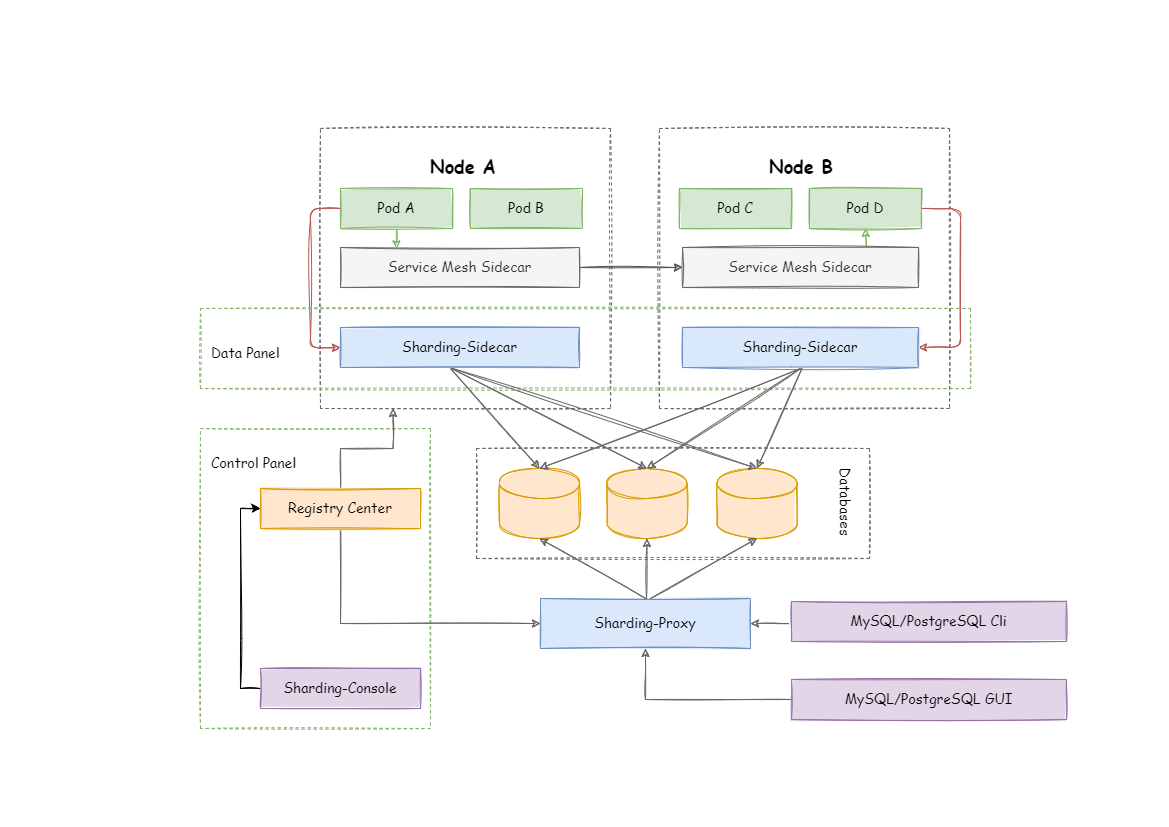
-ShardingSphere-Sidecar是ShardingSphere的第三个产品,目前仍然在`规划中`。
-定位为Kubernetes或Mesos的云原生数据库代理,以DaemonSet的形式代理所有对数据库的访问。
+ShardingSphere-Sidecar 是 ShardingSphere 的第三个产品,目前仍然在`规划中`。
+定位为 Kubernetes 或 Mesos 的云原生数据库代理,以 DaemonSet 的形式代理所有对数据库的访问。
-通过无中心、零侵入的方案提供与数据库交互的的啮合层,即Database Mesh,又可称数据网格。
-Database
Mesh的关注重点在于如何将分布式的数据访问应用与数据库有机串联起来,它更加关注的是交互,是将杂乱无章的应用与数据库之间的交互进行有效地梳理。使用
Database Mesh,访问数据库的应用和数据库终将形成一个巨大的网格体系,应用和数据库只需在网格体系中对号入座即可,它们都是被啮合层所治理的对象。
+通过无中心、零侵入的方案提供与数据库交互的的啮合层,即 Database Mesh,又可称数据网格。
+Database Mesh
的关注重点在于如何将分布式的数据访问应用与数据库有机串联起来,它更加关注的是交互,是将杂乱无章的应用与数据库之间的交互进行有效地梳理。使用 Database
Mesh,访问数据库的应用和数据库终将形成一个巨大的网格体系,应用和数据库只需在网格体系中对号入座即可,它们都是被啮合层所治理的对象。
@@ -26,4 +26,4 @@ Database Mesh的关注重点在于如何将分布式的数据访问应用与数
| 无中心化 | 是 | 否 | `是`
|
| 静态入口 | 无 | 有 | `无`
|
-ShardingSphere-Sidecar的优势在于对Kubernetes和Mesos的云原生支持。
+ShardingSphere-Sidecar 的优势在于对 Kubernetes 和 Mesos 的云原生支持。
diff --git a/docs/document/content/user-manual/shardingsphere-ui/_index.cn.md
b/docs/document/content/user-manual/shardingsphere-ui/_index.cn.md
index 5c7a129..98828ff 100644
--- a/docs/document/content/user-manual/shardingsphere-ui/_index.cn.md
+++ b/docs/document/content/user-manual/shardingsphere-ui/_index.cn.md
@@ -7,6 +7,6 @@ chapter = true
## 简介
-ShardingSphere-UI是ShardingSphere的一个简单而有用的web管理控制台。它用于帮助用户更简单的使用ShardingSphere的相关功能,目前提供注册中心管理、动态配置管理、数据库编排等功能。
+ShardingSphere-UI 是 ShardingSphere 的一个简单而有用的web管理控制台。它用于帮助用户更简单的使用
ShardingSphere 的相关功能,目前提供注册中心管理、动态配置管理、数据库编排等功能。
-项目结构上采取了前后端分离的方式,前端使用Vue框架,后端采用Spring
Boot框架。使用标准的Maven方式进行打包,部署,同时也可以采用前后端分离的方式本地运行,方便开发调试。
+项目结构上采取了前后端分离的方式,前端使用 Vue 框架,后端采用 Spring Boot 框架。使用标准的 Maven
方式进行打包,部署,同时也可以采用前后端分离的方式本地运行,方便开发调试。
diff --git
a/docs/document/content/user-manual/shardingsphere-ui/usage/_index.cn.md
b/docs/document/content/user-manual/shardingsphere-ui/usage/_index.cn.md
index 7d350e1..d2d0686 100644
--- a/docs/document/content/user-manual/shardingsphere-ui/usage/_index.cn.md
+++ b/docs/document/content/user-manual/shardingsphere-ui/usage/_index.cn.md
@@ -7,4 +7,4 @@ chapter = true
## 导览
-本章节将介绍ShardingSphere-UI相关使用。
+本章节将介绍 ShardingSphere-UI 相关使用。
diff --git
a/docs/document/content/user-manual/shardingsphere-ui/usage/build.cn.md
b/docs/document/content/user-manual/shardingsphere-ui/usage/build.cn.md
index 36675ff..6f1359b 100644
--- a/docs/document/content/user-manual/shardingsphere-ui/usage/build.cn.md
+++ b/docs/document/content/user-manual/shardingsphere-ui/usage/build.cn.md
@@ -13,23 +13,23 @@ weight = 1
## 源码调试模式
-ShardingSphere-UI采用前后端分离的方式。
+ShardingSphere-UI 采用前后端分离的方式。
### 后端
-1. 后端程序执行入口为`org.apache.shardingsphere.ui.Bootstrap`;
-1. 访问`http://localhost:8088/`。
+1. 后端程序执行入口为 `org.apache.shardingsphere.ui.Bootstrap`;
+1. 访问 `http://localhost:8088/`。
### 前端
-1. 进入`shardingsphere-ui-frontend/`目录;
-1. 执行`npm install`;
-1. 执行`npm run dev`;
-1. 访问`http://localhost:8080/`。
+1. 进入 `shardingsphere-ui-frontend/` 目录;
+1. 执行 `npm install`;
+1. 执行 `npm run dev`;
+1. 访问 `http://localhost:8080/`。
## 配置
-ShardingSphere-UI的配置文件为`conf/application.properties`, 它由两部分组成。
+ShardingSphere-UI 的配置文件为 `conf/application.properties`, 它由两部分组成。
1. 程序监听端口;
1. 登录身份验证信息。
@@ -43,7 +43,7 @@ user.admin.password=admin
## 注意事项
-1. 若使用maven构建后,再进行本地运行前端项目时,可能因为node版本不一致导致运行失败,可以清空`node_modules/`目录后重新运行。
+1. 若使用 maven 构建后,再进行本地运行前端项目时,可能因为 node 版本不一致导致运行失败,可以清空 `node_modules/`
目录后重新运行。
错误日志如下:
```
diff --git
a/docs/document/content/user-manual/shardingsphere-ui/usage/config-center.cn.md
b/docs/document/content/user-manual/shardingsphere-ui/usage/config-center.cn.md
index 08e3a3d..87390a6 100644
---
a/docs/document/content/user-manual/shardingsphere-ui/usage/config-center.cn.md
+++
b/docs/document/content/user-manual/shardingsphere-ui/usage/config-center.cn.md
@@ -6,12 +6,12 @@ weight = 2
## 配置中心配置
首先需要添加并激活配置中心。可以添加多个配置中心,但只能有一个处于激活状态,后面的规则配置功能是针对当前已激活的配置中心进行操作。
-目前提供Zookeeper的支持,后续会添加第三方配置中心的支持。
+目前提供 Zookeeper 的支持,后续会添加第三方配置中心的支持。
## 规则配置
-+ 添加激活配置中心后,可以获取当前配置中心中所有数据源的相关配置,包括数据分片,读写分离、Properties配置等。
++ 添加激活配置中心后,可以获取当前配置中心中所有数据源的相关配置,包括数据分片,读写分离、Properties 配置等。
-+ 可以通过YAML格式对相关配置信息进行修改。
++ 可以通过 YAML 格式对相关配置信息进行修改。
-+ 点击 + 按钮可以添加新的数据源和分片规则。
\ No newline at end of file
++ 点击 + 按钮可以添加新的数据源和分片规则。
diff --git
a/docs/document/content/user-manual/shardingsphere-ui/usage/registry-center.cn.md
b/docs/document/content/user-manual/shardingsphere-ui/usage/registry-center.cn.md
index bade213..665a3b1 100644
---
a/docs/document/content/user-manual/shardingsphere-ui/usage/registry-center.cn.md
+++
b/docs/document/content/user-manual/shardingsphere-ui/usage/registry-center.cn.md
@@ -6,7 +6,7 @@ weight = 3
## 注册中心配置
首先需要添加并激活注册中心。可以添加多个注册中心,但只能有一个处于激活状态,后面的运行状态功能都是针对当前已激活的注册中心进行操作。
-目前提供Zookeeper的支持,后续会添加第三方注册中心的支持。
+目前提供 Zookeeper 的支持,后续会添加第三方注册中心的支持。
## 运行状态
diff --git a/shardingsphere-scaling/README_ZH.md
b/shardingsphere-scaling/README_ZH.md
index 356885c..64cabaa 100644
--- a/shardingsphere-scaling/README_ZH.md
+++ b/shardingsphere-scaling/README_ZH.md
@@ -10,10 +10,10 @@
1. 只支持迁移在分片规则中配置的表,暂不支持迁移指定的表。
2. 迁移过程分为两步——历史数据迁移和实时数据迁移。
- - 在历史数据迁移过程中,ShardingSphere-Scaling使用 `select
*`语句去获取数据,使用`insert`语句将数据迁移到目标库中;
- - 在实时数据迁移过程中,ShardingSphere-Scaling使用binlog来迁移数据,并且在迁移前会标记下binlog位置。
+ - 在历史数据迁移过程中,ShardingSphere-Scaling 使用 `select *`语句去获取数据,使用 `insert`
语句将数据迁移到目标库中;
+ - 在实时数据迁移过程中,ShardingSphere-Scaling 使用 binlog 来迁移数据,并且在迁移前会标记下 binlog 位置。
-3. 如果源schema中的表有主键,ShardingSphere-Scaling就能够使用 `where`声明的条件,并发地迁移表中的数据。
+3. 如果源 schema 中的表有主键,ShardingSphere-Scaling 就能够使用 `where` 声明的条件,并发地迁移表中的数据。
## 环境准备

