On 01/27/2006 02:16 PM, John Clabaugh wrote:
> On 1/27/06, Benjamin Carlisle <[EMAIL PROTECTED]> wrote:
>
>> On 1/27/06, Wendy Seltzer <[EMAIL PROTECTED]> wrote:
>>
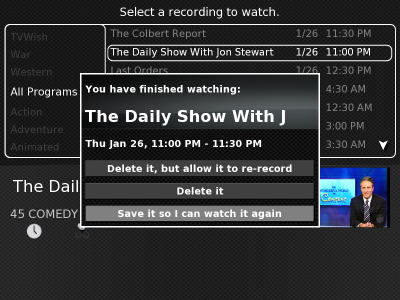
>>> <http://wendy.seltzer.org/mythtv/good-popup.png > same screen, now it
>>> selects, and the buttons are gray (after starting the program and
>>> fast-forwarding to the end a second time)
>>>
>> I've seen the same thing - in SVN as of about 2-3 weeks ago.  I usually have
>> to restart the frontend (from a terminal, because I can't select an option
>> on the Quit dialog box) to get control back.  It started happening about the
>> same time I installed Greyhem but I doubt that's the problem because it
>> happens in other themes too.  I have not found a pattern for when it
>> happens.
>>
> I've seen this on the Minimalist-Wide theme.  I think it may be a
> focus issue.  Once I move the mouse and click on the dialog box, it
> receives focus and then everything is fine.
>
I agree with the focus theory.  I've seen this issue when using older
versions of xine.  It's an ugly hack, but you may want to consider
http://www.gossamer-threads.com/lists/mythtv/users/82722#82722 .
Although the post focuses on issues caused by xine (which has now been
patched to prevent the problems), any 3rd-party/external/non-Myth
application can cause the issues.  Also, use the "; movemouse" approach
to call the external app (instead of the script) to prevent problems
with spaces, etc. in the command line.
If you're just using the menu or a terminal window or otherwise
interactively calling the other apps, try just manually doing what the
script does (i.e. after you return to the Myth GUI (immediately--don't
wait until you have a "broken popup" or the fix won't work because
you'll have to click the popup instead--which is hard to do when you
can't see the mouse cursor), move the mouse outside the Myth GUI area
and then back in).  This may mean you have to offset the GUI by 1 pixel
in either the vertical or horizontal direction, but a pixel's a small
price to pay for a fix^H^H^Hworaround (especially since that pixel
should be off-screen due to overscan, anyway).  A big circle of the
mouse going above and to the left of the screen works like a charm.  :)

Also, Wendy, once you've seen these "popup menu oddities", if you
immediately go to the EPG (you can even use a JumpPoint to get you
there) do you see the behavior I described in the post linked above
(i.e. you can move one "cell" in any direction and then you get stuck)?
If so, it's definitely a focus issue...

Mike
_______________________________________________
mythtv-users mailing list
[email protected]
http://mythtv.org/cgi-bin/mailman/listinfo/mythtv-users