https://bugs.documentfoundation.org/show_bug.cgi?id=166950
            Bug ID: 166950
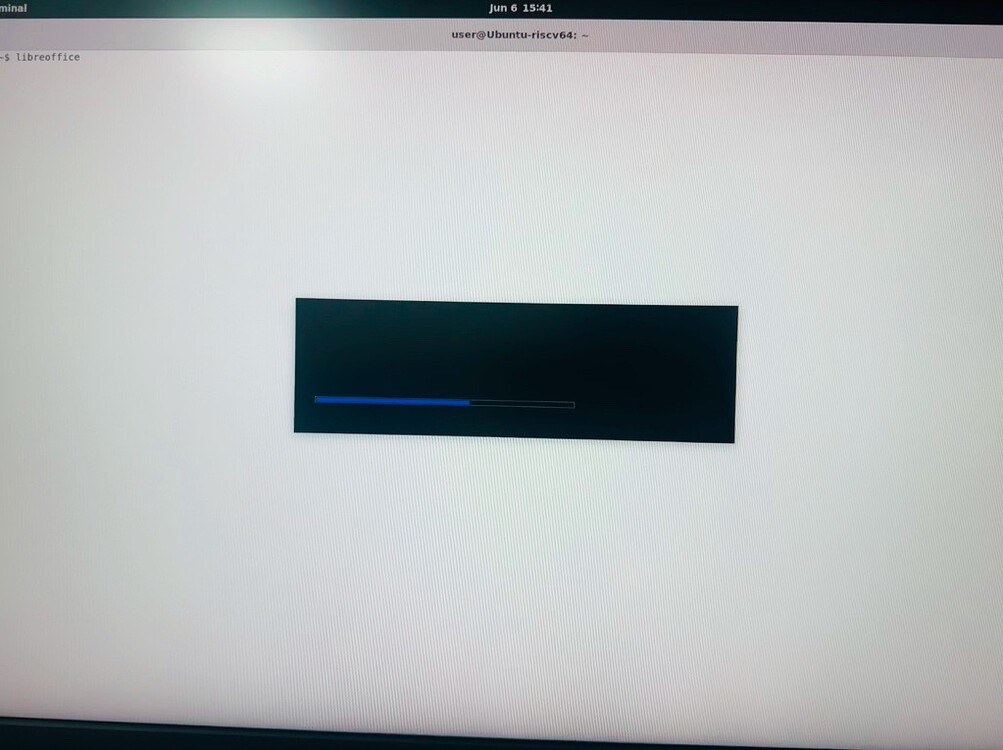
           Summary: LibreOffice splash screen shows Black screen with no
                    logo
           Product: LibreOffice
           Version: 24.8.6.2 release
          Hardware: Other
                OS: Linux (All)
            Status: UNCONFIRMED
          Severity: normal
          Priority: medium
         Component: LibreOffice
          Assignee: [email protected]
          Reporter: [email protected]

Description:
We are working on the internal riscv64 development platform.

Where we have successfully done with the bring up of Gnome with gdm3 as display
manager for wayland with ubuntu 22.04.

When we are trying to install the applications we noticed though we are
successfully able to install the Libreoffice application from the ubuntu 22.04
apt without any issues, we are able to launch the libreoffice and use it.
But the issue we are facing is the splash screen where it is showing as black
loading screen. After which the application resumes normally.

Please find the output image for your reference:
https://ask.libreoffice.org/uploads/asklibo/optimized/3X/b/5/b58d2d185cd4ebb0dd9832cf0e2919311fa31e04_2_1003x750.jpeg


We have also done the same setup on the gnome xorg window environment where the
Libreoffice splash screen works without any issues. But the black splash screen
issue is only noticed on the gnome with wayland.
Can use please suggest us how to resolve black loading screen issue.

Regards,
Sharath.K


Steps to Reproduce:
1.Install libreoffice from the apt on ubuntu 22.04 for riscv64.
2.Launch the libreoffice application using the icon.
3.Notice the black splash screen issue occuring every time with the launch.

Actual Results:
Observing the black splash screen issue occuring every time with the launch.

Expected Results:
Splash screen should be visible with the libreoffice logo along with the
loading bar.


Reproducible: Always


User Profile Reset: No

Additional Info:
riscv64

Ubuntu: 22.04

gnome-wayland: 42.9

--
You are receiving this mail because:
You are the assignee for the bug.