https://bugs.kde.org/show_bug.cgi?id=517461
--- Comment #5 from Nicholas LaPointe <[email protected]> ---
(In reply to frnca.art from comment #4)
> The first image is what it used to give me and the second image is what it’s
> giving me right now

I only see one image attached, while the other report you had created didn't
have any images.
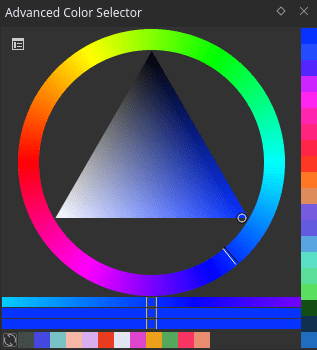
I assume that what you had before was a circle with a full rainbow of colors,
and a triangle with variations of the selected hue, similar to the one in this
image: https://docs.krita.org/en/_images/advanced-color-selector.png
Would that be correct?

> Is there a way to fix it ? I don’t seems to found how on the « image » menu

In case it is helpful to see the French version of the menu names:
>From the "Image" menu, click on "Convertir l'espace colorimétrique de l'image".
A popup with options will appear.
"Modèle" will be "XYZ / Alpha". Change this to "RVB / Alpha", then click "Ok".

--
You are receiving this mail because:
You are watching all bug changes.