Andreas <andreas.kiefer <at> gmail.com> writes:

>
> Hi,
> I'm using gdalwarp to convert a raster dataset from EPSG:4326 to EPSG:2202
>
> $>gdalwarp -s_srs "EPSG:4326" -t_srs "EPSG:2202" inputfile.tif outputfile.tif
>
> after that, the output file is correted converted to the new coordinate
system, but the output raster image has some blank area at the boorders. I
need obtain the lower left corner coordinates from the output raster file
including the blank area.
> My question: is enought use the information obtained from gdalinfo (lower
left corner coordinates)?
> It does includes the blank area?
>
> Is there a way to cut-off these blank area from output file or just inform
gdalwarp to crop the image just to valid data?
Hi,

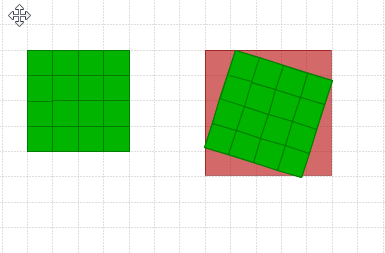
If you want to keep all the valid data you cannot avoid getting additional
pixels values into the corners if warping also rotates the image. That's
because digital images are rectangular and have a constant number of pixels
in each row from top to bottom. See a coarse example
http://latuviitta.org/documents/original_and_warped_image_on_base_canvas.png

However, you can mark the new artificial pixels which are needed for filling
the canvas of the warped image with a nodata value, or you can add an alpha
channel for recording the limits of the real image data. Read about
-dstnodata and -dstalpha at http://www.gdal.org/gdalwarp.html

-Jukka Rahkonen-


_______________________________________________
gdal-dev mailing list
[email protected]
http://lists.osgeo.org/mailman/listinfo/gdal-dev