Forwarding this on because I know a lot of you run headless machines, so
it could be useful. As an aside, I recently subscribed to Linux
Uprising and find it pretty good.
-------- Forwarded Message --------
Subject:        Linux Uprising Daily Articles
Date:   Thu, 25 Apr 2019 00:08:16 +0000
From:   Linux Uprising Blog <[email protected]>
Reply-To:       Linux Uprising Blog <[email protected]>
To:     [email protected]


Linux Uprising Blog


 Linux Uprising Daily Articles <https://www.linuxuprising.com/>

        Link to Linux Uprising Blog <https://www.linuxuprising.com/>

------------------------------------------------------------------------
Analyze Network Traffic With Termshark, A Terminal UI For TShark
(Wireshark)
<http://feedproxy.google.com/~r/LinuxUprising/~3/XVgfq_YymOU/analyze-network-traffic-with-termshark.html?utm_source=feedburner&utm_medium=email>
Posted: 24 Apr 2019 05:48 AM PDT
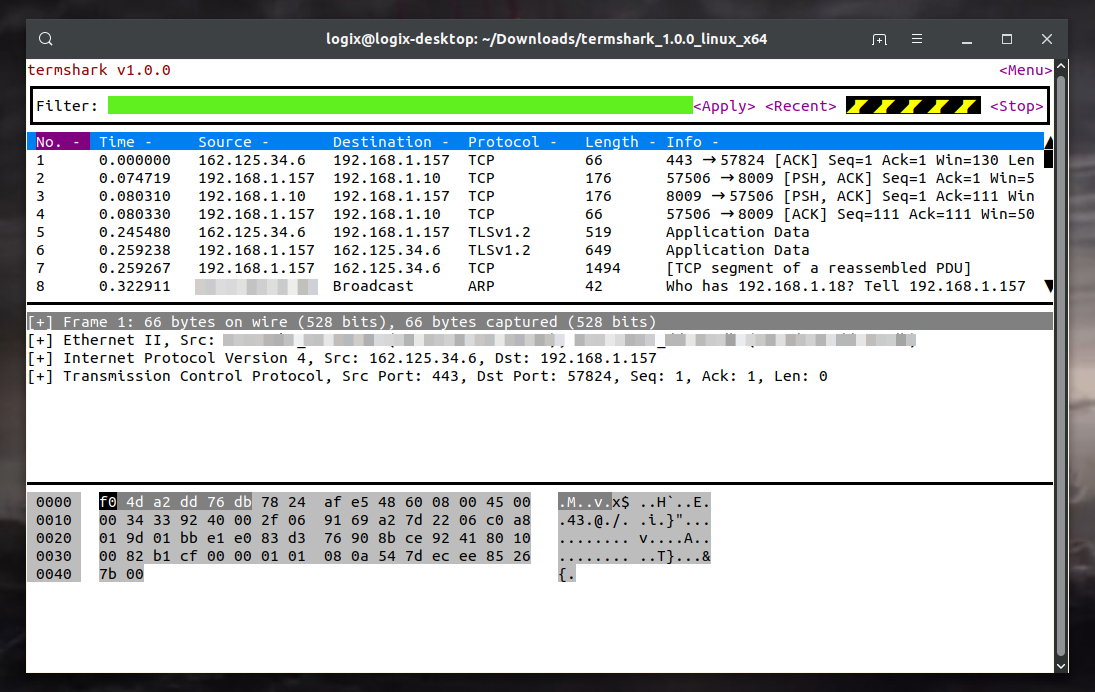
Termshark
<https://2.bp.blogspot.com/-ew0XhhdtFlc/XMBURzhITvI/AAAAAAAACtc/uRFuTPhgPWEmfY4pZ9dkUgTkD2d1skzbwCLcBGAs/s1600/termshark.png>
*Termshark <https://termshark.io/> is a new terminal user interface for
TShark (network protocol analyzer), inspired by Wireshark. It runs on
Linux, macOS and Windows.*
TShark
<https://www.wireshark.org/docs/wsug_html_chunked/AppToolstshark.html>
is a terminal version of Wireshark
<https://en.wikipedia.org/wiki/Wireshark>, the free and open source
packet analyzer used for network troubleshooting, analysis, software and
communication protocol development. TShark doesn't have an interactive
terminal user interface though, and this is where Termshark comes in.
Termshark is written in Go, and makes use of TShark which is part of
Wireshark. Its interactive terminal interface uses tcell, a cell-based
terminal handling package inspired by termbox, and gowid, a Go package
that provides widgets and a framework for making terminal user interfaces.
*The command line tool had its first release a few days ago*, so don't
expect it to support all of TShark's features just yet. Currently
*Termshark features:*
 * *Read pcap files or sniff live interfaces (where TShark is permitted)*
 * *Inspect each packet using familiar Wireshark-inspired views*
 * *Filter pcaps or live captures using Wireshark's display filters*
 * *Copy ranges of packets to the clipboard from the terminal*
*If you want to see it in action, there's a Termshark GIF on its
homepage <https://termshark.io/>. *I preferred not to add it to this
article as it's a bit too large (3mb).
[[ This is a content summary only. Visit Linux Uprising for the full
article ]]
-------------------------------------------------------------------------------------------
Originally posted on Linux Uprising Blog <https://www.linuxuprising.com>.
You are subscribed to email updates from Linux Uprising Blog
<https://www.linuxuprising.com/>.
To stop receiving these emails, you may unsubscribe now
<https://feedburner.google.com/fb/a/mailunsubscribe?k=okgWhqfJHQMydZn0RdnxgAy3qbc>.
Email delivery powered by Google
Google, 1600 Amphitheatre Parkway, Mountain View, CA 94043, United States

_______________________________________________
Discuss mailing list
[email protected]
http://lists.blu.org/mailman/listinfo/discuss