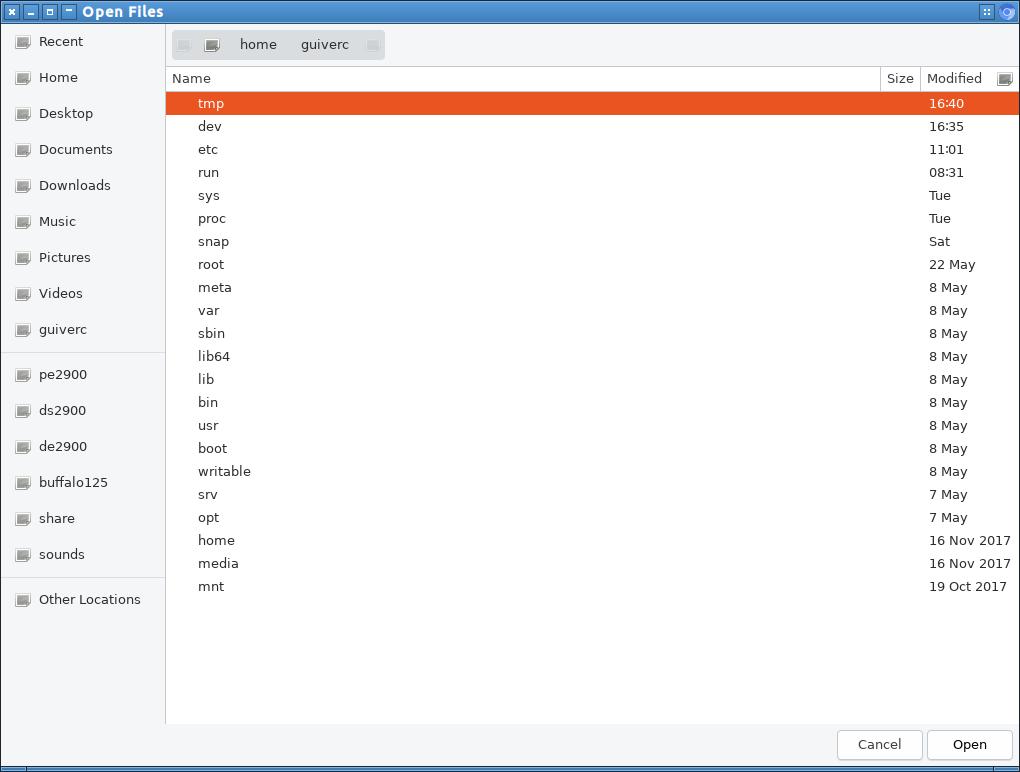
this is the image as I uploaded to community.ubuntu.com.   The primary
difference on this was the lack of icons to the left in the file-open
dialog window.
this image was from d960 (my primary box) and is more likely modified as
I use it all the time. The prior image (which has icons in visible in
this dialog window) would be less used, less modified (more defaults),
and the primary issue of navigation was identical on both boxes.

-- d960 appearance settings (which lacked icons)
Qt Style: Breeze
GTK2 Theme: Radiant-MATE
GTK3 Theme: Radiant-MATE
Icons Theme: Papirus (Papirus icon theme)
LXQt Theme: Ambiance

** Attachment added: "this was window as it appeared on my d960 (dell optiplex
960)"

https://bugs.launchpad.net/ubuntu/+source/chromium-browser/+bug/1832711/+attachment/5270583/+files/chromium_upload_snap.jpg

--
You received this bug notification because you are a member of Desktop
Packages, which is subscribed to chromium-browser in Ubuntu.
https://bugs.launchpad.net/bugs/1832711

Title:
  chromium-browser snap quirks lubuntu 19.10 bookmarks

Status in chromium-browser package in Ubuntu:
  New

Bug description:
  I tried to drag-drop a photo from `pcmanfm-qt` to chromium-browser for
  publishing in a mewe collection; but it wouldn't drag/drop.  My photos
  are stored in /de2900/photos/lumix/

  Next I tried to navigate to that directory for upload from chromium
  using the upload feature, but I was unable to navigate to my NFS
  storage to grab a photos (either /de2900 or /pe2900)

  This was tried first on my d960 (dell 960) primary box, but also on my
  d780 (dell 780) both running Lubuntu 19.10 with similar results.

  If I selected the HOME folder (just below Recent) I expected it to
  navigate to the /home/guiverc/ folder, but it would go to
  $HOME/snap/chromium/733/ on my d960, or $HOME/snap/chromium/750/ on my
  d780 box. The Home view would be the same if I clicked any NFS share
  (de2900, ds2900, pe2900).

  The Documents, Downloads, Music, Pictures, Videos appeared to work as
  expected (most of those folders are empty on my boxes; all my files
  are on my NFS shares)


  ( Olivier Tilloy [oSoMoN] requested this on community.ubuntu.com)

  ProblemType: Bug
  DistroRelease: Ubuntu 19.10
  Package: chromium-browser 75.0.3770.80-0ubuntu1~snap2
  ProcVersionSignature: Ubuntu 5.0.0-13.14-generic 5.0.6
  Uname: Linux 5.0.0-13-generic x86_64
  ApportVersion: 2.20.11-0ubuntu3
  Architecture: amd64
  CurrentDesktop: LXQt
  DRM.card0-DVI-I-1:
   enabled: enabled
   dpms: On
   status: connected
   edid-base64:
AP///////wAQrEhATDk0ORoTAQOAJh547u6Ro1RMmSYPUFSlSwBxT4GAAQEBAQEBAQEBAQEBMCoAmFEAKkAwcBMAeC0RAAAeAAAA/wBEMzI2Sjk2UTk0OUwKAAAA/ABERUwgMTkwOEZQQkxLAAAA/QA4TB5RDgAKICAgICAgAHI=
   modes: 1280x1024 1280x1024 1152x864 1024x768 1024x768 800x600 800x600
640x480 640x480 720x400
  DRM.card0-HDMI-A-1:
   enabled: enabled
   dpms: On
   status: connected
   edid-base64:
AP///////wAQrCZAMzA1UhkSAQOAJh6M7h81pFZNniQSUFSlSwBxT4GAAQEBAQEBAQEBAQEBMCoAmFEAKkAwcBMAeC0RAAAeAAAA/wBQTTA2Mjg2RlI1MDMKAAAA/ABERUxMIDE5MDhGUAogAAAA/QA4TB5RDgAKICAgICAgABY=
   modes: 1280x1024 1280x1024 1152x864 1024x768 1024x768 800x600 800x600
640x480 640x480 720x400
  DRM.card0-VGA-1:
   enabled: disabled
   dpms: On
   status: disconnected
   edid-base64:
   modes:
  Date: Thu Jun 13 20:05:24 2019
  DiskUsage:
   Filesystem     Type   Size  Used Avail Use% Mounted on
   /dev/sda2      ext4   601G   68G  503G  12% /
   tmpfs          tmpfs  3.9G   89M  3.8G   3% /dev/shm
   /dev/sda2      ext4   601G   68G  503G  12% /
  InstallationDate: Installed on 2019-04-17 (57 days ago)
  InstallationMedia: Lubuntu 18.10 "Cosmic Cuttlefish" - Release amd64
(20181017.2)
  MachineType: Dell Inc. OptiPlex 780
  ProcKernelCmdLine: BOOT_IMAGE=/boot/vmlinuz-5.0.0-13-generic
root=UUID=c9fd534a-d678-4301-8d49-760c516343f5 ro quiet splash vt.handoff=1
  Snap.ChromeDriverVersion: ChromeDriver 75.0.3770.80
(9a9aa15057b6b2cc0909bdcf638c0b65ecd516f2-refs/branch-heads/3770@{#948})
  Snap.ChromiumVersion: Chromium 75.0.3770.80 snap
  SourcePackage: chromium-browser
  UpgradeStatus: Upgraded to eoan on 2019-04-17 (57 days ago)
  dmi.bios.date: 02/13/2010
  dmi.bios.vendor: Dell Inc.
  dmi.bios.version: A03
  dmi.board.name: 0200DY
  dmi.board.vendor: Dell Inc.
  dmi.board.version: A00
  dmi.chassis.type: 3
  dmi.chassis.vendor: Dell Inc.
  dmi.modalias:
dmi:bvnDellInc.:bvrA03:bd02/13/2010:svnDellInc.:pnOptiPlex780:pvr:rvnDellInc.:rn0200DY:rvrA00:cvnDellInc.:ct3:cvr:
  dmi.product.name: OptiPlex 780
  dmi.sys.vendor: Dell Inc.

To manage notifications about this bug go to:
https://bugs.launchpad.net/ubuntu/+source/chromium-browser/+bug/1832711/+subscriptions

--
Mailing list: https://launchpad.net/~desktop-packages
Post to     : [email protected]
Unsubscribe : https://launchpad.net/~desktop-packages
More help   : https://help.launchpad.net/ListHelp