This is an automated email from the ASF dual-hosted git repository.

hsluoyz pushed a commit to branch master
in repository https://gitbox.apache.org/repos/asf/casbin-gateway.git
commit 7f49d66f89ac219f4b91a5ceae12eec7a810248d Author: Yang Luo <[email protected]> AuthorDate: Sat Sep 5 02:32:21 2026 +0800 docs: move the install command and screenshots above the agent table --- README.md | 96 +++++++++++++++++++++++++++++++----------------------------- README_zh.md | 92 +++++++++++++++++++++++++++++---------------------------- 2 files changed, 96 insertions(+), 92 deletions(-) diff --git a/README.md b/README.md index a4d9c65..93c040d 100644 --- a/README.md +++ b/README.md @@ -98,6 +98,54 @@ <a href="https://cdn.casbin.org/img/casbin-gateway.gif";><img alt="Casbin Gateway" src="https://cdn.casbin.org/img/casbin-gateway.gif"; width="900"></a> </p> +## Run it + +One command. No database, no Go, no Node, no configuration. + +On Linux and macOS: + +```bash +curl -fsSL https://raw.githubusercontent.com/apache/casbin-gateway/master/scripts/install.sh | bash +``` + +On Windows, in PowerShell: + +```powershell +irm https://raw.githubusercontent.com/apache/casbin-gateway/master/scripts/install.ps1 | iex +``` + +Either one downloads the build for this machine, unpacks it into `~/.local/share/casbin-gateway` (`%LOCALAPPDATA%\casbin-gateway` on Windows), puts a `casbin-gateway` command on your PATH, starts it, and arranges for it to start again when you log in. The terminal you installed from is yours again straight away. + +Gateway then opens in its own window — no sign-in: it serves this machine only and signs the local admin in on sight. Closing that window leaves Gateway running behind its tray icon, which is also where you reopen the window, turn **Start at Login** off and on — **Settings → Startup** is the same switch — and quit for real. There is a **Casbin Gateway** entry on your desktop and in the Start menu, in `~/Applications`, or in the application menu, depending on the platform. An archive unpa [...] + +If you would rather use a browser, or you are on a machine with no desktop at all, everything is still at **http://localhost:17000**, and `casbin-gateway start` runs the server on its own with no window and no tray. + +That is the whole installation. Gateway keeps its data in a SQLite file inside its own directory. + +The password behind that account is `admin` / `123`, and it only matters if you open Gateway to the network — see [Serving other machines](#serving-other-machines). + +## Screenshots + +| Every agent on this machine | Everything those agents carry | +| :---: | :---: | +| [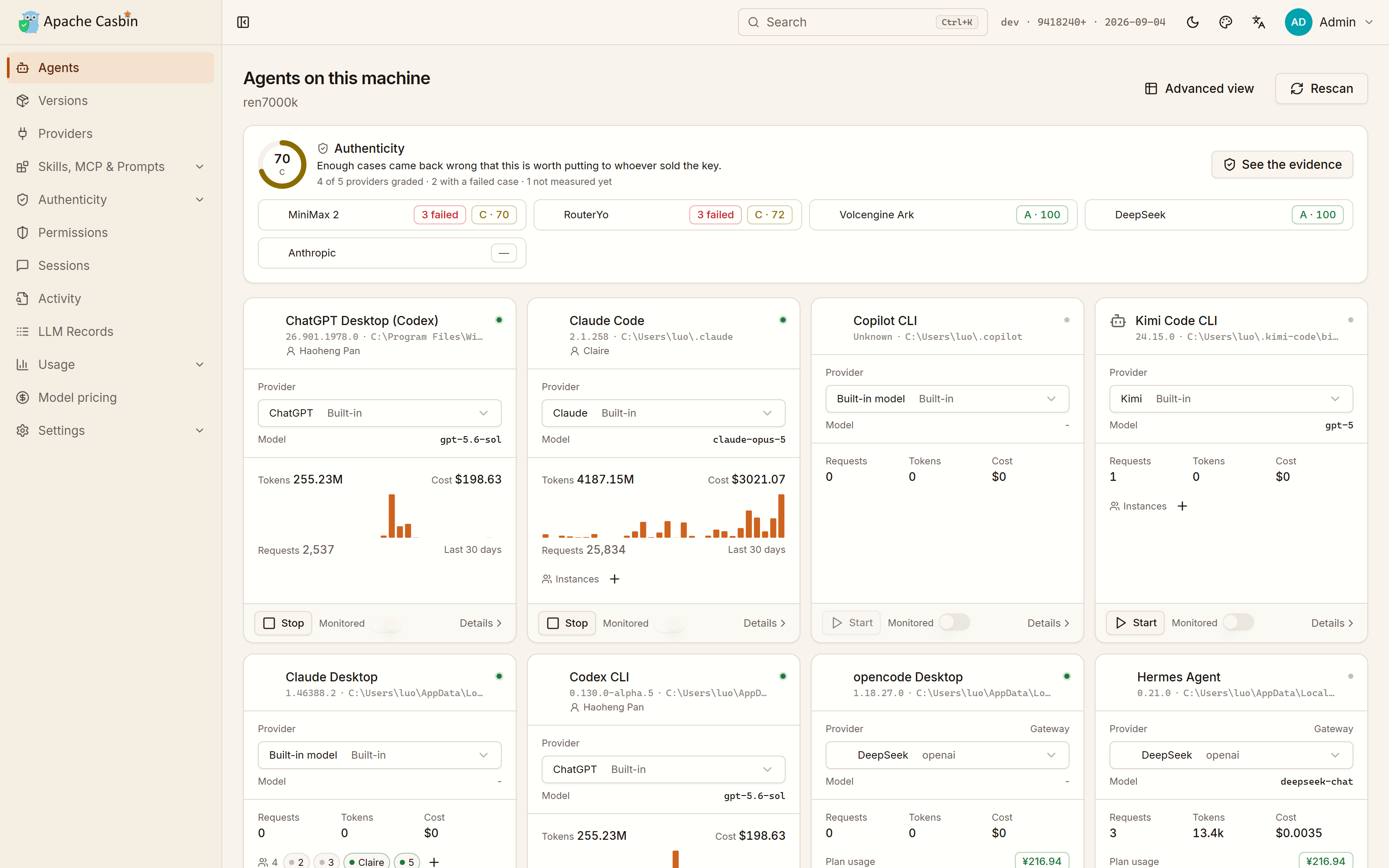](https://cdn.casbin.org/img/casbin-gateway-home.png) | [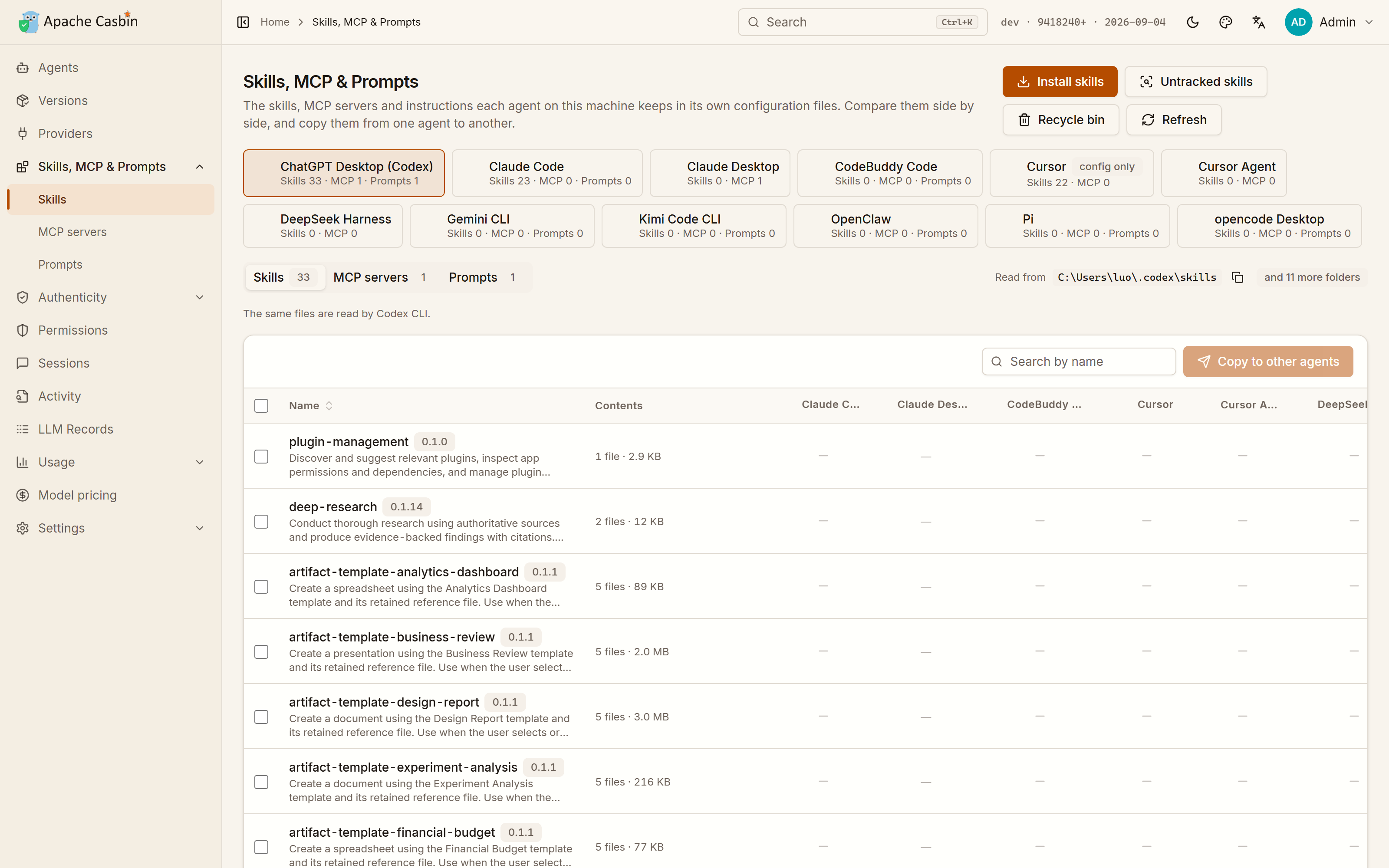](https://cdn.casbin.org/img/casbin-gateway-skills.png) | +| What each one runs on, which account it is signed in to, what it has spent there, and whether it is running | Every skill, MCP server and instruction file of every agent, side by side, copied from one agent to another | + +| What each agent is allowed to do | Which build each agent is on | +| :---: | :---: | +| [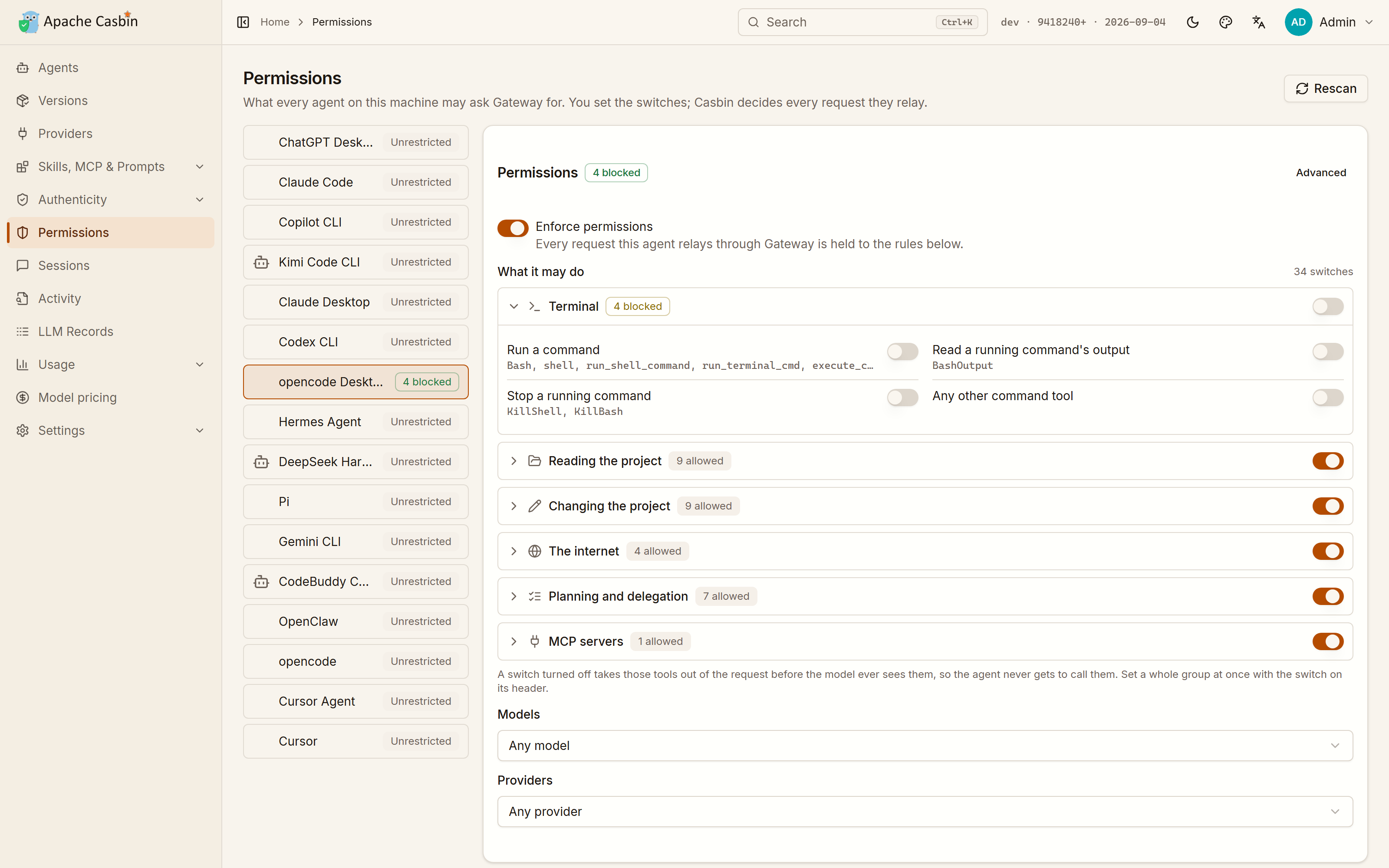](https://cdn.casbin.org/img/casbin-gateway-permissions.png) | [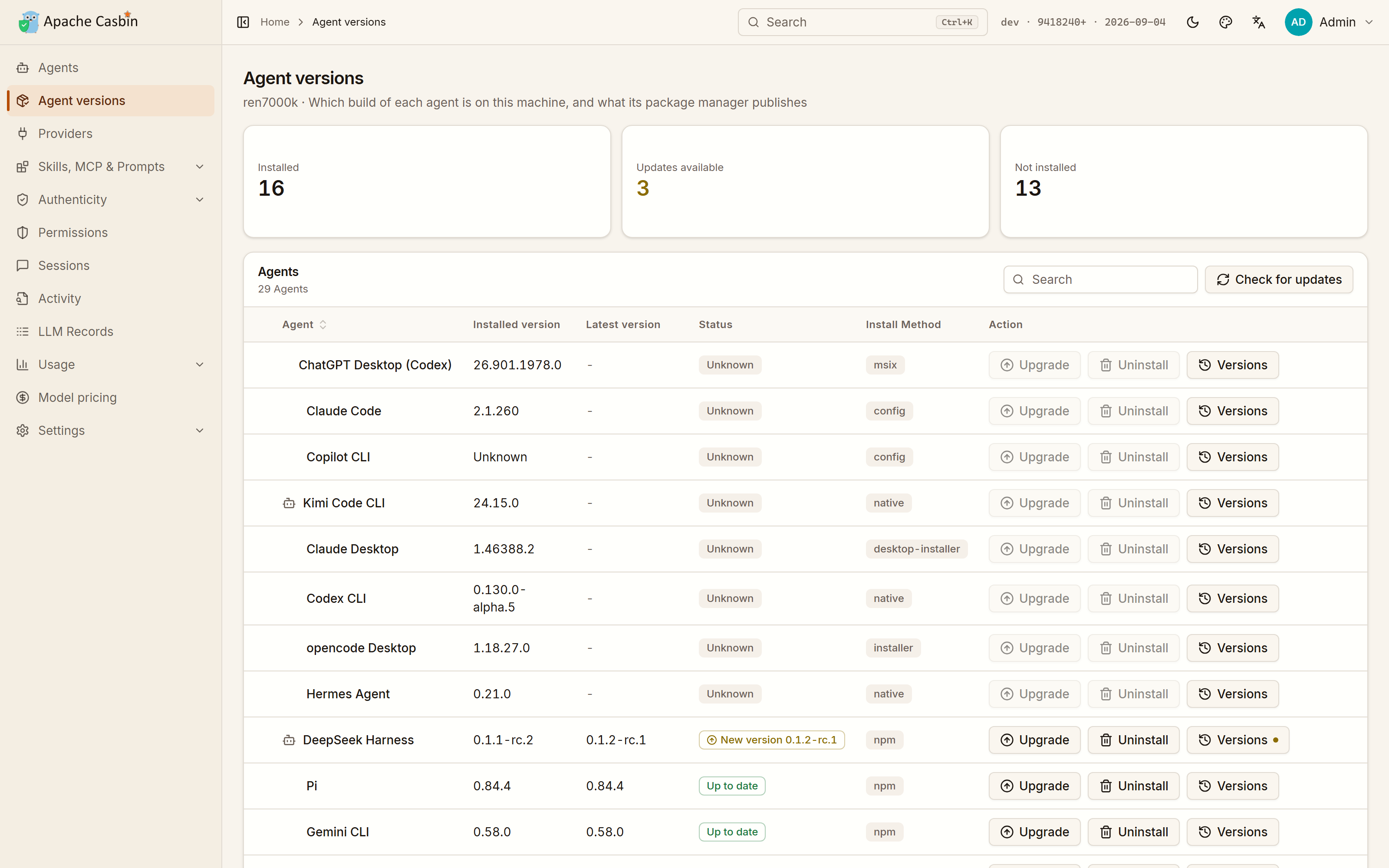](https://cdn.casbin.org/img/casbin-gateway-versions.png) | +| Around forty switches over the agent's tools, models and providers, compiled to a Casbin policy and enforced on every request it relays | The build on this machine against the one its package manager publishes, installed, upgraded, rolled back or removed from the row it is on, whichever way it was installed | + +| What the agents spent | One endpoint per model vendor | +| :---: | :---: | +| [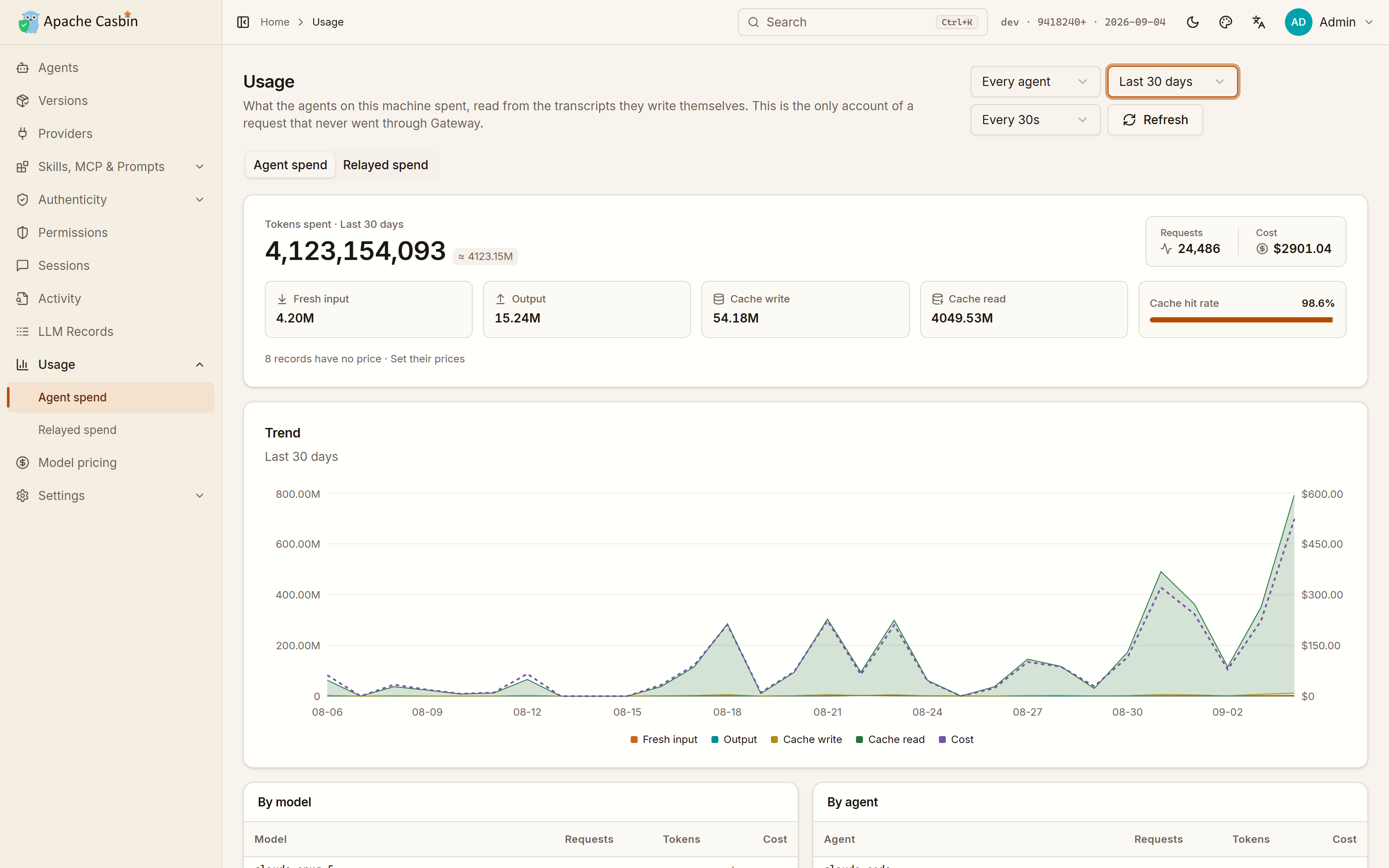](https://cdn.casbin.org/img/casbin-gateway-usage.png) | [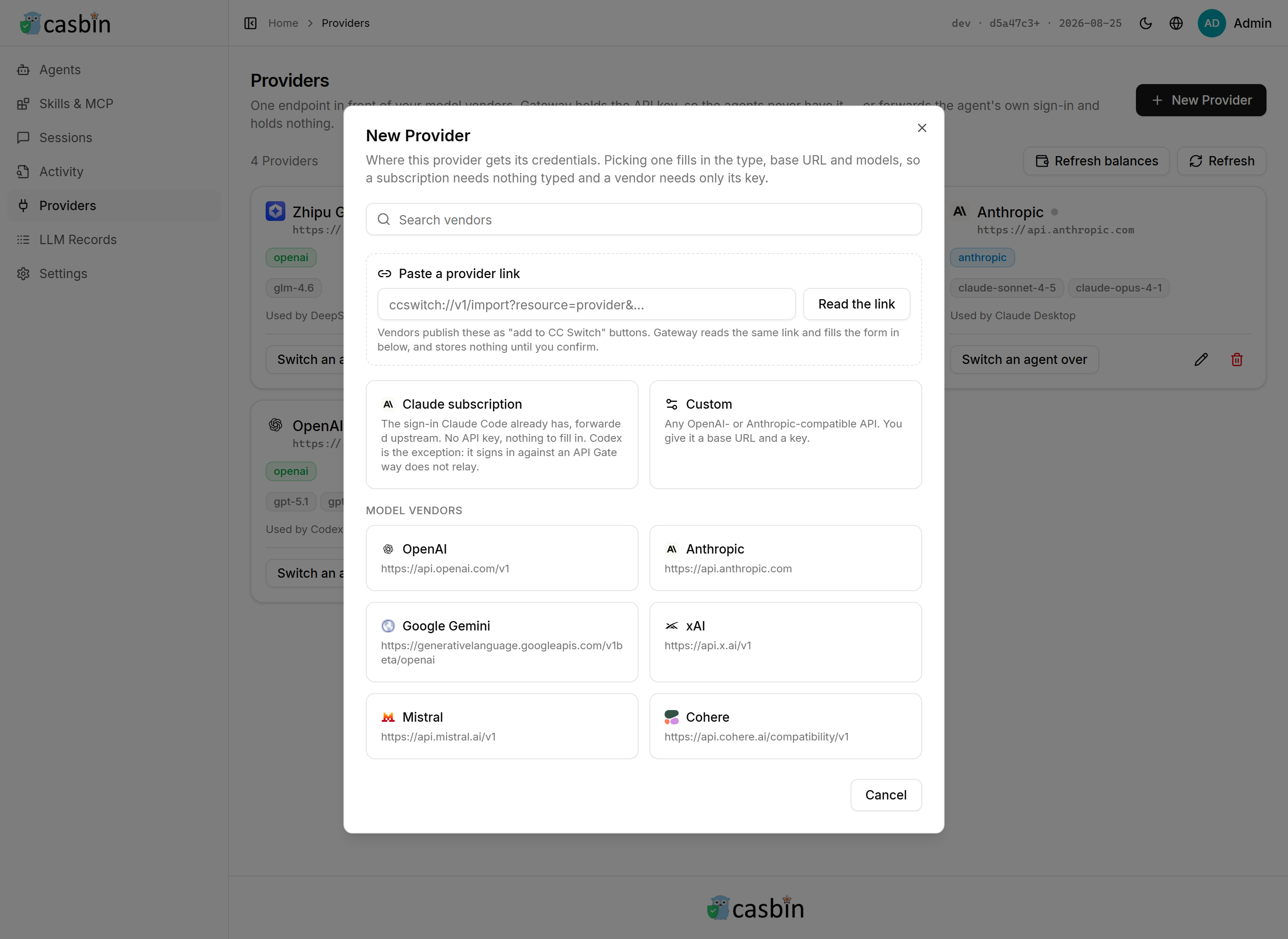](https://cdn.casbin.org/img/casbin-gateway-new-provider.png) | +| Read from the transcripts the agents write themselves, so it counts what never went through Gateway too | 44 vendor presets, or any OpenAI- or Anthropic-compatible base URL | + +| Everything the agents relayed | The whole request, not just a count | +| :---: | :---: | +| [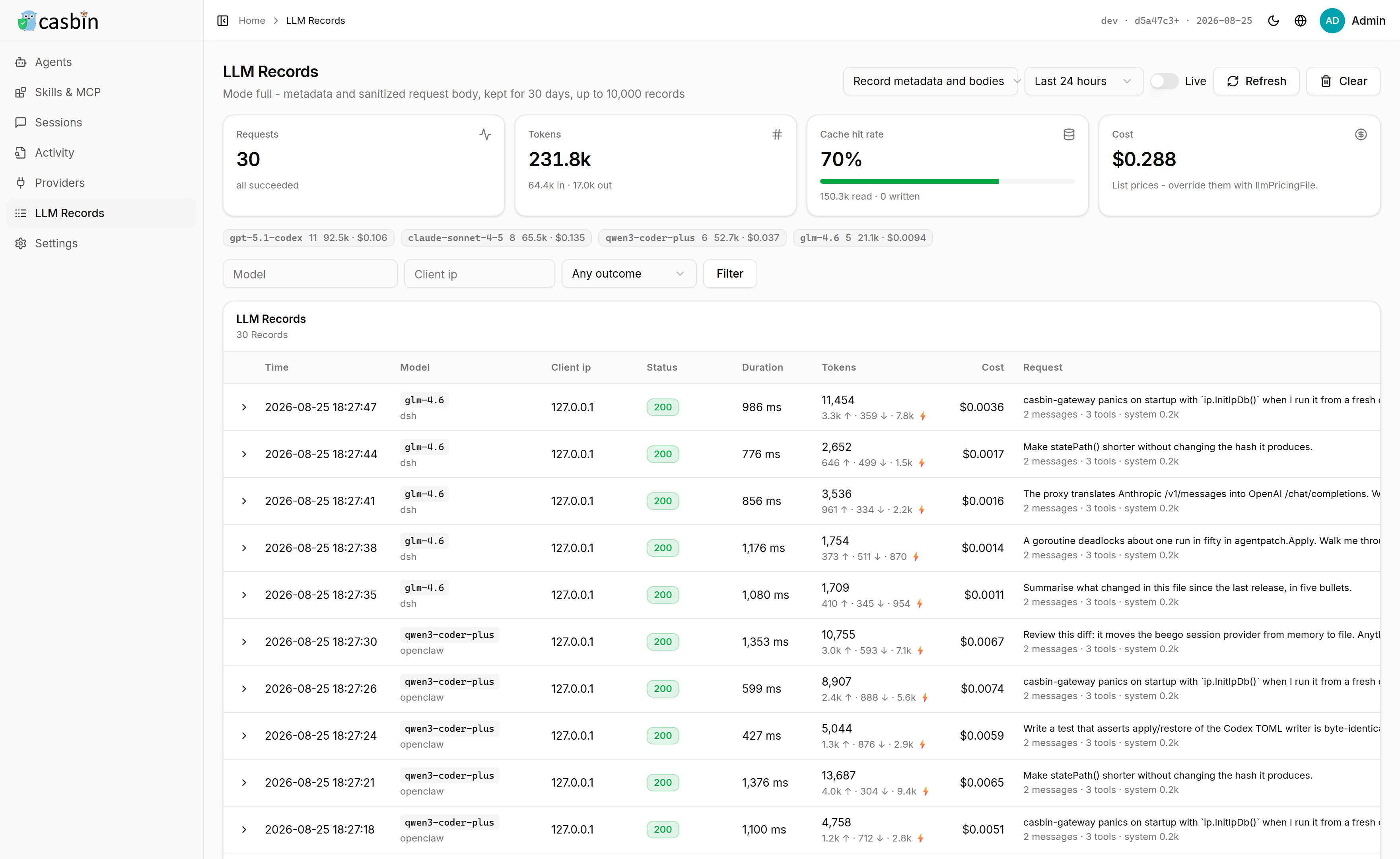](https://cdn.casbin.org/img/casbin-gateway-llm-records.png) | [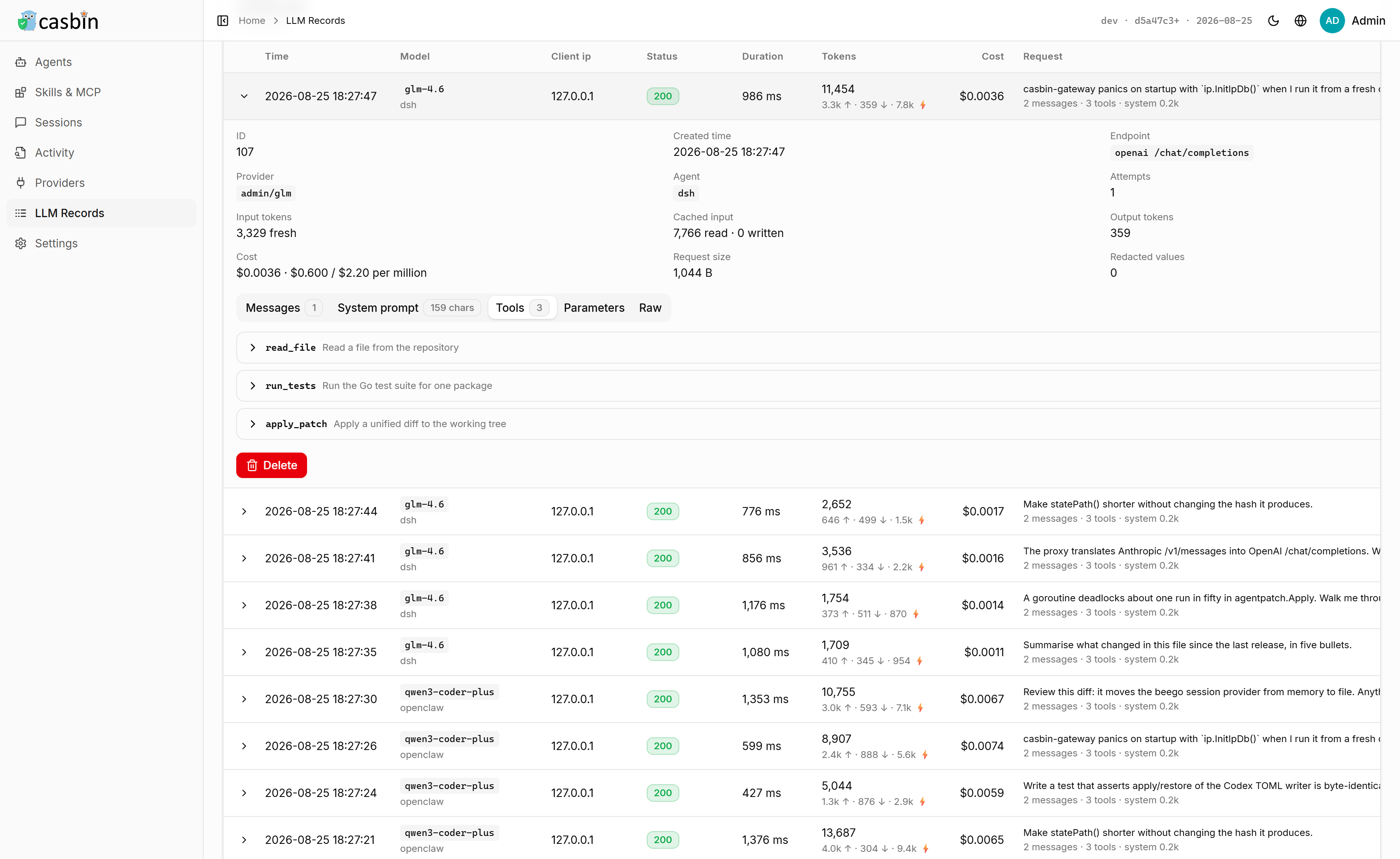](https://cdn.casbin.org/img/casbin-gateway-llm-record.png) | +| Requests, tokens, cache hit rate and cost, broken down by model | The system prompt, every message, and the schema of every tool the model was offered | + ## What Gateway does for each agent | Agent | Monitoring | Provider | MCP | Skills | Prompt | Sessions | Install | @@ -150,53 +198,7 @@ - **[Know what every agent spent, even off Gateway](#what-the-agents-spend-including-what-never-went-through-gateway)** — read straight from the agents' own transcripts. - **[Compare and copy skills, MCP servers and prompts across agents](#what-to-do-next)** — every agent's install list in one table. -## Screenshots - -| Every agent on this machine | Everything those agents carry | -| :---: | :---: | -| [](https://cdn.casbin.org/img/casbin-gateway-home.png) | [](https://cdn.casbin.org/img/casbin-gateway-skills.png) | -| What each one runs on, which account it is signed in to, what it has spent there, and whether it is running | Every skill, MCP server and instruction file of every agent, side by side, copied from one agent to another | - -| What each agent is allowed to do | Which build each agent is on | -| :---: | :---: | -| [](https://cdn.casbin.org/img/casbin-gateway-permissions.png) | [](https://cdn.casbin.org/img/casbin-gateway-versions.png) | -| Around forty switches over the agent's tools, models and providers, compiled to a Casbin policy and enforced on every request it relays | The build on this machine against the one its package manager publishes, installed, upgraded, rolled back or removed from the row it is on, whichever way it was installed | - -| What the agents spent | One endpoint per model vendor | -| :---: | :---: | -| [](https://cdn.casbin.org/img/casbin-gateway-usage.png) | [](https://cdn.casbin.org/img/casbin-gateway-new-provider.png) | -| Read from the transcripts the agents write themselves, so it counts what never went through Gateway too | 44 vendor presets, or any OpenAI- or Anthropic-compatible base URL | - -| Everything the agents relayed | The whole request, not just a count | -| :---: | :---: | -| [](https://cdn.casbin.org/img/casbin-gateway-llm-records.png) | [](https://cdn.casbin.org/img/casbin-gateway-llm-record.png) | -| Requests, tokens, cache hit rate and cost, broken down by model | The system prompt, every message, and the schema of every tool the model was offered | - -## Run it - -One command. No database, no Go, no Node, no configuration. - -On Linux and macOS: - -```bash -curl -fsSL https://raw.githubusercontent.com/apache/casbin-gateway/master/scripts/install.sh | bash -``` - -On Windows, in PowerShell: - -```powershell -irm https://raw.githubusercontent.com/apache/casbin-gateway/master/scripts/install.ps1 | iex -``` - -Either one downloads the build for this machine, unpacks it into `~/.local/share/casbin-gateway` (`%LOCALAPPDATA%\casbin-gateway` on Windows), puts a `casbin-gateway` command on your PATH, starts it, and arranges for it to start again when you log in. The terminal you installed from is yours again straight away. - -Gateway then opens in its own window — no sign-in: it serves this machine only and signs the local admin in on sight. Closing that window leaves Gateway running behind its tray icon, which is also where you reopen the window, turn **Start at Login** off and on — **Settings → Startup** is the same switch — and quit for real. There is a **Casbin Gateway** entry on your desktop and in the Start menu, in `~/Applications`, or in the application menu, depending on the platform. An archive unpa [...] - -If you would rather use a browser, or you are on a machine with no desktop at all, everything is still at **http://localhost:17000**, and `casbin-gateway start` runs the server on its own with no window and no tray. - -That is the whole installation. Gateway keeps its data in a SQLite file inside its own directory. - -The password behind that account is `admin` / `123`, and it only matters if you open Gateway to the network — see [Serving other machines](#serving-other-machines). +## Using it ### Keeping it up to date diff --git a/README_zh.md b/README_zh.md index 301b6f8..c900853 100644 --- a/README_zh.md +++ b/README_zh.md @@ -98,6 +98,52 @@ <a href="https://cdn.casbin.org/img/casbin-gateway.gif";><img alt="Casbin Gateway" src="https://cdn.casbin.org/img/casbin-gateway.gif"; width="900"></a> </p> +## 运行 + +一条命令。不需要数据库,不需要 Go,不需要 Node,不需要配置。 + +Linux 和 macOS: + +```bash +curl -fsSL https://raw.githubusercontent.com/apache/casbin-gateway/master/scripts/install.sh | bash +``` + +Windows,在 PowerShell 中: + +```powershell +irm https://raw.githubusercontent.com/apache/casbin-gateway/master/scripts/install.ps1 | iex +``` + +两者都会下载适配本机的构建产物,解压到 `~/.local/share/casbin-gateway`(Windows 上是 `%LOCALAPPDATA%\casbin-gateway`),把 `casbin-gateway` 命令加入 PATH,启动它,并设置成开机(登录)自启。安装用的那个终端窗口立刻就还给你。 + +Gateway 会在自己的窗口里打开 —— 不用登录:它只服务本机,本机访问会直接以管理员身份进入。关掉窗口不会退出,它缩到托盘图标后台继续跑,重新打开窗口、开关**开机自启**(**设置 → 启动**是同一个开关)和真正退出都在托盘菜单里。桌面和开始菜单里会有一个 **Casbin Gateway** 快捷方式;macOS 上在 `~/Applications`,Linux 上在应用菜单里。手动解压的压缩包也一样,启动器第一次运行时会自己建好。 + +想用浏览器,或者机器上根本没有桌面环境,**http://localhost:17000** 一样能访问;`casbin-gateway start` 则只跑服务端,没有窗口也没有托盘。 + +安装到此为止。Gateway 把数据存在自己目录下的一个 SQLite 文件里,登录也走它自己的用户表。 + +## 界面预览 + +| 本机上的每一个 Agent | 这些 Agent 身上装的每一样东西 | +| :---: | :---: | +| [](https://cdn.casbin.org/img/casbin-gateway-home.png) | [](https://cdn.casbin.org/img/casbin-gateway-skills.png) | +| 每个 Agent 接在哪、登录的是哪个账号、在那里花了多少、此刻是不是在跑 | 所有 Agent 的技能、MCP 服务器和提示词文件并排对比,还能从一个 Agent 复制到另一个 | + +| 每个 Agent 能做什么 | 每个 Agent 装的是哪个版本 | +| :---: | :---: | +| [](https://cdn.casbin.org/img/casbin-gateway-permissions.png) | [](https://cdn.casbin.org/img/casbin-gateway-versions.png) | +| 四十来个开关,覆盖该 Agent 的工具、模型和供应商,编译成 Casbin 策略,转发的每个请求都按它判定 | 本机装的版本对上包管理器发布的版本;不管当初怎么装的,安装、升级、回退和卸载都在这一行上完成 | + +| 每个 Agent 花了多少 | 每个模型厂商一个入口 | +| :---: | :---: | +| [](https://cdn.casbin.org/img/casbin-gateway-usage.png) | [](https://cdn.casbin.org/img/casbin-gateway-new-provider.png) | +| 从 Agent 自己写的会话记录里读出来,所以没走 Gateway 的请求也一样算得上 | 44 个厂商预设,或任何 OpenAI / Anthropic 兼容的 base URL | + +| Agent 转发过的每一个请求 | 完整的请求,而不只是一个计数 | +| :---: | :---: | +| [](https://cdn.casbin.org/img/casbin-gateway-llm-records.png) | [](https://cdn.casbin.org/img/casbin-gateway-llm-record.png) | +| 按模型统计请求数、Token、缓存命中率和成本 | 系统提示词、每一条消息,以及模型拿到的每个工具的 schema | + ## 每个 Agent 支持到什么程度 | Agent | 行为监控 | 换供应商 | MCP | 技能 | 提示词 | 会话 | 安装 | @@ -150,51 +196,7 @@ - **[统计每个 Agent 花了多少,包括没走 Gateway 的部分](#每个-agent-花了多少包括没走-gateway-的那部分)** —— 直接读 Agent 自己写的会话记录。 - **[跨 Agent 对比、复制技能 / MCP / 提示词](#接下来做什么)** —— 一张表看到所有 Agent 装了什么。 -## 界面预览 - -| 本机上的每一个 Agent | 这些 Agent 身上装的每一样东西 | -| :---: | :---: | -| [](https://cdn.casbin.org/img/casbin-gateway-home.png) | [](https://cdn.casbin.org/img/casbin-gateway-skills.png) | -| 每个 Agent 接在哪、登录的是哪个账号、在那里花了多少、此刻是不是在跑 | 所有 Agent 的技能、MCP 服务器和提示词文件并排对比,还能从一个 Agent 复制到另一个 | - -| 每个 Agent 能做什么 | 每个 Agent 装的是哪个版本 | -| :---: | :---: | -| [](https://cdn.casbin.org/img/casbin-gateway-permissions.png) | [](https://cdn.casbin.org/img/casbin-gateway-versions.png) | -| 四十来个开关,覆盖该 Agent 的工具、模型和供应商,编译成 Casbin 策略,转发的每个请求都按它判定 | 本机装的版本对上包管理器发布的版本;不管当初怎么装的,安装、升级、回退和卸载都在这一行上完成 | - -| 每个 Agent 花了多少 | 每个模型厂商一个入口 | -| :---: | :---: | -| [](https://cdn.casbin.org/img/casbin-gateway-usage.png) | [](https://cdn.casbin.org/img/casbin-gateway-new-provider.png) | -| 从 Agent 自己写的会话记录里读出来,所以没走 Gateway 的请求也一样算得上 | 44 个厂商预设,或任何 OpenAI / Anthropic 兼容的 base URL | - -| Agent 转发过的每一个请求 | 完整的请求,而不只是一个计数 | -| :---: | :---: | -| [](https://cdn.casbin.org/img/casbin-gateway-llm-records.png) | [](https://cdn.casbin.org/img/casbin-gateway-llm-record.png) | -| 按模型统计请求数、Token、缓存命中率和成本 | 系统提示词、每一条消息,以及模型拿到的每个工具的 schema | - -## 运行 - -一条命令。不需要数据库,不需要 Go,不需要 Node,不需要配置。 - -Linux 和 macOS: - -```bash -curl -fsSL https://raw.githubusercontent.com/apache/casbin-gateway/master/scripts/install.sh | bash -``` - -Windows,在 PowerShell 中: - -```powershell -irm https://raw.githubusercontent.com/apache/casbin-gateway/master/scripts/install.ps1 | iex -``` - -两者都会下载适配本机的构建产物,解压到 `~/.local/share/casbin-gateway`(Windows 上是 `%LOCALAPPDATA%\casbin-gateway`),把 `casbin-gateway` 命令加入 PATH,启动它,并设置成开机(登录)自启。安装用的那个终端窗口立刻就还给你。 - -Gateway 会在自己的窗口里打开 —— 不用登录:它只服务本机,本机访问会直接以管理员身份进入。关掉窗口不会退出,它缩到托盘图标后台继续跑,重新打开窗口、开关**开机自启**(**设置 → 启动**是同一个开关)和真正退出都在托盘菜单里。桌面和开始菜单里会有一个 **Casbin Gateway** 快捷方式;macOS 上在 `~/Applications`,Linux 上在应用菜单里。手动解压的压缩包也一样,启动器第一次运行时会自己建好。 - -想用浏览器,或者机器上根本没有桌面环境,**http://localhost:17000** 一样能访问;`casbin-gateway start` 则只跑服务端,没有窗口也没有托盘。 - -安装到此为止。Gateway 把数据存在自己目录下的一个 SQLite 文件里,登录也走它自己的用户表。 +## 使用 ### 保持最新 --------------------------------------------------------------------- To unsubscribe, e-mail: [email protected] For additional commands, e-mail: [email protected]









