This is an automated email from the ASF dual-hosted git repository.

hsluoyz pushed a commit to branch master
in repository https://gitbox.apache.org/repos/asf/casbin-gateway.git
commit a9008e5f6db40d535a333c3f0a20c3974d81d34d Author: Yang Luo <[email protected]> AuthorDate: Thu Sep 3 19:38:53 2026 +0800 docs: add authenticity, usage and skills screenshots --- README.md | 73 +++++++++++++++++++++++++++++++++++++++++++----------------- README_zh.md | 66 +++++++++++++++++++++++++++++++++++++++--------------- 2 files changed, 100 insertions(+), 39 deletions(-) diff --git a/README.md b/README.md index 8d3b58c..025d77c 100644 --- a/README.md +++ b/README.md @@ -37,12 +37,39 @@ <b>English</b> | <a href="./README_zh.md">中文</a> </p> +<p align="center"> + <a href="https://cdn.casbin.org/img/casbin-gateway.gif";><img alt="Casbin Gateway" src="https://cdn.casbin.org/img/casbin-gateway.gif"; width="900"></a> +</p> + +## The killer feature: is the API behind that key what it was sold as? + +A reseller can sell a frontier model and serve a cheaper one, count a cached prefix as fresh input, or answer in an API it only pretends to speak. None of that shows up in the traffic, so **Authenticity** asks the upstream directly. Every provider is probed on its own — when it is added, when its endpoint, type or key changes, when it has never been probed, and again whenever its report goes stale — and comes back with a score out of 100 and a grade from A to F, on the Authenticity page [...] + +[](https://cdn.casbin.org/img/casbin-gateway-authenticity.png) + +The score is only a summary of the test cases behind it, and every one of them is on the page: whether the model that answers is the one that was asked for, whether a two-level tool schema survives a forced call, whether the event stream carries everything the API documents, whether the prompt cache is really accounted for, whether two identical requests are billed the same, whether the vendor's own headers are there. Each case names the question it puts to the upstream, the exact reques [...] + +[](https://cdn.casbin.org/img/casbin-gateway-authenticity-cases.png) + +Reweight a case, turn it off, rewrite its question, or add one of your own — the questions worth asking of a reseller are not the same everywhere, and a score whose method is not published is not evidence. **Restore defaults** puts the shipped suite back and leaves your own cases alone. + +The report has a second half that costs nothing and sends no request: what the records Gateway already kept say +about that upstream — how much of the cache it really accounted for, how many attempts failed, how long it took +to answer, and how much of what it served has no price. + +A probe spends a few cents of that provider's own credit, which is on the report next to the finding. `providerProbeIntervalHours` sets how often a report goes stale, `providerProbeMode = "manual"` probes only when asked, and `"off"` never probes. + ## Screenshots -| Every agent on this machine | One endpoint per model vendor | +| Every agent on this machine | Everything those agents carry | +| :---: | :---: | +| [](https://cdn.casbin.org/img/casbin-gateway-home.png) | [](https://cdn.casbin.org/img/casbin-gateway-skills.png) | +| What each one runs on, which account it is signed in to, what it has spent there, and whether it is running | Every skill, MCP server and instruction file of every agent, side by side, copied from one agent to another | + +| What the agents spent | One endpoint per model vendor | | :---: | :---: | -| [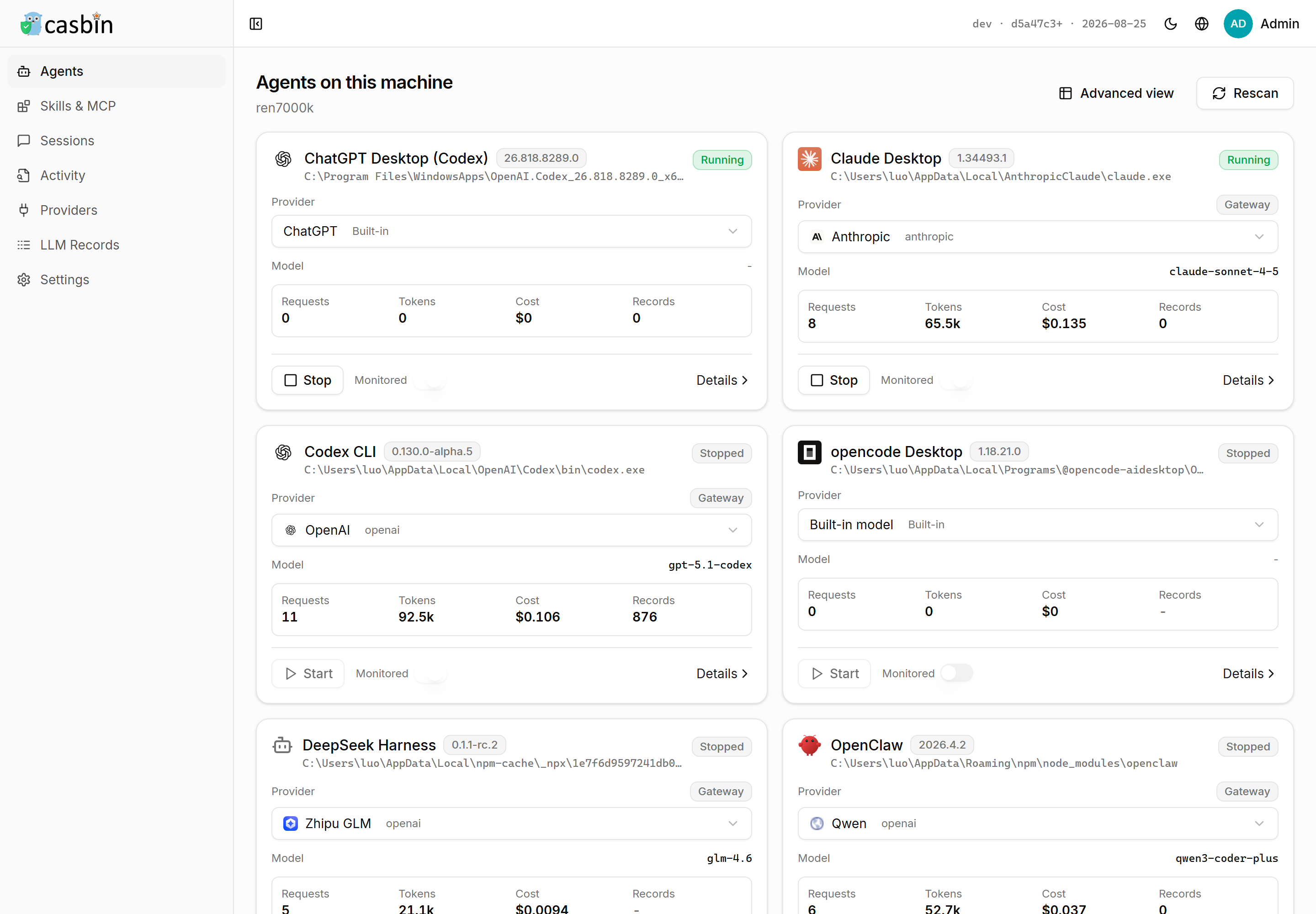](https://cdn.casbin.org/img/casbin-gateway-agents.png) | [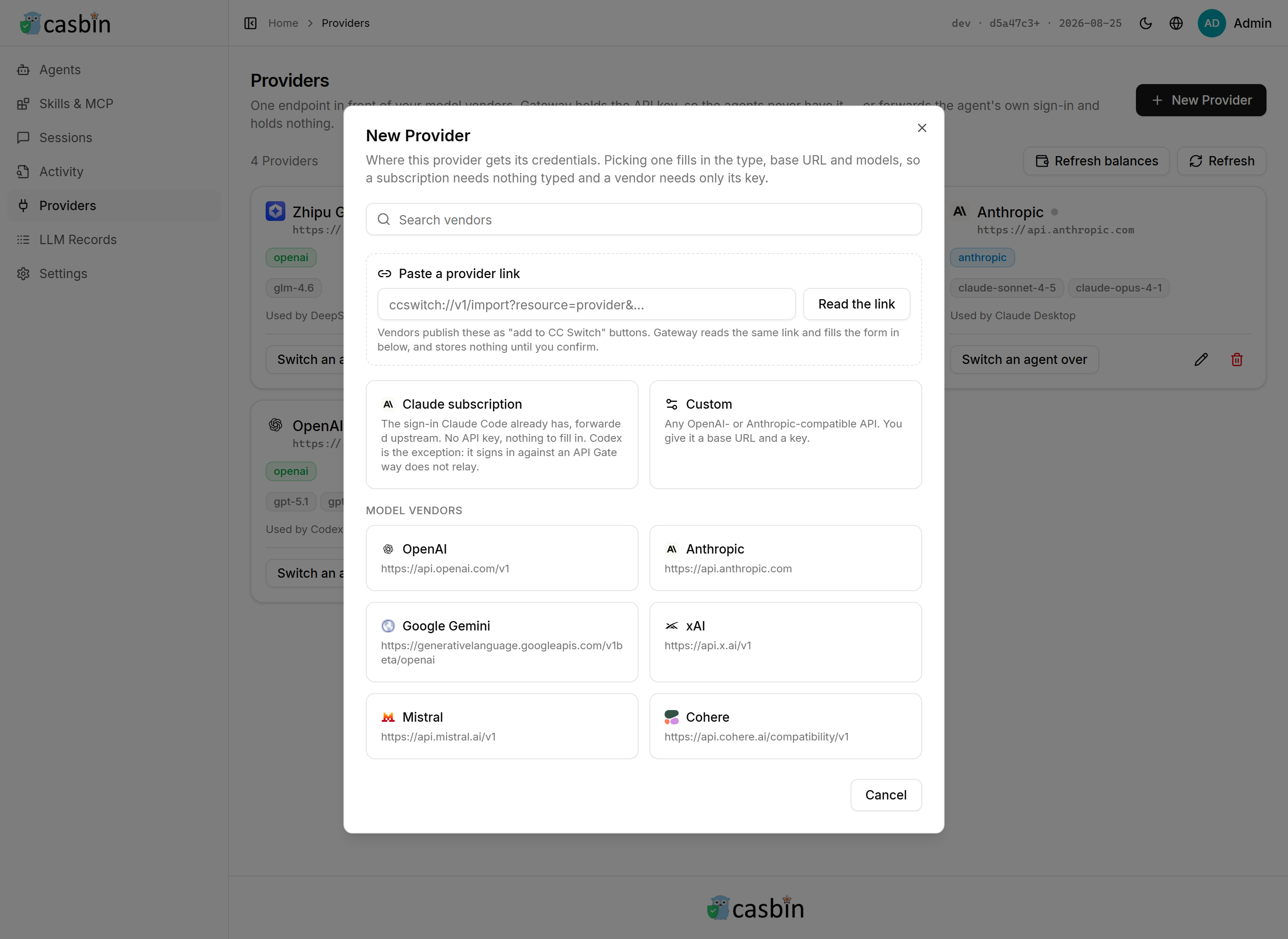](https://cdn.casbin.org/img/casbin-gateway-new-provider.png) | -| What each one runs on, what it has spent there, and whether it is running | 27 vendor presets, or any OpenAI- or Anthropic-compatible base URL | +| [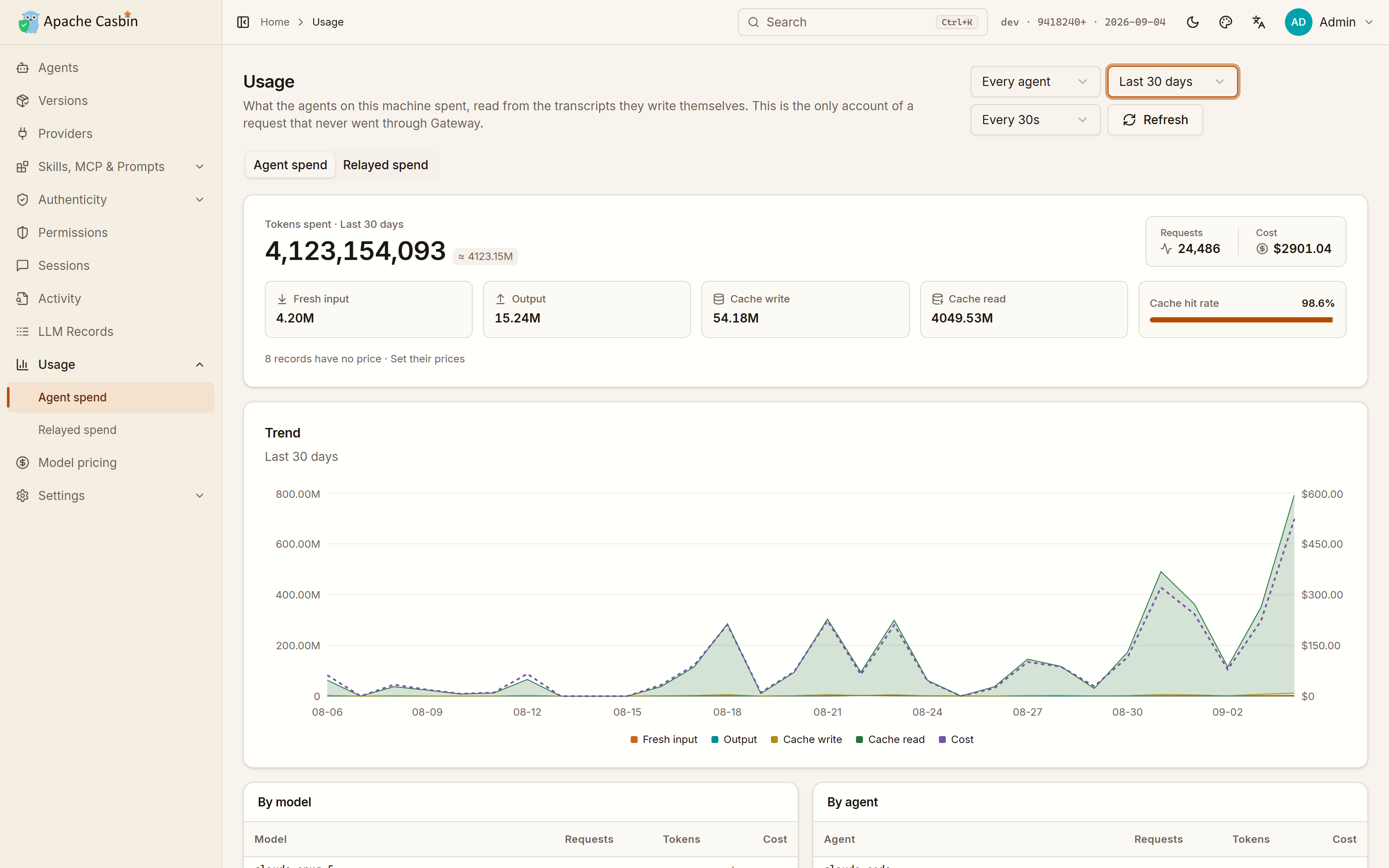](https://cdn.casbin.org/img/casbin-gateway-usage.png) | [](https://cdn.casbin.org/img/casbin-gateway-new-provider.png) | +| Read from the transcripts the agents write themselves, so it counts what never went through Gateway too | 27 vendor presets, or any OpenAI- or Anthropic-compatible base URL | | Everything the agents relayed | The whole request, not just a count | | :---: | :---: | @@ -85,11 +112,15 @@ Gateway installed some other way, or in a directory it cannot write to, says so | Page | What you get | What it needs | | --- | --- | --- | -| **Agents** | Every AI coding agent installed on this machine — Claude Code, Codex CLI, Cursor and more. Click **Patch** on one and its activity streams into the page live. | Nothing | -| **Skills, MCP & Prompts** | Every skill, MCP server and instruction file of every agent in one table. Add an MCP server to one agent or to several at once, edit the instructions an agent reads before every session, open one, delete it, or copy it into another agent. | Nothing | +| **Agents** | Every AI coding agent installed on this machine — Claude Code, Codex CLI, Cursor, the Gemini CLI, opencode and more — four cards to a row, each naming the account it is signed in to, the provider it answers to, what it has spent, and whether it is running right now. Start or stop one from its card, or run several **instances** of the same agent at once, each with a state directory and an account of its own. An agent this machine does not have is listed too, and installed o [...] +| **Skills, MCP & Prompts** | Every skill, MCP server and instruction file of every agent in one table. Install skills from a GitHub repository, a `.zip` or `.tar.gz`, or a folder on this machine, into one agent or several at once. Add an MCP server the same way, edit the instructions an agent reads before every session, open one, delete it, or copy it into another agent. | Nothing | +| **Sessions** | Every session those agents have had, read from the transcripts they leave on disk: the whole conversation, message by message. | Nothing | +| **Activity** | What a monitored agent is doing as it does it — each tool call, its target and how long it took. | Monitoring on for an agent | | **Providers** | One endpoint in front of your model vendors. Gateway holds the API key, so the agents never have it — or forwards the agent's own sign-in and holds nothing. | A vendor API key, or nothing at all | -| **Authenticity** | A score out of 100 and a grade for every provider, measured without being asked: whether the model that answers is the one that was asked for, whether the prompt cache is real, whether two identical requests are billed the same. Every test case behind the score is published, and every one of them can be reweighted, turned off, rewritten or added to. | A provider with an API key | +| **Authenticity** | A score out of 100 and a grade for every provider, measured without being asked — see [the section above](#the-killer-feature-is-the-api-behind-that-key-what-it-was-sold-as). | A provider with an API key | | **LLM Records** | Every request an agent relayed: the full system prompt, every message and tool call, the schema of every tool the model was offered, plus tokens and cost. | A provider, and `llmRecordMode` — see [Recording prompts](#recording-prompts) | +| **Usage** | What every agent on this machine spent, over time and broken down by model and by agent, read from the agents' own transcripts — so it counts the requests that never went through Gateway. A second tab shows what Gateway relayed, which is the only account that knows which provider answered and whether it failed. | Nothing | +| **Model pricing** | What a million tokens costs, which is what every figure on the Usage page is worked out from. Edit a price by hand, or let Gateway reprice the models this machine has run from the [models.dev](https://models.dev) catalogue on a schedule; a price you edited yourself is left alone. | Nothing | Agents are found by reading the user accounts, home directories and install paths of **the machine Gateway runs on**, so run it on the machine whose agents you want to watch. @@ -118,22 +149,21 @@ The environment snippet for such a provider sets the base URL and nothing else Codex is the exception: its ChatGPT sign-in talks to an endpoint no provider stands in for, so a Codex CLI still needs a provider with an API key. -### Is the API behind the key what it was sold as? +### What the agents spend, including what never went through Gateway -A reseller can sell a frontier model and serve a cheaper one, count a cached prefix as fresh input, or answer -in an API it only pretends to speak. None of that shows up in the traffic, so **Authenticity** asks the -upstream directly. Each provider is probed when it is added, when its endpoint or key changes, and again once -its report goes stale — no button, and `providerProbeIntervalHours` sets how often — and comes back with a -score out of 100 and a grade from A to F. +An agent on its own subscription relays nothing through Gateway, and a request that goes straight to the vendor +leaves no record here — but the agent writes a transcript of it on disk anyway. **Usage** reads those +transcripts, so the spend of every agent on this machine is on one page from the first start, with no provider +configured and nothing routed: tokens, cache hit rate and cost, over time and broken down by model and by +agent. The second tab, **What Gateway relayed**, is the narrower account of the traffic that did come through, +and the only one that knows which provider answered and whether it failed. -The score is only a summary of the test cases behind it, and all of them are on the page: what each one asks, -how the answer is judged, the exact request it sends, and what it is worth. Reweight one, turn it off, rewrite -its question, or add a case of your own — the questions worth asking of a reseller are not the same everywhere, -and a score whose method is not published is not evidence. **Restore defaults** puts the shipped suite back and -leaves your own cases alone. +Every figure there is worked out from **Model pricing**, which is a table of what a million tokens costs. +Vendors change their prices and resellers do not follow, so a price can be edited by hand, and Gateway can +reprice the models this machine has run from the [models.dev](https://models.dev) catalogue on a schedule +(`modelsDevSyncMode`, `modelsDevSyncIntervalHours`), leaving anything you edited yourself alone. -A probe spends a few cents of that provider's own credit, which is on the report next to the finding. -`providerProbeMode = "manual"` probes only when asked, and `"off"` never probes. +[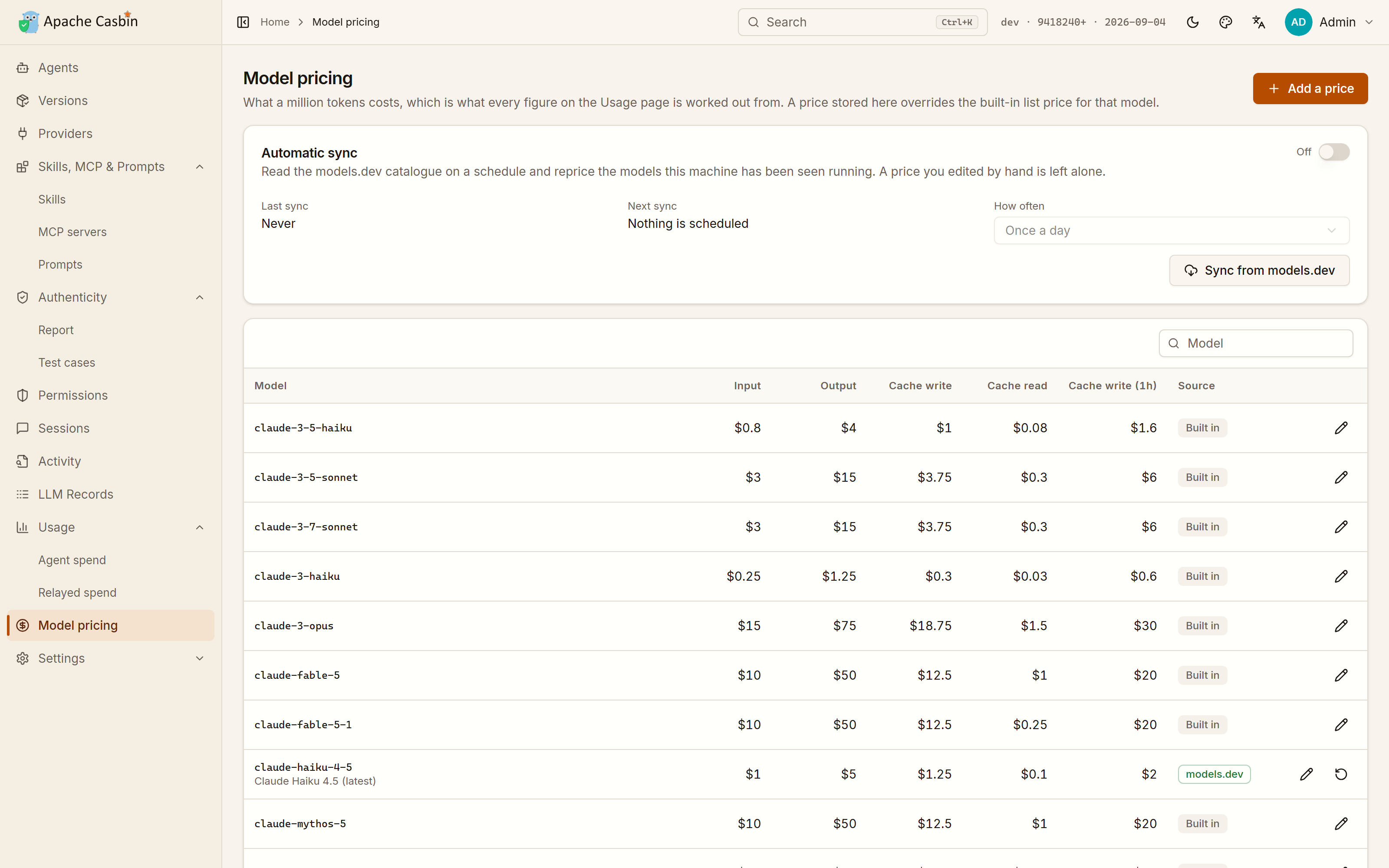](https://cdn.casbin.org/img/casbin-gateway-pricing.png) ### Stopping, upgrading, removing @@ -157,7 +187,7 @@ To serve other machines anyway, set `httpaddr = 0.0.0.0` in `conf/app.conf`, and ### Running in Docker or Podman -**A container cannot see the agents on your machine.** Agents are discovered by reading the home directories and install paths of the machine Gateway runs on, and inside a container that is the container's own filesystem. **Agents**, **Skills, MCP & Prompts** and agent monitoring therefore stay empty there, and the pages say so rather than pretending nothing is installed. Everything that does not depend on the host works normally: **Providers** and **LLM Records**. +**A container cannot see the agents on your machine.** Agents are discovered by reading the home directories and install paths of the machine Gateway runs on, and inside a container that is the container's own filesystem. **Agents**, **Skills, MCP & Prompts** and agent monitoring therefore stay empty there, and the pages say so rather than pretending nothing is installed. Everything that does not depend on the host works normally: **Providers**, **Authenticity** and **LLM Records**. So run the one-command install above on the machine whose agents you want to watch, and use a container when Gateway is only a model endpoint for other machines. @@ -185,6 +215,7 @@ Everything is optional. Settings are changed on the **Settings** page of the web | `httpaddr` | `127.0.0.1` | Interface the web UI binds to — see [Serving other machines](#serving-other-machines) | | `driverName` / `dataSourceName` | `sqlite` / `./data/casbin-gateway.db` | Where data is stored | | `llmRecordMode` | `full` | How much of each relayed LLM request is kept — including the prompt, see [Recording prompts](#recording-prompts) | +| `providerProbeMode` | `auto` | Whether providers are probed for authenticity on their own, only when asked (`manual`), or never (`off`) | | `apiKeyEncryptionKey` | empty | Encrypts provider API keys at rest (AES-256-GCM) | | `casdoorEndpoint` | empty | Switches sign-in over to [Casdoor](https://casdoor.org) SSO | @@ -221,7 +252,7 @@ llmRecordMaxPayloadBytes = 1048576 Bodies are sanitized before they are stored: anything that looks like a credential is replaced, and the number of replacements is shown with the record. Request headers, which is where the inbound API key is, never reach a record at all. A body over `llmRecordMaxPayloadBytes` keeps its structure and loses only its longest strings, so a large conversation is still listed message by message. -The cost next to each record uses built-in list prices, which vendors change and resellers do not follow. Point `llmPricingFile` at a JSON file of your own rates to correct them. +The cost next to each record uses list prices, which vendors change and resellers do not follow. Correct them on the **Model pricing** page, or point `llmPricingFile` at a JSON file of your own rates. ### Connecting Casdoor diff --git a/README_zh.md b/README_zh.md index 5a7f160..887b141 100644 --- a/README_zh.md +++ b/README_zh.md @@ -37,12 +37,38 @@ <a href="./README.md">English</a> | <b>中文</b> </p> +<p align="center"> + <a href="https://cdn.casbin.org/img/casbin-gateway.gif";><img alt="Casbin Gateway" src="https://cdn.casbin.org/img/casbin-gateway.gif"; width="900"></a> +</p> + +## 杀手锏:那个 Key 背后的 API,真是卖给你的那个吗? + +中转商可以卖着前沿模型、跑着便宜模型,可以把缓存过的前缀当新输入计费,也可以假装自己会说某套 API。这些在流量里都看不出来,所以 **Authenticity** 直接去问上游。每个 Provider 都会被单独探测——加入时、端点/类型/密钥变更时、从未探测过时,以及报告过期后——测出来的是一个 100 分制的分数和一个 A 到 F 的等级,显示在 Authenticity 页面上,也显示在首页 Agent 列表的正上方。不用点按钮,也不用配置什么。 + +[](https://cdn.casbin.org/img/casbin-gateway-authenticity.png) + +分数只是背后那些测试用例的汇总,而用例全都摆在页面上:作答的模型是不是点名的那个、强制调用时两层嵌套的工具 schema 能不能扛住、事件流里该有的事件是不是都到齐了、提示词缓存是不是真的在计费上体现出来、两个完全相同的请求计费是否一致、厂商自己的响应头在不在。每条用例都写明它问上游什么、实际发出去的请求长什么样、答案怎么判、占多少权重。 + +[](https://cdn.casbin.org/img/casbin-gateway-authenticity-cases.png) + +可以改权重、停用、重写问题,也可以自己加一条——该问中转商什么,各家情况并不一样,而评分方法不公开就算不上证据。**恢复默认**会把内置用例恢复原样,你自己写的不受影响。 + +报告还有不花钱、也不发任何请求的另一半:直接读 Gateway 已经留下的记录,看这个上游到底表现如何 —— 缓存实际被 +计入了多少、有多少次请求失败、响应有多快、有多少跑过的模型还没有价格。 + +一次探测会花掉该 Provider 一点点额度,具体花了多少就写在报告上。`providerProbeIntervalHours` 决定报告多久算过期,`providerProbeMode = "manual"` 表示只在手动触发时探测,`"off"` 表示从不探测。 + ## 界面预览 -| 本机上的每一个 Agent | 每个模型厂商一个入口 | +| 本机上的每一个 Agent | 这些 Agent 身上装的每一样东西 | +| :---: | :---: | +| [](https://cdn.casbin.org/img/casbin-gateway-home.png) | [](https://cdn.casbin.org/img/casbin-gateway-skills.png) | +| 每个 Agent 接在哪、登录的是哪个账号、在那里花了多少、此刻是不是在跑 | 所有 Agent 的技能、MCP 服务器和提示词文件并排对比,还能从一个 Agent 复制到另一个 | + +| 每个 Agent 花了多少 | 每个模型厂商一个入口 | | :---: | :---: | -| [](https://cdn.casbin.org/img/casbin-gateway-agents.png) | [](https://cdn.casbin.org/img/casbin-gateway-new-provider.png) | -| 每个 Agent 接在哪、在那里花了多少、此刻是不是在跑 | 27 个厂商预设,或任何 OpenAI / Anthropic 兼容的 base URL | +| [](https://cdn.casbin.org/img/casbin-gateway-usage.png) | [](https://cdn.casbin.org/img/casbin-gateway-new-provider.png) | +| 从 Agent 自己写的会话记录里读出来,所以没走 Gateway 的请求也一样算得上 | 27 个厂商预设,或任何 OpenAI / Anthropic 兼容的 base URL | | Agent 转发过的每一个请求 | 完整的请求,而不只是一个计数 | | :---: | :---: | @@ -83,11 +109,15 @@ Gateway 会在自己的窗口里打开 —— 不用登录:它只服务本机 | 页面 | 你能得到什么 | 需要什么 | | --- | --- | --- | -| **Agents** | 本机安装的每一个 AI 编程 Agent —— Claude Code、Codex CLI、Cursor 等等。点其中一个的 **Patch**,它的活动就会实时流进页面。 | 无 | -| **Skills, MCP & Prompts** | 所有 Agent 的所有技能、MCP 服务器和提示词文件汇总在一张表里。可以给一个或多个 Agent 添加 MCP 服务器,编辑某个 Agent 每次会话前读到的提示词,也可以打开、删除,或复制到另一个 Agent。 | 无 | +| **Agents** | 本机安装的每一个 AI 编程 Agent —— Claude Code、Codex CLI、Cursor、Gemini CLI、opencode 等等 —— 一行四张卡片,每张写明它登录的是哪个账号、接的是哪个 Provider、花了多少、此刻是不是在跑。可以在卡片上直接启动或停止,也可以给同一个 Agent 开多个**实例**,每个实例有自己的状态目录和自己的登录账号,同时运行。本机没装的 Agent 也会列出来,可以直接用宿主机已有的包管理器安装或升级。 | 无 | +| **Skills, MCP & Prompts** | 所有 Agent 的所有技能、MCP 服务器和提示词文件汇总在一张表里。可以从 GitHub 仓库、`.zip` / `.tar.gz` 压缩包,或本机的一个目录安装技能,一次装进一个或多个 Agent。MCP 服务器也一样,还能编辑某个 Agent 每次会话前读到的提示词,或者打开、删除、复制到另一个 Agent。 | 无 | +| **Sessions** | 这些 Agent 的每一次会话,从它们留在磁盘上的会话记录里读出来:完整的对话,一条一条。 | 无 | +| **Activity** | 被监控的 Agent 正在做什么:每一次工具调用、调用的目标,以及耗时。 | 给某个 Agent 打开监控 | | **Providers** | 挡在模型厂商前面的统一入口。API Key 由 Gateway 持有,Agent 拿不到;也可以转发 Agent 自己的登录,什么都不持有。 | 一个厂商的 API Key,或者什么都不用 | -| **Authenticity** | 每个 Provider 一个 100 分制的分数和一个等级,不用点按钮就会自动测出来:作答的模型是不是点名的那个、提示词缓存是不是真的、两个完全相同的请求计费是否一致。分数背后的每一条测试用例都是公开的,而且都可以改权重、停用、重写,也可以自己加。 | 一个带 API Key 的 Provider | +| **Authenticity** | 每个 Provider 一个 100 分制的分数和一个等级,不用点按钮就会自动测出来 —— 见[上面那一节](#杀手锏那个-key-背后的-api真是卖给你的那个吗)。 | 一个带 API Key 的 Provider | | **LLM Records** | Agent 转发的每一次请求:完整的 system prompt、每一条消息和工具调用、模型可用的每个工具的 schema,以及 token 数和费用。 | 一个 Provider,以及 `llmRecordMode` —— 见[记录提示词](#记录提示词) | +| **Usage** | 本机每个 Agent 花了多少:按时间、按模型、按 Agent 分别统计,数据来自 Agent 自己写的会话记录 —— 所以没走 Gateway 的请求也算得上。另一个页签是 Gateway 转发过的部分,那是唯一知道由哪个 Provider 作答、是否失败的账。 | 无 | +| **Model pricing** | 每百万 Token 多少钱,Usage 页面上的每一个金额都由它算出来。可以手工改某个价格,也可以让 Gateway 按计划从 [models.dev](https://models.dev) 的目录给本机跑过的模型重新定价;你手工改过的价格不会被覆盖。 | 无 | Agent 是通过读取 **Gateway 所在机器**的用户账户、home 目录和安装路径发现的,所以要在你想观察的那台机器上运行它。 @@ -116,19 +146,18 @@ export ANTHROPIC_AUTH_TOKEN="cg-..." Codex 是例外:它的 ChatGPT 登录走的是没有任何 Provider 能替代的端点,所以 Codex CLI 仍然需要一个带 API Key 的 Provider。 -### Key 背后的 API 真是它声称的那个吗? +### 每个 Agent 花了多少,包括没走 Gateway 的那部分 -中转商可以卖着前沿模型、跑着便宜模型,可以把缓存过的前缀当新输入计费,也可以假装自己会说某套 API。这些在流量里 -都看不出来,所以 **Authenticity** 直接去问上游。每个 Provider 在加入时、端点或密钥变更时、以及报告过期后都会被 -自动探测一次——不用点按钮,间隔由 `providerProbeIntervalHours` 决定——测出来的是一个 100 分制的分数和一个 -A 到 F 的等级。 +用自己订阅登录的 Agent 不会往 Gateway 转发任何东西,直接打到厂商的请求在这里也不会留下记录 —— 但 Agent 自己会 +把这次会话写到磁盘上。**Usage** 读的就是这些会话记录,所以哪怕一个 Provider 都没配、什么都没接管,本机每个 Agent +花了多少也从第一次启动起就摆在一个页面上:Token、缓存命中率和费用,按时间、按模型、按 Agent 分别统计。另一个页签 +**Gateway 转发的部分** 是更窄的一本账,但它是唯一知道由哪个 Provider 作答、是否失败的。 -分数只是背后那些测试用例的汇总,而用例全都摆在页面上:每条问什么、答案怎么判、实际发出去的请求长什么样、占多少 -权重。可以改权重、停用、重写问题,也可以自己加一条——该问中转商什么,各家情况并不一样,而评分方法不公开就算不上 -证据。**恢复默认**会把内置用例恢复原样,你自己写的不受影响。 +上面的每一个金额都由 **Model pricing** 算出来,那是一张“每百万 Token 多少钱”的表。厂商会调价、中转商也不跟着调, +所以价格可以手工改,也可以让 Gateway 按计划(`modelsDevSyncMode`、`modelsDevSyncIntervalHours`)从 +[models.dev](https://models.dev) 的目录给本机跑过的模型重新定价,你手工改过的那些不受影响。 -一次探测会花掉该 Provider 一点点额度,具体花了多少就写在报告上。`providerProbeMode = "manual"` 表示只在手动 -触发时探测,`"off"` 表示从不探测。 +[](https://cdn.casbin.org/img/casbin-gateway-pricing.png) ### 停止、升级、卸载 @@ -152,7 +181,7 @@ Gateway 默认只监听 `127.0.0.1`,因为有两样东西对能连上这个端 ### 在 Docker 或 Podman 里运行 -**容器看不到你机器上的 Agent。** Agent 是靠读取 Gateway 所在机器的用户主目录和安装路径发现的,而在容器里那是容器自己的文件系统。所以 **Agents**、**Skills, MCP & Prompts** 和 Agent 监控在容器里一直是空的,页面会直接说明这一点,而不是让人以为什么都没装。不依赖宿主机的部分照常可用:**Providers** 和 **LLM Records**。 +**容器看不到你机器上的 Agent。** Agent 是靠读取 Gateway 所在机器的用户主目录和安装路径发现的,而在容器里那是容器自己的文件系统。所以 **Agents**、**Skills, MCP & Prompts** 和 Agent 监控在容器里一直是空的,页面会直接说明这一点,而不是让人以为什么都没装。不依赖宿主机的部分照常可用:**Providers**、**Authenticity** 和 **LLM Records**。 因此,想监控哪台机器上的 Agent,就在那台机器上跑上面的一键安装;只把 Gateway 当作别的机器的模型入口时,才用容器部署。 @@ -180,6 +209,7 @@ podman compose up -d | `httpaddr` | `127.0.0.1` | Web UI 监听的网卡 —— 见[让其他机器也能访问](#让其他机器也能访问) | | `driverName` / `dataSourceName` | `sqlite` / `./data/casbin-gateway.db` | 数据存放位置 | | `llmRecordMode` | `full` | 每次转发的 LLM 请求保留多少内容 —— 包含提示词正文,见[记录提示词](#记录提示词) | +| `providerProbeMode` | `auto` | Provider 是自动做真伪探测,还是只在手动触发时探测(`manual`),或者从不探测(`off`) | | `apiKeyEncryptionKey` | 空 | 加密存储 Provider 的 API Key(AES-256-GCM) | | `casdoorEndpoint` | 空 | 把登录切换到 [Casdoor](https://casdoor.org) SSO | @@ -216,7 +246,7 @@ llmRecordMaxPayloadBytes = 1048576 请求体在存储前会被脱敏:看起来像凭据的内容会被替换掉,替换次数会随记录一起显示。请求头(入站 API Key 就在里面)根本不会进入记录。超过 `llmRecordMaxPayloadBytes` 的请求体会保留结构、只截断其中最长的字符串,所以一段很长的对话仍然能逐条消息列出来。 -每条记录旁边的费用用的是内置的官方标价,而厂商会调价、经销商也不按它来。把 `llmPricingFile` 指向你自己的费率 JSON 文件即可修正。 +每条记录旁边的费用用的是官方标价,而厂商会调价、中转商也不按它来。在 **Model pricing** 页面上改掉,或者把 `llmPricingFile` 指向你自己的费率 JSON 文件即可修正。 ### 接入 Casdoor --------------------------------------------------------------------- To unsubscribe, e-mail: [email protected] For additional commands, e-mail: [email protected]









