02.10.2020 15:00, Eugene Grosbein wrote:

>>>> You have dual supervisor on this box.
>>>> Can you do a failover to the secondary and see if that stops the input
>>>> errors?
>>>> This will localise the problem
>>>
>>> Do I need to disable NSF (non-stop forwarding) to localise the problem?
>>> I guess both RSP should exchange data routinely when NSF is enabled.
>>
>> Or I could just eject stand-by RSP out of the chassis.
>
> So I've changed redundancy mode to to RPR (Route Processor Redundancy, was
> SSO) then stand-by RSP was ejected physically.
> I expected that errors would stop or would not change at all but neither
> happened.
>
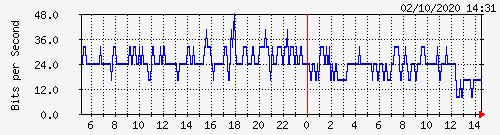
> Instead, error rate decreased significantly but not ceased (12:25 was the
> moment):
> http://www.grosbein.net/cisco/eobc0_0-day.png
>
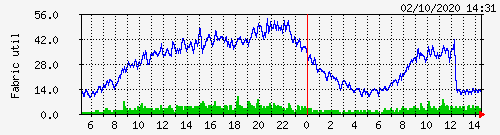
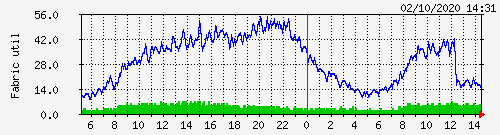
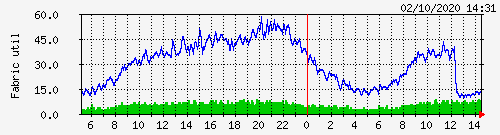
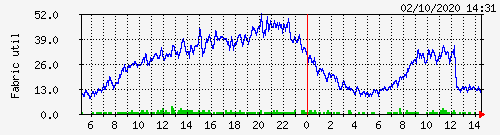
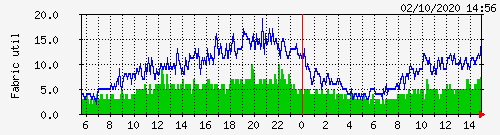
> Also something strange happened with these stats that I consider as "fabric
> utilisation":
>
> CISCO-CAT6K-CROSSBAR-MIB::cc6kxbarStatisticsInUtil.1.0 = INTEGER: 25
> CISCO-CAT6K-CROSSBAR-MIB::cc6kxbarStatisticsInUtil.1.1 = INTEGER: 37
> CISCO-CAT6K-CROSSBAR-MIB::cc6kxbarStatisticsInUtil.2.0 = INTEGER: 6
> CISCO-CAT6K-CROSSBAR-MIB::cc6kxbarStatisticsInUtil.2.1 = INTEGER: 5
> CISCO-CAT6K-CROSSBAR-MIB::cc6kxbarStatisticsInUtil.3.0 = INTEGER: 8
> CISCO-CAT6K-CROSSBAR-MIB::cc6kxbarStatisticsInUtil.3.1 = INTEGER: 1
> CISCO-CAT6K-CROSSBAR-MIB::cc6kxbarStatisticsInUtil.4.0 = INTEGER: 4
> CISCO-CAT6K-CROSSBAR-MIB::cc6kxbarStatisticsInUtil.4.1 = INTEGER: 4
> CISCO-CAT6K-CROSSBAR-MIB::cc6kxbarStatisticsInUtil.5.0 = INTEGER: 0
> CISCO-CAT6K-CROSSBAR-MIB::cc6kxbarStatisticsInUtil.6.0 = INTEGER: 0
> CISCO-CAT6K-CROSSBAR-MIB::cc6kxbarStatisticsOutUtil.1.0 = INTEGER: 7
> CISCO-CAT6K-CROSSBAR-MIB::cc6kxbarStatisticsOutUtil.1.1 = INTEGER: 12
> CISCO-CAT6K-CROSSBAR-MIB::cc6kxbarStatisticsOutUtil.2.0 = INTEGER: 13
> CISCO-CAT6K-CROSSBAR-MIB::cc6kxbarStatisticsOutUtil.2.1 = INTEGER: 18
> CISCO-CAT6K-CROSSBAR-MIB::cc6kxbarStatisticsOutUtil.3.0 = INTEGER: 13
> CISCO-CAT6K-CROSSBAR-MIB::cc6kxbarStatisticsOutUtil.3.1 = INTEGER: 13
> CISCO-CAT6K-CROSSBAR-MIB::cc6kxbarStatisticsOutUtil.4.0 = INTEGER: 7
> CISCO-CAT6K-CROSSBAR-MIB::cc6kxbarStatisticsOutUtil.4.1 = INTEGER: 11
> CISCO-CAT6K-CROSSBAR-MIB::cc6kxbarStatisticsOutUtil.5.0 = INTEGER: 0
> CISCO-CAT6K-CROSSBAR-MIB::cc6kxbarStatisticsOutUtil.6.0 = INTEGER: 0
>
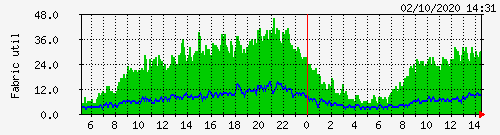
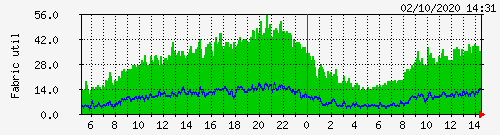
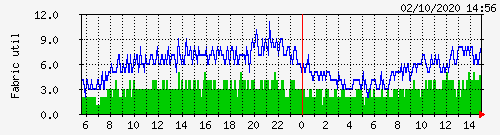
> Here are corresponding graphs. Modules 5 and 6 (RSPs) almost always show
> zeroes,
> graphs for modules 1 and 4 do not show any unusual but graph for modules 2
> and 3 do:
>
> http://www.grosbein.net/cisco/f10-day.png
> http://www.grosbein.net/cisco/f11-day.png
> http://www.grosbein.net/cisco/f20-day.png
> http://www.grosbein.net/cisco/f21-day.png
> http://www.grosbein.net/cisco/f30-day.png
> http://www.grosbein.net/cisco/f31-day.png
> http://www.grosbein.net/cisco/f40-day.png
> http://www.grosbein.net/cisco/f41-day.png
>
> I get RSP and configuration back and graphs restore to previous shapes.
Also I should note this router has multiple 2 or 4-port Port-channels with
1Gbps ports.
Some Port-channels have members at single line card, some have members spread
over multiple line cards.
Maybe this is relevant.
_______________________________________________
cisco-nsp mailing list  [email protected]
https://puck.nether.net/mailman/listinfo/cisco-nsp
archive at http://puck.nether.net/pipermail/cisco-nsp/