1. This is Chrome, not Chromium (though I have that installed as well,
just haven't used it as much, and it is not set up as a launcher on CD)
2. Output from xprop | grep CLASS is:

WM_CLASS(STRING) = "google-chrome", "Google-chrome"

(note the capital 'G' in the second string)

3. Output from cairo-dock -l debug | grep "chromium application
detected" is nil; there is nothing on the screen.  HOWEVER - If I open
my Google Hangouts plugin (so I can IM, for example), and THEN run the
command, I get

 chromium application detected, changing the class 'Google-chrome' to
'crx_nckgahadagoaajjgafhacjanaoiihapd'

Which tells me that the funky name you saw earlier in the initial post
was the result of the Hangout (a webapp perhaps?) being open in addition
to the browser.  That does not change the fact, however, that when the
browser is the only Chrome item open, it creates separate icons in the
running applications section of the dock, as opposed to just being tied
to the launcher like it used to (and like Firefox and other apps do).
It's almost as if it's ignoring the 'Mix launchers and applications'
setting in CD (which I confirmed is set).

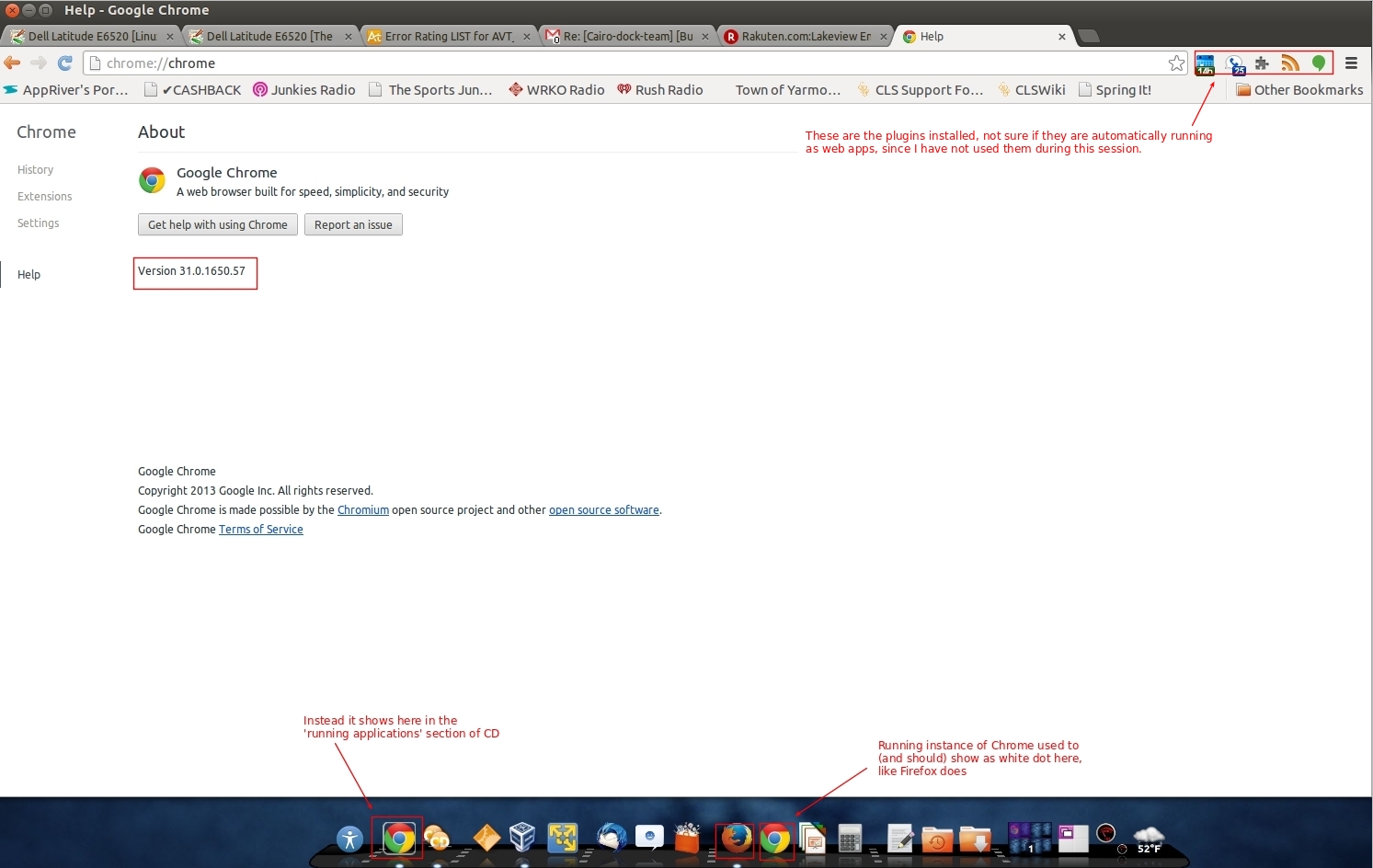
I am attaching a screenshot of my Chrome browser, and the CD, showing
Chrome as a separate running app, to give you guys a better idea.


** Attachment added: "Screenshot of Chrome browser and CD"

https://bugs.launchpad.net/cairo-dock-core/+bug/1254771/+attachment/3918388/+files/Selection_741.jpeg

--
You received this bug notification because you are a member of Cairo-
Dock Devs, which is subscribed to Cairo-Dock Core.
https://bugs.launchpad.net/bugs/1254771

Title:
  Launching Chrome results in new icon instance on main dock

Status in Cairo-Dock : Core:
  Invalid

Bug description:
  Ubuntu 12.04 64-bit (Unity)
  Cairo-dock 3.3.2
  Chrome 31.0.1650.57

  Within the past week, launching Chrome from my Cairo-dock main dock
  now creates a new instance of the Chrome icon, in the area of the dock
  normally reserved for applications that don't have a launcher.  (On my
  dock, that's towards the left side, just to the right of the separator
  for the 'help' icon.).  Clicking on the launcher again, consequently,
  results in another instance of Chrome  being launched.

  Prior to this, launching Chrome from CD would result in a white dot
  under the launcher - the same as for any other application launched
  from CD.  My other launchers do not exhibit this behavior - e.g.,
  Firefox, LibreOffice, etc. all respond with a white dot (showing it's
  running), and I can click on it to activate.

  Not sure of any changes to system, but it's possible that Chrome was
  updated.

  I tried dropping and re-adding the Chrome launcher, but it did not
  resolve the issue.

  Thanks in advance - attached is the text from the following command:
  cairo-dock -l debug >debug.txt

  Note I had to ctrl-Z to get it to stop in command line (maybe b/c CD
  was already running?) - not sure - so take the below with a grain of
  salt.

To manage notifications about this bug go to:
https://bugs.launchpad.net/cairo-dock-core/+bug/1254771/+subscriptions

_______________________________________________
Mailing list: https://launchpad.net/~cairo-dock-team
Post to     : [email protected]
Unsubscribe : https://launchpad.net/~cairo-dock-team
More help   : https://help.launchpad.net/ListHelp